Associate
July 4, 2025
Solved

Unable to the flash after using X-CUBE-SBSFU to test the secure boot

  • July 4, 2025
  • 2 replies
  • 487 views

Hi,

I am working on NUCLEO-H743ZI EVK to test the secure boot using X-CUBE-SBSFU-v2.7.0 package.

I have successfully uploaded the boot image at the location 0x8000000 address and i have uploaded the userapp.sbf file using tera-term tool.

I have followed the user manual of Getting started with the X-CUBE-SBSFU STM32Cube Expansion Package - User manual for all my set up.

And now i just want to erase the flash memory using stm32cubeprogrammer tool but am unable to flash the normal led application after erasing.

Please look into the images mentioned below for your reference.

1. The below error is coming when uploading the basic led example.

Error: Failed to read memory at address 0x08000000 during verification

Error: Download verification failed

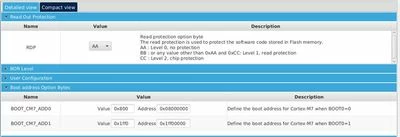
2. Settings of RDP and Boot Option Bytes
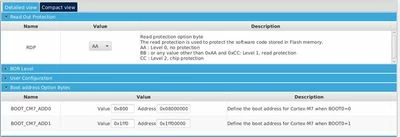
kumar1_0-1751607249998.jpeg

3.  Settings of write protection

kumar1_1-1751607443200.jpeg

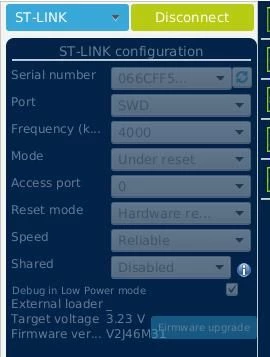
4. Settings of ST-LINK connection

kumar1_2-1751607522449.jpeg

4. The below image is my first uploaded userapp A.
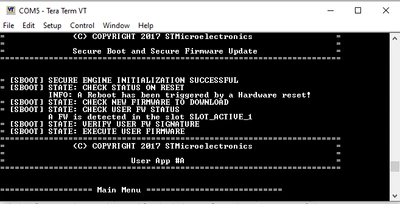
kumar1_3-1751607609399.png

Please guide me on how to erase the flash memory fully using programmer tool.

Thanks

Best answer by jorventhorne01

Your flash is likely locked or write-protected. Set RDP to Level 0, disable write protection, do a full chip erase, then reset the board. After that, you should be able to upload your program.

2 replies

Jocelyn RICARD
ST Employee
July 10, 2025

Hello @kumar1 ,

it looks like you have changed the default settings in secure protections, but you left the write protection active. You need to remove it in option bytes.

Best regards

Jocelyn

jorventhorne01Best answer
Visitor II
July 10, 2025

Your flash is likely locked or write-protected. Set RDP to Level 0, disable write protection, do a full chip erase, then reset the board. After that, you should be able to upload your program.

kumar1Author
Associate
July 16, 2025

Thanks for the reply.

I have successfully erased the chip using programmer tool by changing the PCROP address and disabled write protection.