Explorer
March 26, 2026
Solved

Validating FW Image on NUCLEO-H753 SBSFU example

  • March 26, 2026
  • 1 reply
  • 88 views

Left commented out SFU_NO_SWAP and defined ENABLE_IMAGE_STATE_HANDLING in app_sfu.h, but when trying to build SECoreBin and SBSFU errors appear:

/Middlewares/ST/STM32_Secure_Engine/Core/se_fwimg.h:47:61: error: unknown type name 'SE_FwStateTypeDef'

Is there something I am missing? I selected AES-GCM crypto scheme

I have followed https://www.st.com/resource/en/application_note/an5056-integration-guide-for-the-xcubesbsfu-stm32cube-expansion-package-stmicroelectronics.pdf (Chapter 8.5)



Best answer by STOnizuka09

Hello @lakins 
sorry for the late response. 

This looks like a compilation/configuration issue rather than a crypto-scheme issue.

As per said in the AN5056 (Chapter 8.5) 

Onizuka09_1-1777051515888.png


you need to enable the FLAG in the 3 projects: 

ENABLE_IMAGE_STATE_HANDLING

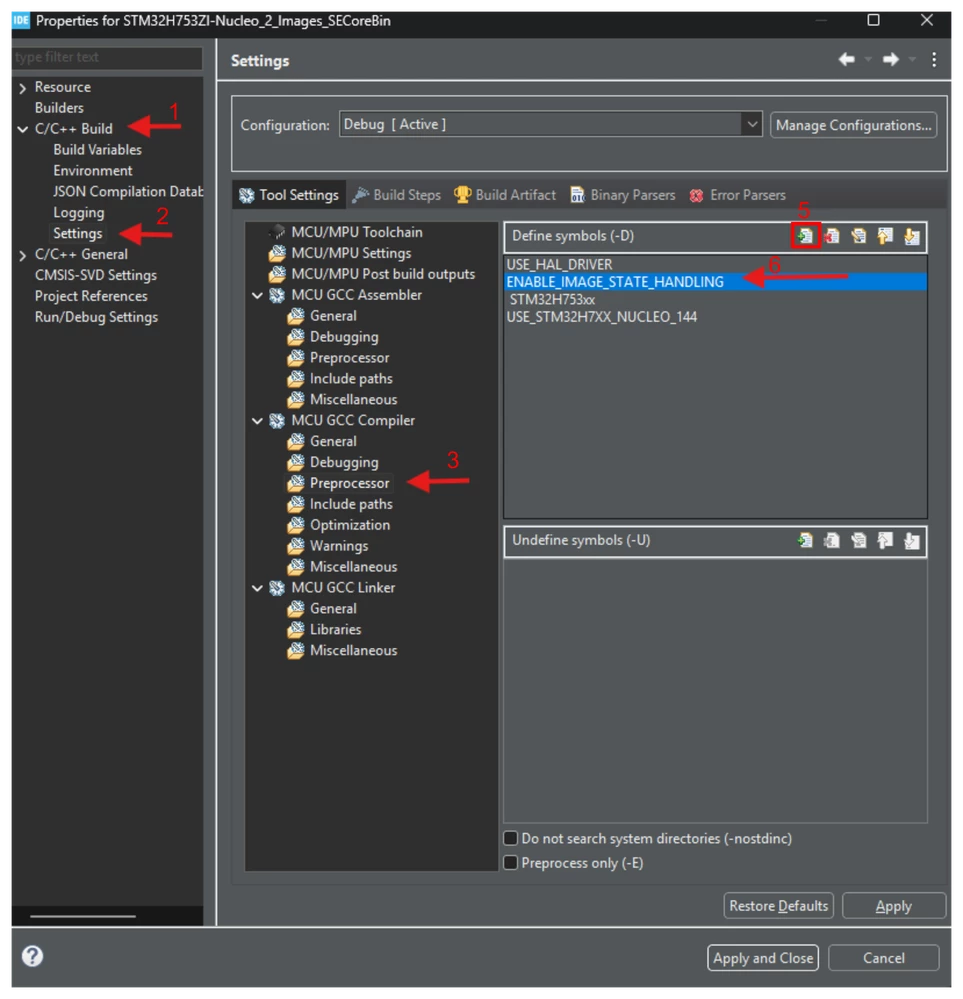
To do so, Go into each project (SECoreBin, SBSFU, UserApp) and follow these steps:

- Right click and then properties and follow the instructions below as set in the picture below:  

Onizuka09_0-1777051372672.png

Then click apply and close. 

Then do a clean and rebuild of all projects.


1 reply

STOnizuka09Best answer
ST Employee
April 27, 2026

Hello @lakins 
sorry for the late response. 

This looks like a compilation/configuration issue rather than a crypto-scheme issue.

As per said in the AN5056 (Chapter 8.5) 

Onizuka09_1-1777051515888.png


you need to enable the FLAG in the 3 projects: 

ENABLE_IMAGE_STATE_HANDLING

To do so, Go into each project (SECoreBin, SBSFU, UserApp) and follow these steps:

- Right click and then properties and follow the instructions below as set in the picture below:  

Onizuka09_0-1777051372672.png

Then click apply and close. 

Then do a clean and rebuild of all projects.