Associate
September 29, 2025
Solved

After I update TouchGFX to 4.26 version, Display color changed

  • September 29, 2025
  • 3 replies
  • 332 views

I'm currently using Touchgfx after updating from version 4.25 to 4.26.

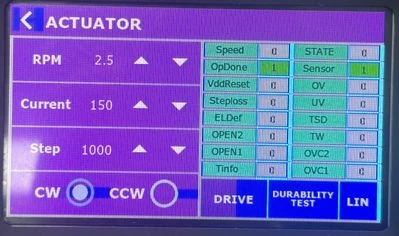
When I build and run the code generated by Touchgfx 4.26, Display color doesn't match the design in Touchgfx 4.26.

But When I do the same thing through Touchgfx 4.25, Display color matched very well. 
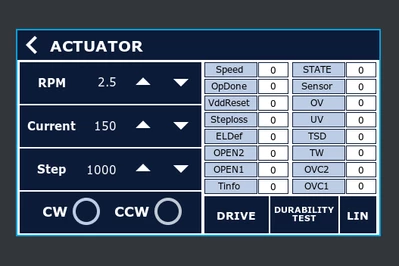
MJKIM_0-1759113043916.png

MJKIM_2-1759113478546.jpeg

Best answer by MJKIM

Sorry I am late. I solved it already.. 

But I forgot how to solve..Maybe I changed the RGB color setting in CubeMX.

I think It was a collision between touchgfx old version and touchgfx new version.

I saw new version's updated list on touchgfx official website.

3 replies

Osman SOYKURT
Technical Moderator
September 29, 2025

Hello @MJKIM ,

Could you give more info about your application?

  • Which STM32 MCU are you using?
  • Do you work on a custom board or does this issue happened on a ST discovery board?
  • If this is your own custom board, which type of screen is this?
  • What's your framebuffer color format?
  • Does this issue happen on image assets/shapes/text elements?
  • Is there any transparency used?
  • Do you use image compression?

BR,

Osman SOYKURTST Software Developer | TouchGFX
Senior
January 27, 2026

Hey, was this ever solved?


I've run into the same problem and even with GIT Control, and reverting to a previous version I knew definitely worked. Something with the IDE or/and TouchGFX is making the colours change after updating version.


Resorting back to a previous version of TouchGFX 4.25 and colours are still in a different state

Kind regards,

Andrew

Lead II
January 27, 2026

Have you tried deleting all generated code and generating it again?

"Kudo posts if you have the same problem and kudo replies if the solution works.Click ""Accept as Solution"" if a reply solved your problem. If no solution was posted please answer with your own."
Senior
January 27, 2026

Is that generated code both under TouchGFX and under STM32CubeIDE debug and application?


Thank you

Lead II
January 27, 2026

I meant TouchGFX generated code. But you can also try STM32CubeMX code. Middlewares might not be updated.

Debug folder has no generated code, only build artifacts.

"Kudo posts if you have the same problem and kudo replies if the solution works.Click ""Accept as Solution"" if a reply solved your problem. If no solution was posted please answer with your own."