Louie88
Senior
April 15, 2025
Solved

Broken images

  • April 15, 2025
  • 8 replies
  • 1298 views

Hi,

I have a funny issue. I just wanted to add a Share button to my Main Screen in an STM32TouchGFX of a working Weather Station app but when I built and run the app in STMCubeIDE all the widgets which uses background images showed surprising garbage images.
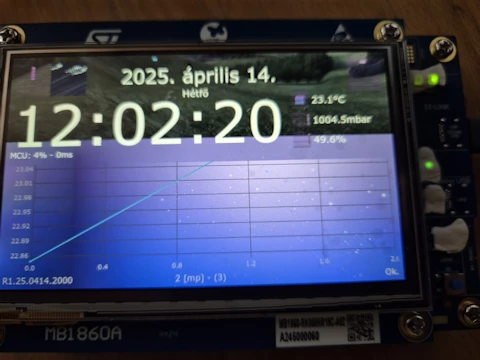
20250415-img-extflash.png

Then I changed the Section and Extra Section to IntFlashSection in Default Image Configuration group of Config menu of STM TouchGFX:
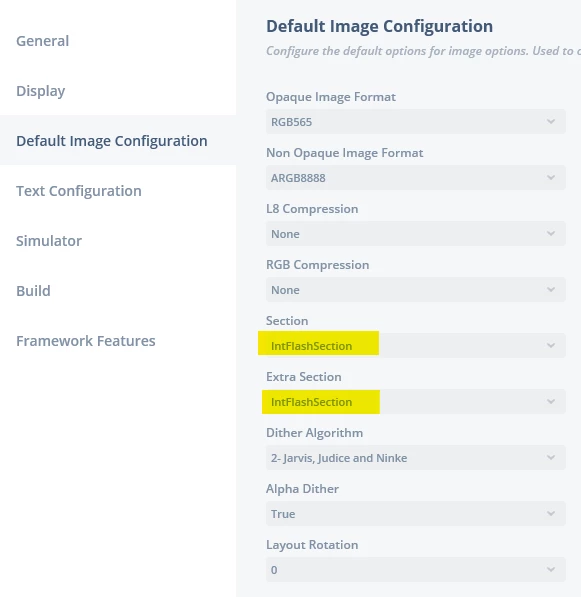
20250415-TGFX-Config-Image-Group.png

Then I rebuilt and run the app and everything worked just fine:
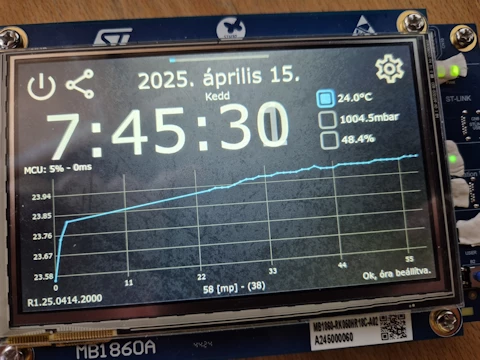
20250415-img-intflash.png

Who understands this?

I Checked the HSPI configuration in STM32CubeMX but I could not find any wrong settings for octo-SPI, so the external flash memory which stores the images (by default) seems to be okay.

In addition any ST Demo which based of TGFX works with external flash settings.

What could go wrong?

Thanks,

Louis

Best answer by GaetanGodart

Hello @Louie88 ,


Sorry for the delay.


For me it flashed fine in TouchGFX Designer both for internal and external flash.


I assumed that when you flashed in TouchGFX Designer it worked because you told me you had warnings (not errors) and I did not see a fail in the log but you don't show the flashing process in the log so I am not sure now if it flashed or not.


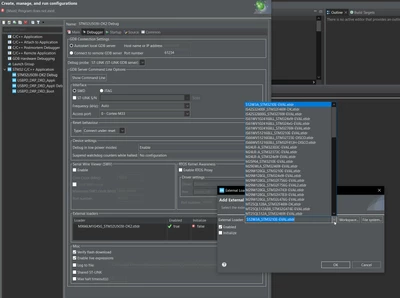
However, I saw that in STM32CubeIDE, you do not set the external loader on the debug.
To fix that, right click on your project in STM32CubeIDE, go to "Debug As" => "Debug Configurations" :

GaetanGodart_0-1746435886532.png

Then select your project followed by "debug", go to "Debugger", in the "External loader" section, click on "Add" and select your board:

GaetanGodart_1-1746435941028.png

Now you can try to flash on STM32CubeIDE.


Regards,


8 replies

GaetanGodart
Technical Moderator
April 15, 2025

Hello @Louie88 ,


Can you repeat the issue consistently?

It look like TouchGFX correctly rebuilt but then only the internal section was flashed but not the external and since before you used the external section to store assets, then your project had the wrong address for the assets.
If you flashed through TouchGFX Designer, I would have guessed that you previously selected "Only flash internal memory" and then forgot to unselect that option, but since you flashed in STM32CubeIDE I guess STM32CubeIDE forgot/failed to flash the external.

But with only one try (and fail) it is hard to diagnose the issue.


If you can repeat the issue, please share the steps to reproduce it and maybe the project so I can try it myself.


Regards,

Louie88
Louie88Author
Senior
April 15, 2025

Hello Gaetan,

Thans for the very quick reply.

Yes, it is consistent. I tried at least 50 times. 

I have never tried to flash it from TouchGFX Designer, but I checked it and the Program All was selected in the Program and Run Target dropdown list. So I set the Section to ExtFlashSection (both) and flashed it from TouchGFX Designer. During building the app I found warnings in the log 

...
... 
 Generating generated/images/src/__generated/image_icon_theme_images_hardware_keyboard_arrow_right_75_75_FFFFFF.svg.cpp
 Generating generated/images/src/__generated/image_icon_theme_images_hardware_keyboard_arrow_up_75_75_ABABAB.svg.cpp
 Generating generated/images/src/__generated/image_icon_theme_images_hardware_keyboard_arrow_up_75_75_FFFFFF.svg.cpp
 Generating generated/images/src/__generated/image_icon_theme_images_social_share_75_75_ABABAB.svg.cpp
 Generating generated/images/src/__generated/image_icon_theme_images_social_share_75_75_FFFFFF.svg.cpp
 WARNING - Char 0x7F is used but does not exist in the font!
 WARNING - A total of 33 Unicode characters did not exist in the font!
 WARNING - Char 0x7F is used but does not exist in the font!
 WARNING - A total of 33 Unicode characters did not exist in the font!
 WARNING - Char 0x7F is used but does not exist in the font!
 WARNING - A total of 33 Unicode characters did not exist in the font!
 WARNING - Char 0x7F is used but does not exist in the font!
 WARNING - A total of 33 Unicode characters did not exist in the font!
 WARNING - Char 0x7F is used but does not exist in the font!
 WARNING - A total of 33 Unicode characters did not exist in the font!
 Done
 Post Generate
 touchgfx update_project --project-file=simulator/msvs/Application.vcxproj
 Done
 Post Generate Target
 touchgfx update_project
 .cproject file: ../STM32CubeIDE/.cproject
 Writing STM32CubeIDE project file: ../STM32CubeIDE/.project
 Writing STM32CubeIDE project file: ../STM32CubeIDE/.cproject
 Done
...
...

I have never seen these warnings before. I have Hungarian translations but the translations appear on the screen right with accent characters so I do not understand it, especially the DELETE (0x7F) character.

Anyway, the result is a surprise. The right images appeared in all widgets even the external flash was selected in Config.

That probably means that I have a bad, faulty settings in the STM32CubeIDE.

Thanks for your help!

Louis

PS: I tried to run the app in simulator (from TGFX) but I could not. I got "main.h" not found (!) errors...

...
... 
 Compile
 make -f simulator/gcc/Makefile -j8
 Reading ./application.config
 Reading ./target.config
 Compiling gui/src/setup_screen/SetupPresenter.cpp
 Compiling gui/src/setup_screen/SetupView.cpp
 Compiling gui/src/main_screen/MainPresenter.cpp
 Compiling gui/src/main_screen/MainView.cpp
 Compiling gui/src/model/Model.cpp
 Compiling gui/src/common/FrontendApplication.cpp
 Compiling generated/gui_generated/src/setup_screen/SetupViewBase.cpp
 Compiling generated/gui_generated/src/main_screen/MainViewBase.cpp
 In file included from gui/src/model/Model.cpp:1:0:
 gui/include/gui/model/Model.hpp:3:10: fatal error: main.h: No such file or directory
 #include "main.h"
 ^~~~~~~~
 compilation terminated.
 make[2]: *** [build/MINGW32_NT-6.2/gui/src/model/Model.o] Error 1
 generated/simulator/gcc/Makefile:196: recipe for target 'build/MINGW32_NT-6.2/gui/src/model/Model.o' failed
 make[2]: *** Waiting for unfinished jobs....
...
...

I added global definitions,enums to "main.h" so I need this file to be included in Model.cppp and all in my screen files. In addition STM32CubeIDE always compiles and builds the application with one warning only:

STM32U5G9J-DK2.elf has a LOAD segment with RWX permissions	STM32U5G9J-DK2		 	C/C++ Problem

Can it be related with the main issue? 

Anyways this warning is always shown even with STM examples, demoes.


GaetanGodart
Technical Moderator
April 23, 2025

Hello @Louie88 ,


You say that you never flashed with TouchGFX Designer before but you certainly used TouchGFX Designer to create your project (with a working TBS then) because I see that you are using one of our discovery board (STM32U5G9J-DK2).
Then you should have a working STM32CubeIDE environment.
Can you share your project so I can try to flash it myself?


The warning are regarding fonts so it should not affect the widgets with images I assume.


I am not sure what you did to add the main.h to your simulator project but yes it is not included by default so you have to add the file to the simulator Makefile. Here is a couple thread talking about that :


Regarding the warning "LOAD segment with RWX permissions" this is because a section has the permission to read, write and execute but usually it is not allowed to have both write and execute together because we don't want to write a part of the running program.
I have already tried to fix that issue (just change the permission in the linker script) but re-generating the code will change the permission back.
So you can just ignore it.


Regards,

Louie88
Louie88Author
Senior
April 23, 2025

Hi Gaetan,

Thanks for the answers. Interesting. Should I just Export the project as a ZIP file from STM32CubeIDE. I have never exported or sent any projects to other developers so I am not sure how I can do that.

Thanks,

Louis

GaetanGodart
Technical Moderator
April 23, 2025

When creating your project from TouchGFX Designer, a folder is created.
Zip that folder (containing, the .ioc, the TouchGFX foldler, the STM32CubeIDE foldler, etc) using 7zip this way I can check the configurations, test the TouchGFX Designer flashing, etc.


Regards,

Louie88
Louie88Author
Senior
April 23, 2025

Hi Gaetan,

Okay, I attached content of my TouchGFX.zip folder. It is a demonstration Weather Station app which utilizes Adafruit BM2280 environmental sensor chip (Temperature, pressure and humidity via SPI) It show the date/time and has a data logger which shows the last 400 BME280 samples on a X/Y Line chart.

Without the chip the app might be locked in BME280_Measure() (in BME280.c) function because SPI1 is not interrupt driven and it might wait for answer from a not connected chip. Comment that function call out from Model.cpp (handleBMW280()).

Thanks for your help. I am sure I did something wrong; I am not guru.

Best regards,

Louis


GaetanGodart
Technical Moderator
April 24, 2025

Hello @Louie88 ,


Can you send me the full project, not just the TouchGFX folder, but the project's folder that includes the TouchGFX folder, the .ioc, the STM32CubeIDE folder, etc?

Right now I am missing the .ioc so I have to create a new project and import your project as a GUI which doesn't import the files outside of the TouchGFX folder.


Regards,

Louie88
Louie88Author
Senior
April 24, 2025

Hi Gaetan,

This is why I asked you what to send. Sharing a project is not sharpest function of Eclipse based IDEs...

Anyways I zipped the whole project but I deleted the Debuig and Release folders from STM32CubeIDE folder. There is an STM32U5G9J-DK2.ioc file in the WeatherStation root folder. Also in Readme.md, you found all my "internal" notes, and how to wire BME280 sensor to the development board.

Best regards,

Louis


Louie88
Louie88Author
Senior
May 4, 2025

Hi Gaetan,

Any answer? You got the source code more than a week ago.

Thanks,

Louis

GaetanGodart
GaetanGodartBest answer
Technical Moderator
May 5, 2025

Hello @Louie88 ,


Sorry for the delay.


For me it flashed fine in TouchGFX Designer both for internal and external flash.


I assumed that when you flashed in TouchGFX Designer it worked because you told me you had warnings (not errors) and I did not see a fail in the log but you don't show the flashing process in the log so I am not sure now if it flashed or not.


However, I saw that in STM32CubeIDE, you do not set the external loader on the debug.
To fix that, right click on your project in STM32CubeIDE, go to "Debug As" => "Debug Configurations" :

GaetanGodart_0-1746435886532.png

Then select your project followed by "debug", go to "Debugger", in the "External loader" section, click on "Add" and select your board:

GaetanGodart_1-1746435941028.png

Now you can try to flash on STM32CubeIDE.


Regards,


Louie88
Louie88Author
Senior
May 6, 2025

Hi Gaetan,

Thanks for the solution.

What a shame, I should have known that myself....

However, in ToughGFX, in Config > Default Image Configuration int Section and Extra Section combo box I had to switch back to ExtFlashSection (from IntFlashSecion) otherwise even the external flash loader is selected In STM32CubeIDE the images still will be stored in internal flash.

I confirm that after selecting MX66LM1G45G_STM32U5G9J-DK2.stldr as External flash loader in Debug Configurations > Debug > External Loaders and using ExtFlashSection in ToughGFX Config every image appears on the LCD without any problem. There ara no broken images anymore.

Many thanks for your help. It was excellent.

Best regards,

Louis


GaetanGodart
Technical Moderator
May 6, 2025

Hello @Louie88 ,


My pleasure! :)


However, in ToughGFX, in Config > Default Image Configuration int Section and Extra Section combo box I had to switch back to ExtFlashSection (from IntFlashSecion) otherwise even the external flash loader is selected In STM32CubeIDE the images still will be stored in internal flash.

Yes, that is expected behavior because it is TouchGFX that place the assets in the memory, so if you selected internal flash, you will store the images in internal flash regardless of whether you have anexternal loader or not.


Regards,

July 21, 2025
 

Hey Louis, it looks like the issue was with how images were being loaded from external flash, and switching to resolved it. For more insights on STM32TouchGFX setups, check out 180 celsius to fahrenheit.