

AAlis.23
Associate III
March 8, 2025
Solved

Bug in TouchGFX 4.25: Issue when duplicating a TextArea with manually assigned ID

  • March 8, 2025
  • 3 replies
  • 657 views

I’ve encountered a bug in TouchGFX version 4.25 when working with TextAreas. If you manually assign an ID to a TextArea, such as "id_txt_config_ntp", and then duplicate the TextArea (using copy and paste), the second generated one remains linked to the first. Even if you change the ID of the second one, any modification made to either of them affects both. 
Best answer by GaetanGodart

Hello @AAlis.23 ,


Ok sorry, I understand the issue now.

Whether you create a textArea by copy-pasting or by creating a new textArea, as soon as you assign a textID to your textArea, you will modify that textID.
So if as you say, you change the textID in the second textArea, what you will actually do is to change the textID name but you won´t create a new textID so they will still be "linked".

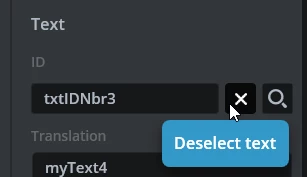
If you want the 2 textArea to not be linked you need to assign them 2 different textID. By default it is auto-generated but if you copy-paste or assign an existing textID they will  get linked, to unlink them, you have to un-assign the textID by clicking on the cross called "Deselect text".

GaetanGodart_0-1741685883786.png
Then you can keep the text ID auto-generated or you can assign a new textID.


I hope I understood correctly this time and that I answered your question/solved the issue.


Regards,


3 replies

GaetanGodart
Technical Moderator
March 10, 2025

Hello @AAlis.23 ,


This behavior is the same on TouchGFX 4.24.0.

I think this is not a bug.

When you create a textArea, assign a text to it and set the ID of it, if you create another textArea with the same textID, both textArea will display the same text because they have the same textID.

When you create a textID, a specific set of characters are linked to that ID, so when you add that textID to a different textArea, it will show the same text.
Also, when you change the text assigned to the textID (whether you do it in the initial textArea, in a different textArea or in the text and typography tab, the change will be reflected on all the occurence of the textID.


Regards,

AAlis.23
AAlis.23Author
Associate III
March 11, 2025

Hi Gaetan,

Yes, but read carefully: "Even if you change the ID of the second one, any modification made to either of them affects both." The behavior you are describing is logical, but changing the ID should unlink the two text areas, yet it does not.


GaetanGodart
GaetanGodartBest answer
Technical Moderator
March 11, 2025

Hello @AAlis.23 ,


Ok sorry, I understand the issue now.

Whether you create a textArea by copy-pasting or by creating a new textArea, as soon as you assign a textID to your textArea, you will modify that textID.
So if as you say, you change the textID in the second textArea, what you will actually do is to change the textID name but you won´t create a new textID so they will still be "linked".

If you want the 2 textArea to not be linked you need to assign them 2 different textID. By default it is auto-generated but if you copy-paste or assign an existing textID they will  get linked, to unlink them, you have to un-assign the textID by clicking on the cross called "Deselect text".

GaetanGodart_0-1741685883786.png
Then you can keep the text ID auto-generated or you can assign a new textID.


I hope I understood correctly this time and that I answered your question/solved the issue.


Regards,


AAlis.23
AAlis.23Author
Associate III
March 11, 2025

Oh, I see what you mean now. If I change the textID of the second one, the first one also changes, so they stay linked. I hadn’t noticed that before. Like you said, I need to remove the textID first (auto-generate) and then assign a new one. This behavior of being linked is a bit new to me since normally, in any application, you would select both controls instead, but I get its usefulness. Thanks!

GaetanGodart
Technical Moderator
March 12, 2025

No problem @AAlis.23 !
I am glad you can work on your project now!


Regards,