

Button with Label and Icon, Hide Icon when Not Pressed
Hello community! Going to say thanks in advance for your help and direction here. Before I get started, understand that I am using an external rotary encoder knob as the user input for the display, no touchscreen. I am hijacking the button pressed/released behavior to show the navigation with the encoder and manually handling the encoder press to load a new screen or other behavior as needed. I have the external hardware mapped in properly and can view the knob turn/press events as needed, no problems there.
I'm trying to build in a menu list of sorts with each menu entry as flex button with some custom behavior. I want for each entry to have an icon, a text label, and a different pressed/released background image, but I only want to have the icon showing when the menu entry is selected. When the entry is not selected, the background image will match the overall UI background to blend in. See the image below where the first entry is selected.
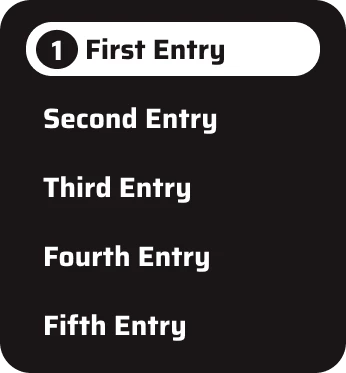
This same menu entry behavior will ultimately live in several screens and I would also like to not have duplicate copies of the code living in each ScreenView file but I'm unsure of where to put these functions to share to all screens while also handling the screen specific menu entry objects.
The issues I'm trying to solve:
- How to hide the icon when the entry is not selected
- How to shift the text to the right when the entry is selected and the icon is showing
- How best to organize code to have this all live in one place instead of duplicated in all necessary screen files.
I appreciate your help and suggestions.