Associate II
July 18, 2024
Solved

Cannot build project with CubeIDE (undefined reference to ...)

  • July 18, 2024
  • 4 replies
  • 10879 views

Hello, I'm trying to setup a simple "Hello world" project for a custom board with an STM32H7A3IIT6.

I've successfully created the project from CubeMX (6.12) generated the code for Keil MDK and, starting from the application template of the TGFX designer (4.24), I managed to add the GUI to the project, compile and flash the board successfully.

As I wanted to start using CubeIDE (currently version 1.16) I tried the same approach, so:

- CubeMX ioc project (copy of the same file used before for the Keil code generation)

- Generate code for CubeIDE ("Generate under root" checked as with unchecked it gave me the following error (https://community.st.com/t5/stm32-mcus-touchgfx-and-gui/touchgfx-designer-error-quot-unable-to-locate-c-lt-path-to/td-p/100242)

- Open the generated "ApplicationTemplate.touchgfx.part" file with TouchGFX Designer

- Import the Blank UI and put a coloured box on the main screen

- Generate code

- Open the project with CubeIDE and build the project

-> This leads to 174 errors, all of them referred to undefined reference to touchgfx::xyz (with xyz = AbstractPartition, Application, Container, etc)

So I tried on CubeIDE to select Project->Convert to C and tried to build again.

-> This leads to a couple of errors, the same case of:

https://community.st.com/t5/stm32-mcus-touchgfx-and-gui/undefined-reference-to-touchgfx-init/td-p/175810

https://community.st.com/t5/stm32cubemx-mcus/stm32h747iitx-undefined-reference-to-touchgfx-init-its-stm32/td-p/154926/page/2

with:

C:/TouchGFXProjects/STM32H7_DTouch1_TGFX/TouchGFX/App/app_touchgfx.c:68: undefined reference to `touchgfx_components_init'

C:/ST/STM32CubeIDE_1.16.0/STM32CubeIDE/plugins/com.st.stm32cube.ide.mcu.externaltools.gnu-tools-for-stm32.12.3.rel1.win32_1.0.200.202406191623/tools/bin/../lib/gcc/arm-none-eabi/12.3.1/../../../../arm-none-eabi/bin/ld.exe: C:/TouchGFXProjects/STM32H7_DTouch1_TGFX/TouchGFX/App/app_touchgfx.c:69: undefined reference to `touchgfx_init'

C:/ST/STM32CubeIDE_1.16.0/STM32CubeIDE/plugins/com.st.stm32cube.ide.mcu.externaltools.gnu-tools-for-stm32.12.3.rel1.win32_1.0.200.202406191623/tools/bin/../lib/gcc/arm-none-eabi/12.3.1/../../../../arm-none-eabi/bin/ld.exe: ./Application/User/TouchGFX/App/app_touchgfx.o: in function `TouchGFX_Task':

C:/TouchGFXProjects/STM32H7_DTouch1_TGFX/TouchGFX/App/app_touchgfx.c:87: undefined reference to `touchgfx_taskEntry'

collect2.exe: error: ld returned 1 exit status

make: *** [makefile:67: STM32H7_DTouch1_TGFX.elf] Error 1

"make -j4 all" terminated with exit code 2. Build might be incomplete.

Build Failed. 4 errors, 0 warnings.

The solutions proposed in the other forum discussions didn't solve my case.

I hope I've been clear enough to explain my case and you can help me with this topic.

Thank you!
Best answer by MCA_Dev

I've managed to build the project comparing the CubeIDE setup with one generated from a ST demoboard.

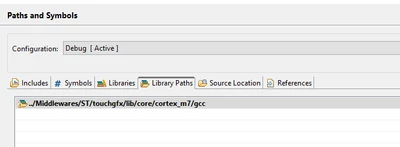
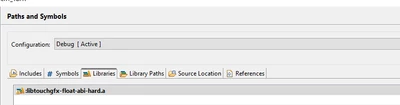
CubeMX doesn't automatically include in the CubeIDE project the TouchGFX "Libraries" and the "Library Paths" that must be set manually.

These options can be found under (right click on the project)-> Properties ->C/C++ General -> Path and Symbols

MCA_Dev_0-1721715753783.png

MCA_Dev_1-1721715938970.png

4 replies

GaetanGodart
Technical Moderator
July 18, 2024

Hello @MCA_Dev ,


Martin's answer wasn't helpful to solve the "generate under root" issue?
It is usually not recommended to generate under root.

To compile TouchGFX project, you shouldn't convert to C as TouchGFX is C++.

Maybe the 174 errors could be solves by including the different folder of your project, I expect the folders generated by TouchGFX Designer to maybe not be included in the STM32CubeIDE project.


Regards,

MCA_DevAuthor
Associate II
July 19, 2024

Hello @GaetanGodart , thank you for your support.

I've tried again generating a new project with "Generate under root" unckecked and managed to generate code successfully from the TouchGFX generator.

I've compared the folders included in the project with the ones of a working demoboard project and look fine to me.

MCA_Dev_0-1721317537105.png

Any other advice?

Probably it's something not very difficult to fix but given my little experience with both TouchGFX and CubeIDE I cannot manage to make it work properly.

Thank you

MCA_DevAuthor
Associate II
July 19, 2024

I also switched to another machine and it gave me the same results (the GUI is just an empty page with a full screen coloured box).

So I guess I'm missing some additional configuration on CubeIDE/CubeMX.

GaetanGodart
Technical Moderator
July 19, 2024

Ok good!

Also, once your STM32CubeMx project is created, you should open your .touchgfx.part file, select blank UI, then click on "Generate code" From within TouchGFX Designer.

Then you can open the project in STM32CubeIDE to build it. Tell me if you still get the 174 errors from there.

Another solution is to directly compile and flash from TouchGFX Designer by clicking the button on the bottom right.


Regards,

MCA_DevAuthorBest answer
Associate II
July 23, 2024

I've managed to build the project comparing the CubeIDE setup with one generated from a ST demoboard.

CubeMX doesn't automatically include in the CubeIDE project the TouchGFX "Libraries" and the "Library Paths" that must be set manually.

These options can be found under (right click on the project)-> Properties ->C/C++ General -> Path and Symbols

MCA_Dev_0-1721715753783.png

MCA_Dev_1-1721715938970.png

Associate II
September 18, 2024

Hello, 

I'm facing the same issues and I'm a bit new to STM32.
Screenshot 2024-09-19 030003.png
Can you please help me to add library and library path? What should I add there?

Thank you in advance

GaetanGodart
Technical Moderator
July 23, 2024

I am glad that you found a solution! :smiling_face_with_smiling_eyes:

ST Employee
September 26, 2024

Hello @MCA_Dev ,

The 4.24.1 is out with a fix for issue.

BR,