Associate II
August 20, 2024
Question

Cannot play custom videos using the Video widget on Riverdi-RVT101HVSNWC00-B.

  • August 20, 2024
  • 1 reply
  • 1502 views

Hi,

I am using the TouchGFX video widget to play custom videos on the STM32H747I-DISCO development board. I am able to play videos by placing them in the assets/videos folder and modifying Screen1View.cpp as described in the MJPEG Video . The video playback works as expected on this board, as shown in the the image below.
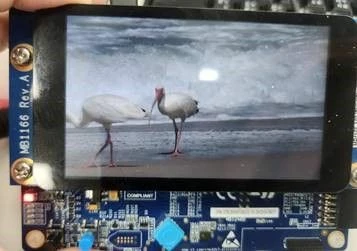
747.jpg


However, when using non-ST development boards, such as the Riverdi-RVT101HVSNWC00-B and my custom development board, I encounter issues. The video widget does not display the video, even though it works in the simulator with TouchGFX. The screen remains blank.
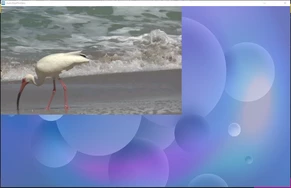
TouchGFX simulatorTouchGFX simulatorVideo not show on screenVideo not show on screen

Could you please advise on how to resolve the issue of using the video widget to play videos on development boards other than the official ST boards?

1 reply

ST Employee
August 20, 2024

Hello @ChungEN ,

There are a couple of steps that you need to take before rendering videos. I assume the MCU you are using is capable of video decoding (or at least, hardware decoders are accessible).

Firstly, you need to follow the steps in Enable Video Decoding. Then, apply the related settings based on Hardware decoding or Software decoding that is explained here 

Please follow the documentations, and let me know the progress

Best regards,

ChungENAuthor
Associate II
August 26, 2024

Hello @Mohammad MORADI ESFAHANIASL ,

  I followed the steps and am using a custom development board with the MCU STM32H743BGTx.

The TouchGFX framebuffer is set to single buffer, and video decoding is set to hardware/direct to framebuffer, so there is no need to create a videoTaskFunc() in the RTOS.


  This setting works with the Riverdi-RVT101HVSNWC00-B, but it doesn't work on the custom development board. Strangely, if I set video decoding to "Disable," the TouchGFX screen displays correctly on the monitor. However, when set to "Hardware," the screen turns completely black.How can I do to my custom development board?

TouchGFX settingTouchGFX setting

ChungEN_1-1724639368189.pngChungEN_2-1724639402575.pngChungEN_3-1724639456048.pngChungEN_4-1724639479327.png


ST Employee
August 28, 2024

Hello @ChungEN,

Is it possible to share your project? Or at least, please share the TouchGFXHAL (both .cpp and .hpp) and TouchGFXGeneratedHAL both (.cpp and .hpp)

Kind regards,