Associate II
April 4, 2025
Solved

Configure stm32h747i-disco touch screen to make a graphic interface.

  • April 4, 2025
  • 7 replies
  • 2387 views

I am a student in embedded systems. I have a final project with the stm32h747i-disco card. I want to configure the touch screen to make a graphic interface.

Best answer by mƎALLEm

Hello @slimani and welcome to the ST community,

Please use TouchGFX designer tool to create a ready-to-use graphic project based on that board. The hardware will be configured automatically: LCD, Frame buffer, TouchScreen, memories, etc ..

As shown in this screenshot, find your board and click on create button:
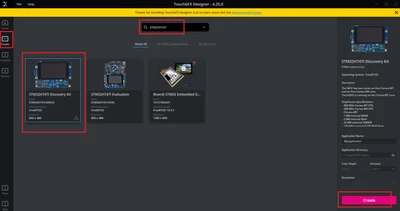
mALLEm_0-1743781022473.png

Hope that answers your question.

7 replies

mƎALLEm
mƎALLEmBest answer
Technical Moderator
April 4, 2025

Hello @slimani and welcome to the ST community,

Please use TouchGFX designer tool to create a ready-to-use graphic project based on that board. The hardware will be configured automatically: LCD, Frame buffer, TouchScreen, memories, etc ..

As shown in this screenshot, find your board and click on create button:

mALLEm_0-1743781022473.png

Hope that answers your question.

"To give better visibility on the answered topics, please click on ""Accept as Solution"" on the reply which solved your issue or answered your question."
slimaniAuthor
Associate II
April 5, 2025

I am making a project on touchgfx and I upload this project to the card but the card screen does not work remains black please help me 


mƎALLEm
Technical Moderator
April 5, 2025

Hello,

You are using a dual core product and there are two projects related to both cores CM4 and CM7. Make sure to upload the two binaries of both cores:

mALLEm_0-1743865758321.png

No relation with activating a timer with the display.

"To give better visibility on the answered topics, please click on ""Accept as Solution"" on the reply which solved your issue or answered your question."
slimaniAuthor
Associate II
April 5, 2025

I do all that but nothing changes the screen remains black does not turn on can you give me the steps to test the screen

slimaniAuthor
Associate II
April 5, 2025

I also activate the timer but the screen always remains black and does not light up.

slimaniAuthor
Associate II
April 5, 2025

I download it how do I upload it to stm32

slimaniAuthor
Associate II
April 5, 2025

slimani_0-1743873891984.pngslimani_1-1743873928831.png


slimaniAuthor
Associate II
April 5, 2025

slimani_2-1743874350523.jpeg

finally it works


mƎALLEm
Technical Moderator
April 5, 2025

Now did you try the generated TouchGFX project?

Note: don't start a debug session. Just upload the two applications CM4 and CM7 disconnect and reconnect the STLINK USB cable again.

"To give better visibility on the answered topics, please click on ""Accept as Solution"" on the reply which solved your issue or answered your question."
slimaniAuthor
Associate II
April 5, 2025

I want to make this graphical interface, can you help me to do that and thank you very much 

slimani_0-1743879071540.jpeg


mƎALLEm
Technical Moderator
April 5, 2025

1 - Did you solve your original issue or not? does the generated TouchGX project is working for you? and how it worked for you.

2- 


@slimani wrote:

I want to make this graphical interface, can you help me to do that and thank you very much 

slimani_0-1743879071540.jpeg


This is another question, you need to open e new thread for it.

Thank you.

"To give better visibility on the answered topics, please click on ""Accept as Solution"" on the reply which solved your issue or answered your question."
slimaniAuthor
Associate II
April 6, 2025

No, my problem is not solved. I didn't understand the cause of this problem. When I create a project with TouchGFX and upload it to the STM32, the screen remains black and doesn't light up. However, when I upload the demo project you gave me, the screen works correctly.
And I will open a new thread for the GFX interface.

slimaniAuthor
Associate II
April 6, 2025

slimani_0-1743949245410.png

I didn't understand your answer correctly but I opened stmprogrammer and I found this file and I clicked on connect, what is this file for? Is it for you to upload this file and then I upload the project if it explains to you what exactly needs to be done?

mƎALLEm
Technical Moderator
April 6, 2025

This the flashloader used by STM32CubeProgrammer to upload the external Flash (QuadSPI). The quad SPI flash contains the TouchGFX assets: images, texts etc.. 

Select that Flash loader then upload the two hex files as I mentionned before. Did you see somthing on the screen?

"To give better visibility on the answered topics, please click on ""Accept as Solution"" on the reply which solved your issue or answered your question."
slimaniAuthor
Associate II
April 6, 2025

I uploaded the two .hex files from CM7 and CM4 but the screen remains black and does not light up. The screen only lights up when I upload the demo project. I don't understand the cause of this.