
Associate II
December 2, 2024
Solved

CubeIDE don't generate C Files at all

  • December 2, 2024
  • 1 reply
  • 4476 views

Hello, at first im new in the STM32 world.

Yesterday I set up the Touch GFX as

"How to TouchGFX: Installing TouchGFX Designer for STM32 GUI applications" tells me.

For that i delete all STM Programm tha i install pervius. Download lates Version and start install process as discript in the Video.I follow all steps and pass with no errors. Than i try to start a new STM32 project. But the IDE dont generate any c-file at all.

en.stm32cubemx-win-v6-13-0
en.stm32cubeprg-win64-v2-18-0
en.st-stm32cubeide_1.17.0_23558_20241125_2245_x86_64.exe
en.x-cube-touchgfx.4.24.1

I'm not a beginner with this stuff, I'm working for long time with Arduino and ESP32.

The IDE is very complex and may be I'm only set one checkbox to much


Best answer by mƎALLEm

Hello,

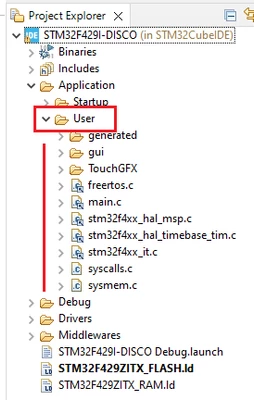
This is the CubeIDE explorer screenshot of your project:

SofLit_1-1733229143889.png

I don't see any issue on it. The user code is under User folder.

The project is compiling without errors!

1 reply

mƎALLEm
Technical Moderator
December 2, 2024

Hello @Peter57 and welcome to the community,

The video doesn't show how to generate the code. You need to watch the next video: How to TouchGFX: Creating my first GUI with TouchGFX Designer for STM32 GUI applications 

What board are you using?

"To give better visibility on the answered topics, please click on ""Accept as Solution"" on the reply which solved your issue or answered your question."
Peter57Author
Associate II
December 3, 2024

Hello SifLit, thank you for the reply. My Board ist the F429i-DISC1 type. After play a litle bit with the softwar i notice that afer set up the fils in the order form the Video, the STMCubeMX ist the part that don't work. Now, after the new install, the MX generates the code for me, but the set up is wrong. in the Project Mamager the Toolchain was wrong, the ewarm was set, not the STM32CubeIDE and "Generate Under Root" was tick. I fix that and start a new projekt. But now the Application->User folder is missing. Yes, as you wrote, I see the second Vide "Creating my first GUI with TouchGFX Designer for STM32 GUI applications" and try to finish it. but still missing same code Parts. Peter

mƎALLEm
Technical Moderator
December 3, 2024

Sorry I didn't understand. What files are missing in the generated code.

Could you please attach your complete project?

Thank you.

"To give better visibility on the answered topics, please click on ""Accept as Solution"" on the reply which solved your issue or answered your question."