Custom Loaders for the STM32L496 with MT25QL128 QuadSPI External Flash (ultimately for touchGFX)
Hi All,
I've been trying to bring up a custom external loader for well over a week and I'm just not getting anywhere.
My processor is an STM32L496VGT6 and its connected via quadSPI to an MT25QL128A 16MB external flash memory. I'm running the clock at 80MHz, and my QUADSPI is setup like this (both in my custom loader, and in the application code I'm developing):
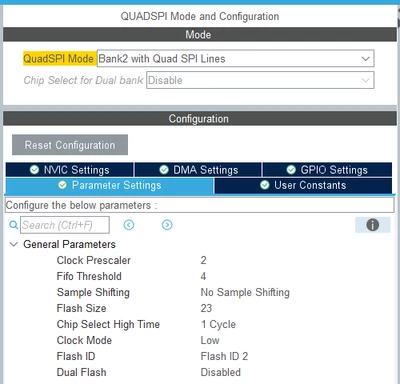
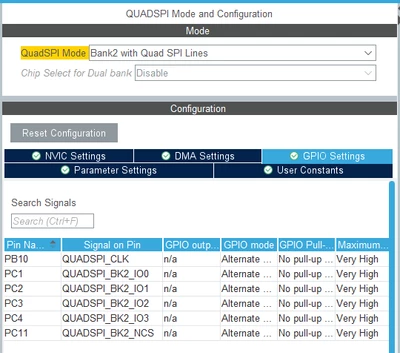
Following mostly along with the "External QSPI loader how to" (from here External QSPI loader how to - 05 – QSPI driver coding - YouTube), and utilizing the files in the contrib branch of the stm external loader github repository (GitHub - STMicroelectronics/stm32-external-loader at contrib), I've put together what seems like a working driver for the MT25QL128. I got there by starting with the quadspi.h/c files in the stm32-custom-loader/QSPI_Drivers/MT25QL512/ folder, and then modifying them using the micro datasheet for the part to swap different commands where necessary. I pulled in test code from the main.c file in stm32-external-loader-contrib\Loader_Files\other devices\, and also used the Loader_Src.c, Dev_Inf.h/c, an linker.ld files from the same folder. The following test code runs with no issues when debugging:
/* USER CODE BEGIN 2 */
uint8_t buffer_test[MEMORY_SECTOR_SIZE];
uint32_t var = 0;

CSP_QUADSPI_Init();

for (var = 0; var < MEMORY_SECTOR_SIZE; var++) {
buffer_test[var] = (var & 0xff);
}

for (var = 0; var < SECTORS_COUNT; var++) {

if (CSP_QSPI_EraseSector(var * MEMORY_SECTOR_SIZE, (var + 1) * MEMORY_SECTOR_SIZE - 1) != HAL_OK) {

while (1)
; //breakpoint - error detected
}

if (CSP_QSPI_WriteMemory(buffer_test, var * MEMORY_SECTOR_SIZE, sizeof(buffer_test)) != HAL_OK) {

while (1)
; //breakpoint - error detected
}

}

if (CSP_QSPI_EnableMemoryMappedMode() != HAL_OK) {

while (1)
; //breakpoint - error detected
}

for (var = 0; var < SECTORS_COUNT; var++) {
if (memcmp(buffer_test, (uint8_t*) (QSPI_BASE + var * MEMORY_SECTOR_SIZE), MEMORY_SECTOR_SIZE) != HAL_OK) {
while (1)
; //breakpoint - error detected - otherwise QSPI works properly
}
}
/* USER CODE END 2 */
I then modified my project options to generate the stldr file per the youtube video, changed to the "linker.ld" file, and copied the stldr file it into my STM32CubeProgrammer ExternalLoader folder. I used the STM32CubeProgrammer to read memory (starting at 0x90000000), and write to the same memory area using the "testbinary1M.bin" file from \stm32-external-loader-contrib\QSPI_testing\.
Everything up to this point seems to work without problems so far.
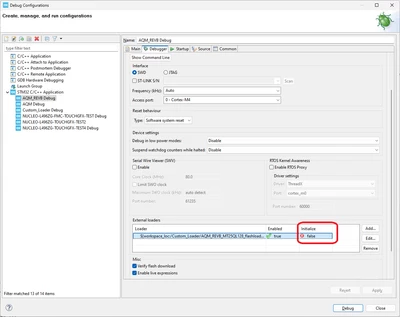
Where my problem begins is when I attempt to use the new external loader I generated in my debug sessions while trying to develop my main application. Here I've gone into the debug sessions, pointed to my generated loader file, and started to debug.
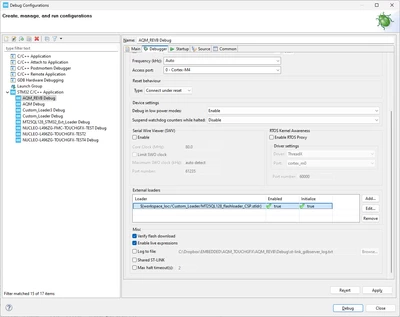
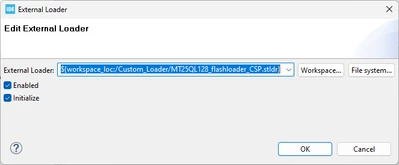
With the external loader enabled as above, the code stops on the first use of:
HAL_Delay(1);
If I drill down a little with the debugger, the code is stuck within HAL_Delay() in the while loop:
__weak void HAL_Delay(uint32_t Delay)
{
uint32_t tickstart = HAL_GetTick();

uint32_t wait = Delay;

/* Add a period to guaranty minimum wait */
if (wait < HAL_MAX_DELAY)
 {
 wait += (uint32_t)uwTickFreq;
 }

while ((HAL_GetTick() - tickstart) < wait) // <===== STUCK HERE!
 {
 }
}
Where HAL_GetTick() constantly returns 0, which doesn't seem right.
When I disable the external loader, everything goes back to working fine. What do I check next? Is my external loader really just not working in some untested way? Or is there some initialization I need to do in my main() initialization when using an external loader? Or maybe some deinitialization I didn't do in my loader?