Debugging TouchGFX example project on STM32H757I-EVAL fails to program
I have a new STM32H757I-EVAL board. The examples that can programmed on it ran perfectly.
I want to compile and debug the TouchGFX example myself but I only managed to kill the app that is running on it.
I've created the TouchGFX example from within STMCube32IDE by selecting the evaluation board, and then the example. It builds without errors.
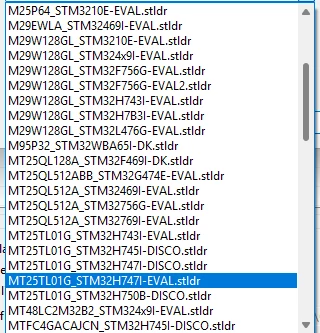
In Debug Configuration, on Debug tab under External Loaders, I've added MT25TL01G_STM32H747I-DISCO.stldr with Enabled set to true and Initialised set to false.
When I select debug, it starts to program but fails after a while. Below is the output from Console.
What is wrong, and how can I fix it?
STMicroelectronics ST-LINK GDB server. Version 7.10.0
Copyright (c) 2025, STMicroelectronics. All rights reserved.
Starting server with the following options:
Persistent Mode : Disabled
Logging Level : 1
Listen Port Number : 61234
Status Refresh Delay : 15s
Verbose Mode : Disabled
SWD Debug : Enabled
InitWhile : Enabled
Info : default port : 7184
Info : Remote address: 127.0.0.1
Info : stlinkserver already running, exit
Waiting for debugger connection...
Debugger connected
Waiting for debugger connection...
Debugger connected
Waiting for debugger connection...
-------------------------------------------------------------------
STM32CubeProgrammer v2.19.0
-------------------------------------------------------------------
Log output file: /tmp/STM32CubeProgrammer_a1UHge.log
ST-Link Server is running on port : 7184
ST-LINK SN : 003D003D3234510637333934
ST-LINK FW : V3J16M7
Info : default port : 7184
Info : Remote address: 127.0.0.1
Info : stlinkserver already running, exit
Info : default port : 7184
Info : Remote address: 127.0.0.1
Info : stlinkserver already running, exit
Board : STM32H757I-EVAL
Voltage : 3.27V
SWD freq : 8000 KHz
Connect mode: Under Reset
Reset mode : Hardware reset
Device ID : 0x450
Revision ID : Rev V
Device name : STM32H7xx
Flash size : 2 MBytes
Device type : MCU
Device CPU : Cortex-M7/M4
BL Version : 0x91
Opening and parsing file: ST-LINK_GDB_server_OwfSTT.srec
Memory Programming ...
File : ST-LINK_GDB_server_OwfSTT.srec
Size : 30.07 MB
Address : 0x08000000
Erasing memory corresponding to sector 0:
Erasing internal memory sector 0
Erasing memory corresponding to sector 0:
Erasing internal memory sectors [10 13]
Erasing memory corresponding to sector 0:
Erasing external memory sectors [544 780]
Error: failed to erase memory
Error: failed to erase memory
Encountered Error when opening /Applications/STM32CubeIDE.app/Contents/Eclipse/plugins/com.st.stm32cube.ide.mcu.externaltools.cubeprogrammer.macos64_2.2.100.202412061334/tools/bin/STM32_Programmer_CLI
Error in STM32CubeProgrammer
Shutting down...
Exit.