
Mathan Raja
Associate III
October 24, 2024
Solved

Discrepancy in colours between TouchGFX and the display

  • October 24, 2024
  • 3 replies
  • 3698 views

Hi,

I am using the STM32H563 with an ST7735S display and encountering a colour difference between TouchGFX and the display. How can this issue be resolved?
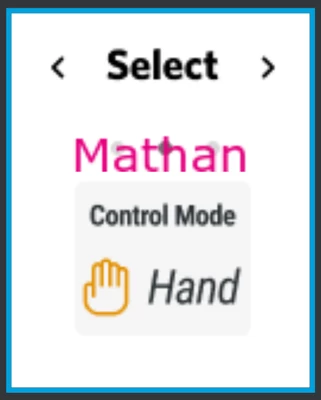
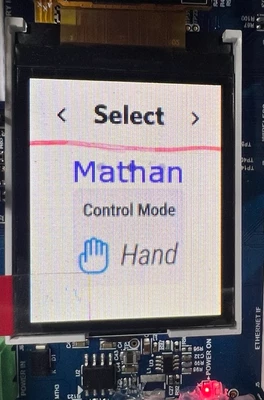
MathanRaja_0-1729768799673.png

MathanRaja_1-1729769132153.png

Thanks

Mathan

Best answer by Michael K

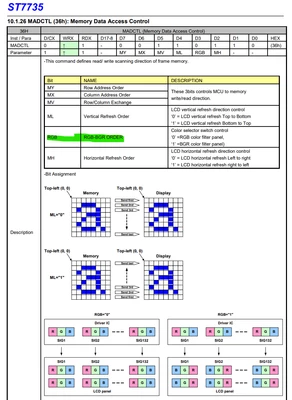
The ST7735 has a register called MADCTL (Memory Access Data Control), address 0x36. Notice that one of the bitfields is the RGB/BGR Order. You could try toggling this bit, which will tell the driver to interpret the red and blue channels opposite to what they currently are now.
MichaelK_1-1731245826858.png


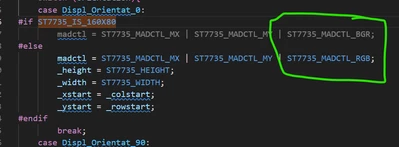
In your project file drv_st7735.c, check the DRV_ST7735_SetRotation function. Notice that some pre-processor "if" sections set the madctl variable to the ST7735_MADCTL_RGB define and some others set it to ST7735_MADCTL_BGR. 
MichaelK_2-1731246208501.png

Try swapping the ST7735_MADCTL_RGB with ST7735_MADCTL_BGR and vice versa for all rotation cases.


3 replies

GaetanGodart
Technical Moderator
October 25, 2024

Hello @Mathan Raja ,


Most likely the drivers of your screen don't use the same format as TouchGFX.
For instance, TouchGFX uses ARGB but your display's driver might be in ABGR.

Someone else had a similar issue with an STT7735, here is how they solved it : https://community.st.com/t5/stm32-mcus-touchgfx-and-gui/touchgfx-wrong-color-issue/td-p/195514


Please tell me if that helped you.


Regards,

Mathan Raja
Associate III
October 25, 2024

Hi Gaetan Godart,

I display images in a loop, and pressing an external button changes the image (a small application).

Adjusting the data size resolved the colour issue, and now the correct colours appear.

However, the application is not functioning as expected. The callback and image-changing functions execute during debugging, but the issue persists, and the display appears frozen.

Thanks 

Mathan

GaetanGodart
Technical Moderator
October 28, 2024

Hello @Mathan Raja ,


I don't really understand the issue here.

You changed the format and now your first image is fine?
But once you execute your interrupt that changes to another image, then you get the wrong colors again and the application freeze?


Can you share your project?

How do you change the image?

Can you try to isolate the actions (one for the image change and one for the interrupt), what happens in each case?

Do you use data cache (Dcache)?

What is your memory protection unit settings? Do you prevent speculative reading?


Regards,

Michael K
Michael KBest answer
Senior III
November 10, 2024

The ST7735 has a register called MADCTL (Memory Access Data Control), address 0x36. Notice that one of the bitfields is the RGB/BGR Order. You could try toggling this bit, which will tell the driver to interpret the red and blue channels opposite to what they currently are now.

MichaelK_1-1731245826858.png


In your project file drv_st7735.c, check the DRV_ST7735_SetRotation function. Notice that some pre-processor "if" sections set the madctl variable to the ST7735_MADCTL_RGB define and some others set it to ST7735_MADCTL_BGR. 

MichaelK_2-1731246208501.png

Try swapping the ST7735_MADCTL_RGB with ST7735_MADCTL_BGR and vice versa for all rotation cases.


Mathan Raja
Associate III
November 12, 2024

Hi,

The issue was fixed thanks to Michael’s suggestion.

Big thanks to both Michael and Gaetan Godart for the help!

Thanks

Mathan

GaetanGodart
Technical Moderator
November 12, 2024

Hello @Mathan Raja ,


I am glad you made it work! :smiling_face_with_smiling_eyes:


Regards,
