
Senior
November 5, 2024
Solved

Feature request: Stadium button

  • November 5, 2024
  • 1 reply
  • 920 views

1) Using the definition I found here (Wolfram-Stadium).
Would it be possible to add an option in the flex button to change into a flex-Stadium/button?
I ask this because I saw multiple implementation of keyboards and most of them instantiate way to many object around the idea of a button (4 corners png , text, callbacks).

2)(extra) I ask this because because you can't easily "stylise" a keyboard via Designer.
It feels like it is easier to just program them manually at the screen setup (i.e.: Gaetan's T9KeyboardCustomWidget).

1b) The only obvious thing that I see is to set a radius_pixel and that would limit the minimal size to not be smaller than a circle. Not sure if customizing the edge with a custom spline would make sense (easing function from the Academy videos).
Best answer by GaetanGodart

Hello @Marc_LM and welcome to the community!


Indeed, this feature is not available yet.
It has already been brought to our attention and we will therefore, in order to increase user satisfaction, implement a solution in a further release.

But note that this is not a priority as there is an easy walkaround : using an image with rounded corners.
This can be done for buttons (design the image yourself and add it to the image field of the button), box (simply add an image instead of the box), etc.

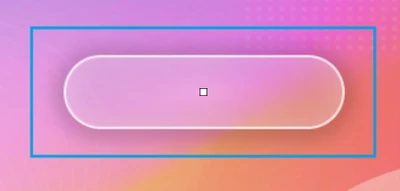
Furthermore, there already are buttons that perfectly fit your description, here is an example:

GaetanGodart_0-1730823261462.png

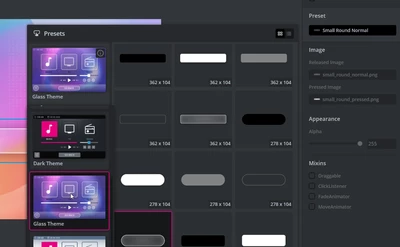
It can be found in the Glass theme :

GaetanGodart_1-1730823294628.png


I hope this helps! :smiling_face_with_smiling_eyes:
If this comment answers your question, I invite you to select it as "best answer".


Regards,

1 reply

GaetanGodart
GaetanGodartBest answer
Technical Moderator
November 5, 2024

Hello @Marc_LM and welcome to the community!


Indeed, this feature is not available yet.
It has already been brought to our attention and we will therefore, in order to increase user satisfaction, implement a solution in a further release.

But note that this is not a priority as there is an easy walkaround : using an image with rounded corners.
This can be done for buttons (design the image yourself and add it to the image field of the button), box (simply add an image instead of the box), etc.

Furthermore, there already are buttons that perfectly fit your description, here is an example:

GaetanGodart_0-1730823261462.png

It can be found in the Glass theme :

GaetanGodart_1-1730823294628.png


I hope this helps! :smiling_face_with_smiling_eyes:
If this comment answers your question, I invite you to select it as "best answer".


Regards,

Marc_LMAuthor
Senior
November 5, 2024

Indeed png/svg for the buttons seems to be the only way right now.
Thanks for the confirmation.

I'm still getting my mind around how much memory hungry these abstractions are.
I was not expecting it when a dozen of buttons took ~6 kB just for their stateness.

I'll probably have to think of refreshing a scrolling list like the browser does on sites like reddit (load next 100 items).

GaetanGodart
Technical Moderator
November 7, 2024

Hello @Marc_LM ,


If you use an image or SVG that is similar and as simple as the example in the link you shared, you can compress the image in TouchGFX to hugely reduce its size and the size of a SVG like this would already be very small.


Regards,