Hab Collector
Associate III
February 28, 2025
Solved

FlexButton background color how to change in code

  • February 28, 2025
  • 2 replies
  • 529 views

I googled how to make this change.  I found several references to class members setBackgroundColor, setButtonColor, setBoxColor but none of them work (are members).  I checked BoxWithBorderButtonStyle.hpp and could find no reference to any of these nor any (obvious) function that would allow me to change the color.  The documentation that I can find online does not match my results.  Any feedback would be helpful.  I am using TouchGFX 4.24.2

Best answer by mƎALLEm

Hello,

I think you need to use:


 /**
 * Sets the colors.
 *
 * colorReleased The color released.
 * colorPressed The color pressed.
 * borderColorReleased The border color released.
 * borderColorPressed The border color pressed.
 */
 void setBoxWithBorderColors(const colortype colorReleased, const colortype colorPressed, const colortype borderColorReleased, const colortype borderColorPressed)
 {
 up = colorReleased;
 down = colorPressed;

 borderUp = borderColorReleased;
 borderDown = borderColorPressed;

 handlePressedUpdated();
 }


Tip: how did I find it? 

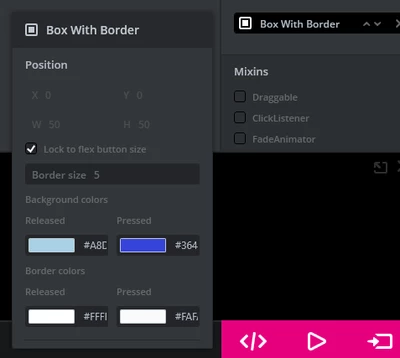
Create a flex button and change the background colors.
mALLEm_0-1740750745820.png

Go to the ScreenXXXViewBase in "generated" folder and check what was the call corresponding to the color settings:


flexButton1.setBoxWithBorderColors(touchgfx::Color::getColorFromRGB(168, 209, 230), touchgfx::Color::getColorFromRGB(54, 68, 217), touchgfx::Color::getColorFromRGB(255, 255, 255), touchgfx::Color::getColorFromRGB(250, 250, 250));


The two first parameters correspond to the pressed/released background colors.

Hope that helps.

2 replies

mƎALLEm
mƎALLEmBest answer
Technical Moderator
February 28, 2025

Hello,

I think you need to use:


 /**
 * Sets the colors.
 *
 * colorReleased The color released.
 * colorPressed The color pressed.
 * borderColorReleased The border color released.
 * borderColorPressed The border color pressed.
 */
 void setBoxWithBorderColors(const colortype colorReleased, const colortype colorPressed, const colortype borderColorReleased, const colortype borderColorPressed)
 {
 up = colorReleased;
 down = colorPressed;

 borderUp = borderColorReleased;
 borderDown = borderColorPressed;

 handlePressedUpdated();
 }


Tip: how did I find it? 

Create a flex button and change the background colors.

mALLEm_0-1740750745820.png

Go to the ScreenXXXViewBase in "generated" folder and check what was the call corresponding to the color settings:


flexButton1.setBoxWithBorderColors(touchgfx::Color::getColorFromRGB(168, 209, 230), touchgfx::Color::getColorFromRGB(54, 68, 217), touchgfx::Color::getColorFromRGB(255, 255, 255), touchgfx::Color::getColorFromRGB(250, 250, 250));


The two first parameters correspond to the pressed/released background colors.

Hope that helps.

"To give better visibility on the answered topics, please click on ""Accept as Solution"" on the reply which solved your issue or answered your question."
Hab Collector
Associate III
February 28, 2025

Thank you so much - that was most helpful.