
BWKidd
Senior
March 6, 2024
Question

Getting started with TouchGFX and bringing up a board

  • March 6, 2024
  • 5 replies
  • 7574 views

Hi All,

I'm trying to get started with TouchGFX.

I'm currently working with a NUCLEO-L496ZG eval board connected to an NHD-2.8-240320AF-CSXP-FT (320 x 240 TFT LCD with ST7789 internal controller.)

I've successfully connected up the display via FMC and been able to display colors and images and such to the screen, just using statements like 

*(__IO uint16_t *)(0x60000000) = command;

*(__IO uint16_t *)(0x60020000) = data;

to send data to the command and data registers, and everything seems to be working well.

Now I'm trying to bring in TouchGFX into the mix and I'm having a difficult time. I've read through the board bring up process, and where I think I'm having trouble is knowing which functions to modify from the generated code to integrate the ST7789 driver code I've written.

To give you an idea of what I've tried and what my setup is, here's what my TouchGFX setup looks like in the IOC:
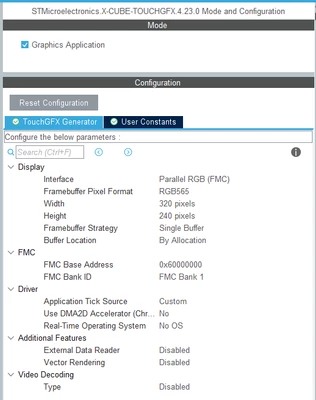
BWKidd_0-1709759336646.png

After generating the code, I used TouchGFX designer and opened the ApplicationTemplate.touchgfx.part file and then added a simple splash bitmap to the default screen:
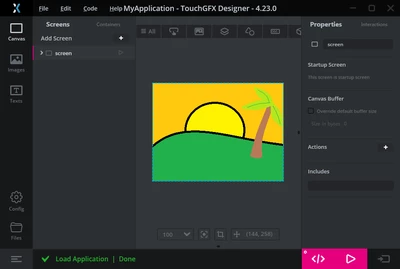
BWKidd_1-1709759709814.png

(I know, I could quit being an electrical engineer and draw pictures in paint for a living, right?)

I then generated code, went back to STM32CubeIDE re built with no errors.

On first debug session, nothing happened on the LCD, which makes sense since I hadn't modified any of the generated code. Based on the example here FMC and SPI Display Interface | TouchGFX Documentation I realized I was probably supposed to modify flushFrameBuffer in the TouchGFXHAL.cpp file, so I did so like this:

void TouchGFXHAL::flushFrameBuffer(const touchgfx::Rect& rect)

{

// Set Cursor

TFT_setAddress_WidthHeight(rect.x, rect.y, rect.width, rect.height);

TFT_flushFrameBuffer(frameBuffer0);

}

That didn't make any difference, and I noticed that setting a breakpoint within this function, the flushFrameBuffer function doesn't seemed to get called anyways, and it was at this point that I realized there is too much I don't know/ don't understand. I don't even know of "frameBuffer0" points to the frame buffer I created in the TouchGFX part of the IOC file. According to a note in there, the framebuffer is supposed to be called "framebuf" but the compiler doesn't recognize that.

I realize that I'm missing a big chunk of knowledge here, so please forgive my ignorance. Could someone point me in the right direction?

5 replies

GaetanGodart
Technical Moderator
March 7, 2024

Hello @BWKidd ,


First of all I have to say that I am quite impressed by your paint masterpiece!


Regarding your TouchGFX issue, I will do my best to assist you.

Can you explain how you were able to display colors and images using FMC.
I assume you wrote the data and commands using the HAL FMC functions. I assume that "0x60000000" is the memory address for the command register that you mentioned in STM32CubeMx in the FMC section (same for data on memory 0x60020000).

1 )
What is your Data size (8 or 16 bits) ?
I think that for 16 bits it should work with FMC interface but for 8 bits it has to be custom and the functions must be modified.

2 )
Let's try first to no modify the generated functions.
Also maybe try with a simple colored box first.

3 )
You can create projects using the H5 boards.
Some uses FMC 8 bits with custom interface, others uses FMC 16 bits with FMC interface :

GaetanGodart_0-1709817097534.png
You could get inspired by those and look if they have something different than yours.


4 )

What is your compiler?
Do you generate code from STM32SubeMx selecting the STM32CubeIde toolchain?
Somehow your "Flash" button (in the bottom right corner) in Designer is not pink, doesn't look clickable, it would be easier in the beginning to flash from Designer


5 )
Also, could you share you ioc file?


Regards,


Edit : 
The STM32H573I-DK_EXT-FLASH (the second from the left) that is using 8 bits data and custom interface is using the same driver as you.
Data sheet found on digikey (Digikey link for your screen ) link to the driver datasheet : Driver ST7789V datasheet 
And This is the screen used in the application, according to the file TouchGFXHAL.cpp :

GaetanGodart_1-1709818091915.png

You can find the TouchGFXHAL.cpp file in the project folder path ProjectName\TouchGFX\target\.


Find attached a zipped file of the project STM32H573I-DK_EXT-FLASH.

BWKidd
BWKiddAuthor
Senior
March 7, 2024

Hello @GaetanGodart ,

Thank you for your complements on my artwork :)

I'm using STM32CubeIDE Version 1.14.1, and I'm using TouchGFX Designer 4.23.0. I created my project, ioc, etc using the CubeIDE, and then opened the .part file in Designer to add that bitmap. I see what you mean about the launch button not being clickable. I'll take a look at the sample projects that you sent and try starting a new project from Designer.

To give you a little more detail on how I'm able to communicate with the display using the FMC without using TouchGFX, I've got the FMC setup like so:

BWKidd_0-1709819257225.png

Specifically, i'm using 16 bit mode.

My hardware connections are as follows:

BWKidd_1-1709820784004.png

To communicate with the display via FMC, I've defined two helper macros:


#define TFT_writeCommand(command) (*(__IO uint16_t *)(0x60000000) = command)
#define TFT_writeData(data) (*(__IO uint16_t *)(0x60020000) = data)


I initialize my display in the setup portion of void main() like so:


HAL_GPIO_WritePin(DISP_RES_GPIO_Port, DISP_RES_Pin, GPIO_PIN_RESET); // Activate Reset (Reset = Low)
HAL_Delay(100);
HAL_GPIO_WritePin(DISP_RES_GPIO_Port, DISP_RES_Pin, GPIO_PIN_SET); // Reset line to HIGH
HAL_Delay(100);
TFT_writeCommand(SLPOUT);//exit SLEEP mode
HAL_Delay(100);

//MADCTL: memory data access control
TFT_writeCommand(MADCTL);
TFT_writeData(MX+MV);
... etc


(i'm happy to provide the full code if that helps, but its just fairly standard ST7789 driver stuff)

And then I can color the screen blue (for instance) by doing something like this:


//X address set

TFT_writeCommand(CASET);
TFT_writeData(0);
TFT_writeData(0);
TFT_writeData(0x01);
TFT_writeData(0x3F);

//Y address set
TFT_writeCommand(RASET);
TFT_writeData(0);
TFT_writeData(0);
TFT_writeData(0);
TFT_writeData(0xEF);

TFT_writeCommand(RAMWR); // Memory Write

const uint16_t colorWord = 0x001F; // RGB565 Blue

for (unsigned long b = 0; b < 320*240; b++) {
 TFT_writeData(colorWord);
}


I've attached my IOC file.

It will probably be a few days before I get a chance to dig into those examples and try recreating the project, but when I do, I'll post what I find. Thank you so much for your responses and advice!

GaetanGodart
Technical Moderator
March 19, 2024

Hello @BWKidd ,


Have you had the opportunity to spend some more time on your project?


Regards,

BWKidd
BWKiddAuthor
Senior
March 19, 2024

@GaetanGodart ,

Thanks for checking in on me! I did managed to start converting the code in the TouchGFXHAL.cpp file of the STM32L496G-DISCO example project over (the one that uses 16-bit FMC with the ST7789H2), but have not yet successfully completed that. I'm hoping to have something to try in another day or two...if people will stop coming in my office and asking me to do stuff!

I'll post an update once I either have something working or have driven myself mad from frustration.

GaetanGodart
Technical Moderator
April 3, 2024

Hello @BWKidd ,


Just checking in if you had some alone time to work on your project! :beaming_face_with_smiling_eyes:


Regards,

GaetanGodart
Technical Moderator
March 20, 2024

Haha sounds good!

Talk to you soon.


Regards,

GaetanGodart
Technical Moderator
April 19, 2024

Hello @BWKidd ,


The flashFrameBuffer is used when a certain area of the screen has to be redrawn (basicaly when you invalidate something, change to a different screen, run an animation, etc).

What you should care about is that TouchGFX send a endFrame callback when it is done updating the whole screen. After that you are ready to update a new frame so you should send a vsync signal (do not use a timer for that):

GaetanGodart_0-1713519986236.png

The TouchGFX process is constantly waiting for a vsync signal.


Regards,

BWKidd
BWKiddAuthor
Senior
August 1, 2024

@GaetanGodart I hope you have been well! I'm finally getting back to this, and have managed a little success in that I am now able to finally get a screen I have designed in touchGFX to compile and display on my prototype setup. The bad news is I cheated and did what you told me not to do - I setup a timer and I've been calling OSWrappers::signalVSync() 10x a second. 

I tried to implement the code your recommended in your previous post with TouchGFXHAL::endFrame(), but I wasn't certain what tearingEffectCount was, and further, It doesn't seem like TouchGFXHAL::endFrame() gets called unless OSWrappers::signalVSync gets called first.

So my question, or maybe request, is could you clarify how I should be triggering vSync? Many Thanks!

BWKidd
BWKiddAuthor
Senior
August 2, 2024

While I still need to resolve the correct way of calling the vSync signal, I did want to post how I finally managed to go from nothing to having screens from touchGFX Designer displayed on my setup. It might be helpful to someone else...or maybe just me, but here it is. Fair warning, there's a lot of detail because I get running into brick walls of knowing which button to push, or where to add this code, etc, and I know when I need to do this again in a year, I won't remember.

Development Environment:

STM32CubeIDE 1.15.0

TouchGFX 4.24.0

Hardware Summary:

Processor: STM32L496ZGT6U (On a NUCLEO-L496ZG Dev Board)

Display: NHD-2.8-240320AF-CSXP-FT (ST7789VI Driver)

Schematic:


BWKidd_1-1722628665227.png


STM32CubeIDE Project Creation:

Created a new project using File à New à STM32 Project


From the “Target Selection” dialog box, I selected the “Board Selector” tab, and then selected the “NUCLEO-L496ZG” board, named the project and clicked “Finish”


The GPIO pins were configured as follows:


    • PB0 was set to GPIO_Output, User Label “DISP_RST” (Display Reset line)


The FMC was enabled and configured:

BWKidd_2-1722628717301.png


Then the corresponding GPIO Pins configured for use with the FMC:

BWKidd_3-1722628717303.png


I also activated TIM17 to provide 1 millisecond interrupts for general periodic tasks.


BWKidd_4-1722628717305.png


The interrupt was also enabled within the “NVIC Settings” tab.


BWKidd_5-1722628717306.png


The timer was started in the User Code 2 Section of main.c:

main.c


/* USER CODE BEGIN 2 */
 HAL_TIM_Base_Start_IT(&htim17); // Start Timer 17


And the corresponding callback was written in the main.c User Code 0 section:


main.c


void HAL_TIM_PeriodElapsedCallback(TIM_HandleTypeDef * htim) {
 // Check which timer triggered interrupt
 if (htim == &htim17) { // Timer16
 // Run code that should occur every 1 millisecond
 }
}


Drivers for the ST7789 that I had written were added to the /Core/Inc folder:


ST7789_DRIVER.h contains a list of the various ST7789 register addresses, configuration bits, and macros for sending data via the FMC:


ST7789_DRIVER.h


...
// FMC Command macros to write to the ST7789V's command and data registers
#define TFT_writeCommand(command) (*(__IO uint16_t *)(0x60000000) = command)
#define TFT_writeData(data) (*(__IO uint16_t *)(0x60020000) = data)
...


ST7789_DRIVER.c Implements an init function, display turn on/off command, and a function for setting the address to be written to in display ram.


ST7789_DRIVER.h


...
void TFT_init(void);		// Init GPIO and send initialization commands to display

void TFT_DisplayOn(void);	// Turn Display On
void TFT_DisplayOff(void);	// Turn Display Off

void TFT_setAddress_StartStop(uint16_t xStart, uint16_t yStart, uint16_t xStop, uint16_t yStop);
...


Some macros were defined for common colors in RGB565 format, and a simple function to paint the entire screen one color was then written in the main.c User Code 0 section to test setup thus far:


main.c


...
#define RGB565_BLACK 0x0000 // Black
#define RGB565_WHITE 0xFFFF // White
#define RGB565_RED 0xF800 // Red
#define RGB565_GREEN 0x07E0 // Green
#define RGB565_BLUE 0x001F // Blue
#define RGB565_CYAN 0x07FF // Cyan
#define RGB565_MAGENTA 0xF81F // Magenta
#define RGB565_YELLOW 0xFFE0 // Yellow
#define RGB565_ORANGE 0xFC00 // Orange
#define RGB565_PURPLE 0x780F // Purple
#define RGB565_BROWN 0x8A22 // Brown
#define RGB565_GRAY 0x8410 // Gray
#define RGB565_PINK 0xF81F // Pink
#define RGB565_VIOLET 0x901A // Violet

void fillDisplay(const uint16_t color_RGB565) {
	TFT_setAddress_StartStop(0, 0, TFT_WIDTH, TFT_HEIGHT);

	for (int y = 0; y < TFT_HEIGHT; y++) {
		for (int x = 0; x < TFT_WIDTH; x++) {
			TFT_writeData(color_RGB565);
		}
	}
}
...


To test the code and make sure everything was working so far, I added the following to the while(1) loop in the user code section of main.c:


main.c


...
fillDisplay(RGB565_RED);
HAL_Delay(1000);
fillDisplay(RGB565_WHITE);
HAL_Delay(1000);
fillDisplay(RGB565_BLUE);
HAL_Delay(1000);
...


The display then started sequentially flashing red, white, and blue, one color per second.

With all that verified and the display operating, I opened the ioc file and clicked on “Middleware and Software Packs” à “TouchGFX”


BWKidd_6-1722629133472.png


In the Software Packs Component Selector, I had to click the arrow next to the “Graphics Application” to expand it, then select “ToughGFX Generator.

BWKidd_7-1722629133474.png


In order to enable TouchGFX, I then had to enable the CRC module:


BWKidd_8-1722629133477.png


Back at the X-CUBE-TOUCHGFX item, I clicked the “Graphics Application” and configured TouchGFX:


BWKidd_9-1722629133480.png

After generating code, I got a bunch of errors related to TouchGFX files that were not found, so I then opened TouchGFX Designer, navigated to the projects associated “ApplicationTemplate.touchgfx.part” file, opened it, generated code using the BWKidd_10-1722629133480.png button. I had to repeat this process again (rebuilt the code in STM32CubeIDE and regenerated the code in TouchGFX Designer), and then build the code one more time. I’m not sure why but it worked.


BWKidd_11-1722629133483.png


Next, I needed to integrate my ST7789 driver code into the TouchGFX generated code. This is where I had been stuck for several months. First I moved my ST7789_DRIVER.h/c files into the <Project Folder>/TouchGFX/target/ folder. Then I modified TouchGFXHAL.cpp file (in <Project Folder>/TouchGFX/target/) as follows:


At the beginning of the file, I added #include for the ST7789 driver files, then added my initialization functions to the TouchGFXHAL::initialize function:


TouchGFXHAL.cpp


...
/* USER CODE END Header */

#include <TouchGFXHAL.hpp>

/* USER CODE BEGIN TouchGFXHAL.cpp */
#include "ST7789_DRIVER.h"

using namespace touchgfx;

void TouchGFXHAL::initialize()
{
 // Calling parent implementation of initialize().
 //
 // To overwrite the generated implementation, omit the call to the parent function
 // and implement the needed functionality here.
 // Please note, HAL::initialize() must be called to initialize the framework.
	TFT_init();
	TFT_DisplayOn();

 TouchGFXGeneratedHAL::initialize();
}
...


Near the middle I modified the TouchGFXHAL::flushFrameBuffer to set the address within the frame buffer and then send the frame buffer to the display (via FMC)


TouchGFXHAL.cpp


...
void TouchGFXHAL::flushFrameBuffer(const touchgfx::Rect& rect)
{
 // Calling parent implementation of flushFrameBuffer(const touchgfx::Rect& rect).
 //
 // To overwrite the generated implementation, omit the call to the parent function
 // and implement the needed functionality here.
 // Please note, HAL::flushFrameBuffer(const touchgfx::Rect& rect) must
 // be called to notify the touchgfx framework that flush has been performed.
 // To calculate the start address of rect,
 // use advanceFrameBufferToRect(uint8_t* fbPtr, const touchgfx::Rect& rect)
 // defined in TouchGFXGeneratedHAL.cpp

	uint16_t* frameBuffer = getTFTFrameBuffer();

	// Set the address window to the area that needs to be updated
	TFT_setAddress_StartStop(rect.x, rect.y, rect.right(), rect.bottom());

	// Write the frame buffer data to the display
	for (int32_t y = rect.y; y < rect.bottom(); y++)
	{
		for (int32_t x = rect.x; x < rect.right(); x++)
		{
			uint16_t color = frameBuffer[y * TFT_WIDTH + x];
			TFT_writeData(color);
		}
	}

 TouchGFXGeneratedHAL::flushFrameBuffer(rect);
}
...


Now here’s the part that I’m pretty sure I’m not doing correctly, but its what got things working, at least as far as being able to compose a GUI in TouchGFX and have it show up on my display. This forum topic seems to indicate that others are doing something similar:


Calling OSWrappers::signalVSync() in No-OS Applica... - STMicroelectronics Community


To trigger vSync, I first created a function that is intended to be called every millisecond. It calls OSWrappers::signalVSync() every 100 counts (100 milliseconds). I put it in TouchGFXHAL.cpp, since this seemed like a convenient spot.


TouchGFXHAL.cpp


...
/* USER CODE END Header */

#include <TouchGFXHAL.hpp>

/* USER CODE BEGIN TouchGFXHAL.cpp */
#include "ST7789_DRIVER.h"
#include <touchgfx/hal/OSWrappers.hpp>

using namespace touchgfx;

void TOUCHGFXHAL_1msTimerTick(void) {	// used for simulating vSync from display
	static int countUp = 0;

	countUp++;
	if (countUp >= 100) {
		OSWrappers::signalVSync();	// Trigger vSync
		countUp = 0;				// reload counter
	}
}

void TouchGFXHAL::initialize()
...


I put a prototype for this function in ST7789_DRIVER.h:

ST7789_DRIVER.h


...
void TOUCHGFXHAL_1msTimerTick(void);
...


I then added a call to this function in my timer callback in main.c:

main.c


void HAL_TIM_PeriodElapsedCallback(TIM_HandleTypeDef * htim) {
	// Check which timer triggered interrupt
	if (htim == &htim17) {	// Timer16
		// Run code that should occur every 1 millisecond
		TOUCHGFXHAL_1msTimerTick();
	}
}


Generating the code in TouchGFX Designer, and then building and running the code from STM32CubeIDE, I now get the image I added to TouchGFX Designer! Victory! Well, small victory anyways, but I’ll take it.


BWKidd_12-1722629360171.jpeg

I've attached my main.c, ST7789_DRIVER.h/c files, modified TouchGFXHAL.cpp, and project IOC files.


BWKidd
BWKiddAuthor
Senior
August 2, 2024

And my ST7789 driver code (since max 3 attachments)