

ferro
Lead
June 11, 2025
Solved

GfxDesigner 4.24.1 changes its version in .ioc to 4.25.0

  • June 11, 2025
  • 1 reply
  • 814 views

Dear Gfx Team,

I worked on a project using CubeIDE 1.17.0 and GfxDesigner 4.24.1.

I installed  and un-installed 4.25.0.

Now, when I open \TouchGFX\mcu_project.touchgfx with 4.24.1 and press F4/F5, the version in \mcu_project.ioc is changed from 4.24.1 to 4.25.0.

Why is that and how to stop it please ?
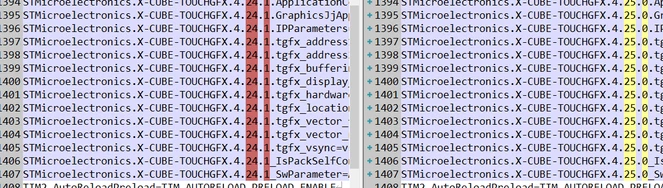
ferro_0-1749654357072.png


Thank you


Best answer by ferro

>> I'll run 4.24.1 installer and try 'Repair' intallation.

Running 'Repair' seems to fix the error in my original question and also error in creating new project in 4.24.1.

I'll mark this post as the answer in few days if there is no problem.

Thanks for help @GaetanGodart 

1 reply

GaetanGodart
Technical Moderator
June 12, 2025

Hello @ferro ,


How did you uninstall TouchGFX?

When you open STM32CubeMX, go into "Help" => "Manage embedded software packages" => "STMicroelectronics" => scroll down => "X-XUBE-TOUCHGFX", what version do you see there?


Regards,

ferro
ferroAuthor
Lead
June 12, 2025

Thanks for your prompt reply.


>> "When you open STM32CubeMX, what version do you see there?"

ferro_0-1749717150619.png


>> "How did you uninstall TouchGFX?"

I think this might be where the problem is.
So I
- had two TouchGfx installed : 4.24.1 and 4.25.0
- I noticed the problem with .ioc
- i deleted folder c:\TouchGFX\4.25.0 (i forgot it is installed)
- the problem with .ioc did not go away
- i realised TouchGfx is installed so I tried to uninstall 4.25.0 'properly' via 'Add Remove Software' - it hanged so unistalling did not end correctly
- i installed 4.25.0 again so I could uninstall it properly
- this time 4.25.0 uninstalled Okay
- the problem with .ioc did not go away

I restarted the machine few times in the process to see if fresh system boot helps but no good

I guess the way I tried to remove 4.25.0 caused some confusion in Windows REGISTERs.

What do you think ?


GaetanGodart
Technical Moderator
June 12, 2025

The windows program uninstaller is limited.

Try to look for TouchGFX-4.25.0.msi:

GaetanGodart_0-1749717864548.png

This is the installer and it can also uninstall.
This installer is more aware of the environment used by TouchGFX.

I found it in C:/Users/myName/STM32Cube/Repository/Packs/STMicroelectronics/X-CUBE-TOUCHGFX/4.25.0/Utilities/PC_Software/TouchGFXDesigner

Perhaps your best bet is to uninstall using the TouchGFX Setup.
You can look for the TouchGFX-4.25.0.msi file directly with a software such as Everything or, if you don't find such file, re-install the version you want to properly uninstall.


Regards,