
ferro
Lead
March 4, 2025
Solved

GfxDesigner: add menu option 'Code > Build Code'

  • March 4, 2025
  • 3 replies
  • 1298 views

Hi Gfx Team,

Could you consider adding an option to build code without running.
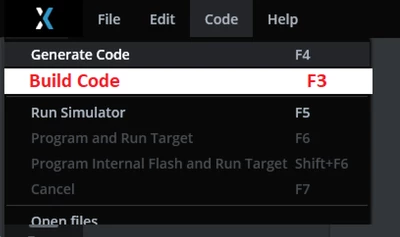
ferro_0-1741111273154.png

Thanks

Best answer by GaetanGodart

Hello @ferro ,


I don't think we will implement this functionality because you can simply click the Program and Run Target button (bottom right) and not connect your board so that it will compile the code but fail at the beginning of the flashing process.
The processes are Generate, Generate assets (sometimes the longest), Post generate, Post generate target, Compile (often the longest), Flash.
If you do not connect a board, STM32CubeProgrammer will not be able to find a STLink connected and the flashing step will quickly fail :

Flash
 make -f ../../gcc/Makefile flash
 make -C PATHTOTHEPROJECT/MyApplication/gcc/ --no-print-directory -f makefile_boot flash
 Linking Boot/TouchGFX/build/bin/target.elf
 Producing additional output formats...
 target.hex - Combined internal+external hex
 intflash.elf - Internal flash, elf debug
 intflash.hex - Internal flash, hex
 -------------------------------------------------------------------
 STM32CubeProgrammer v2.18.0 
 -------------------------------------------------------------------
 
 Error: No debug probe detected.
 PATHTOTHEPROJECT/MyApplication/gcc/include/flash_sections_int_ext.mk:10: recipe for target '_intflash_' failed
 make[2]: *** [_intflash_] Error 1
 makefile_boot:45: recipe for target 'flash' failed
 make[1]: *** [flash] Error 2
 ../../gcc/Makefile:8: recipe for target 'flash' failed
 make: *** [flash] Error 2
 Failed
 Failed


Regards, 

3 replies

GaetanGodart
GaetanGodartBest answer
Technical Moderator
March 5, 2025

Hello @ferro ,


I don't think we will implement this functionality because you can simply click the Program and Run Target button (bottom right) and not connect your board so that it will compile the code but fail at the beginning of the flashing process.
The processes are Generate, Generate assets (sometimes the longest), Post generate, Post generate target, Compile (often the longest), Flash.
If you do not connect a board, STM32CubeProgrammer will not be able to find a STLink connected and the flashing step will quickly fail :

Flash
 make -f ../../gcc/Makefile flash
 make -C PATHTOTHEPROJECT/MyApplication/gcc/ --no-print-directory -f makefile_boot flash
 Linking Boot/TouchGFX/build/bin/target.elf
 Producing additional output formats...
 target.hex - Combined internal+external hex
 intflash.elf - Internal flash, elf debug
 intflash.hex - Internal flash, hex
 -------------------------------------------------------------------
 STM32CubeProgrammer v2.18.0 
 -------------------------------------------------------------------
 
 Error: No debug probe detected.
 PATHTOTHEPROJECT/MyApplication/gcc/include/flash_sections_int_ext.mk:10: recipe for target '_intflash_' failed
 make[2]: *** [_intflash_] Error 1
 makefile_boot:45: recipe for target 'flash' failed
 make[1]: *** [flash] Error 2
 ../../gcc/Makefile:8: recipe for target 'flash' failed
 make: *** [flash] Error 2
 Failed
 Failed


Regards, 

ferro
ferroAuthor
Lead
March 5, 2025

Thanks @GaetanGodart 

"you can simply click the Program and Run Target button"

I do not have a board, I run Simulation only. 'Program Run' is therefore not avaialable.

ferro_0-1741171272338.png

ferro_2-1741171391549.png


"simply click the Program and Run Target button (bottom right) and not connect your board"

I think this is not user friendly - all I want to do is build application.exe, see if it links. Not interested in running simulation not flashing.

I'll accept your answer, please reconsider. Thanks.


GaetanGodart
Technical Moderator
March 5, 2025

It makes sense that we are not allowed to compile if we don't know the target because to compile we need the know the hardware family to get the right generated files (TouchGFXGeneratedSTM32H7xx.hpp and things like that).

I understand that you want to see if your code (in GUI folder) will compile.
To do so, you can create your project on a TBS to be able to compile.
When you want to go back to a simulator (or choose another TBS, perhaps one that you made), you can just create your new project and go to Edit => Import => GUI and select the project you created.


Regards,

GaetanGodart
Technical Moderator
March 7, 2025

Hello @ferro ,


Ok, so at the beginning I thought you wanted to compile and build the full application but you seem to only care about the GUI part since you are fine with just building the simulator part.

So your request would be to have a button to do the same thing as the Run simulator button but stopping after the linking.
I don't think this request would have a positive answer because there is a quick workaround that is to just run the simulator and then close the simulator. This way you will compile and link as you want but you will also have to wait a few seconds to finish the simulator build and for it to start. The drawback of this method (waiting a few seconds) to achieve the same result is probably not enough for me to push a new button.

I am sorry I cannot give you a positive answer on that.


Regards,

ferro
ferroAuthor
Lead
March 7, 2025

"you seem to only care about [...] building the simulator part"

Correct.


"[...] probably not enough for me to push a new button"

No button needed. I never use them - too much effort to move the mouse. Always F-keys, always. Mapping F3 (or Ctrl+B) to "stop after link" feature would be good enough.


"I am sorry I cannot give you a positive answer on that."

No problem at all @GaetanGodart , thanks for considering.

Lead II
March 7, 2025

You can build the project in Visual Studio. The benefit is that you can also debug the project.

"Kudo posts if you have the same problem and kudo replies if the solution works.Click ""Accept as Solution"" if a reply solved your problem. If no solution was posted please answer with your own."
