
Associate III
June 7, 2024
Solved

Graph data not showing

  • June 7, 2024
  • 3 replies
  • 6351 views

Hello.

I would use a static graph to display data. In the handletickevent function, I update the addDataPoint(x data, y data) function for the given page, but nothing appears on the graph, the scale is fine, but no line or change in the x direction can be seen on the display. I am currently using the tickcounter++ variable value for X data, which also increases in debug. For X data, I entered 0min, 200max data in the touchgfx program. I also tried the dynamic graph.

Thanks if anyone can help.
Best answer by JTP1

Good, Please note that just clearing the static graph doesnt reset the horizontal plotting. You must also reset X coordinate value and start increasing it again from 0 to 200 (if your X range is 0-200).

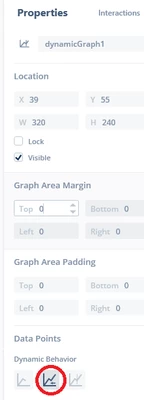
If you need constantly scrolling curve, then dynamic graph is right choice. Select scroll as dynamic behavior:

JTP1_0-1717845201692.png

then just simply add points like


	dynamicGraph1.addDataPoint(some_value);


and graph-widget will place it to first free position (and also scrolls the curve if it is full).

So with dynamic graph you dont have to worry about X values. Naturally using dynamicGraph requires that the x interval of the data points is constant, otherwise the graph will be distorted in the direction of the X-axis.

Br JTP

3 replies

ST Employee
June 7, 2024

Hello @Thomas8607 and welcome to the TouchGFX community !

Can you post your code ?

Regards,

Associate III
June 7, 2024

Hello LouisB,

Here is my screen cpp(tickCounter declared in hpp protect) :

LiveDataScreenView::LiveDataScreenView()
{

}

void LiveDataScreenView::setupScreen()
{
 LiveDataScreenViewBase::setupScreen();
 DisplayValues.ActiveScreenNumber = 3;
 tickCounter = 0;
	graph1.clear();
	if(SettingsValues.RadioButtonSelectedItem == 1)
	{
		graph1.setGraphRangeY(0, 300);
		graph1.setScaleY(1);
		graph1MajorYAxisGrid.setInterval(10);
		graph1MajorYAxisGrid.setScale(1);
		graph1MajorYAxisLabel.setInterval(20);
		graph1MajorYAxisLabel.setLabelDecimals(0);
		graph1MajorYAxisLabel.setScale(1);
	}
	else if(SettingsValues.RadioButtonSelectedItem == 2)
	{
		graph1.setGraphRangeY(0, 6000);
		graph1.setScaleY(1);
		graph1MajorYAxisGrid.setInterval(200);
		graph1MajorYAxisGrid.setScale(1);
		graph1MajorYAxisLabel.setInterval(1000);
		graph1MajorYAxisLabel.setLabelDecimals(0);
		graph1MajorYAxisLabel.setScale(1);
	}
	else if(SettingsValues.RadioButtonSelectedItem == 3)
	{
		graph1.setGraphRangeY(-4, 4);
		graph1.setScaleY(10);
		graph1MajorYAxisGrid.setInterval(1);
		graph1MajorYAxisGrid.setScale(10);
		graph1MajorYAxisLabel.setInterval(2);
		graph1MajorYAxisLabel.setLabelDecimals(1);
		graph1MajorYAxisLabel.setScale(10);
	}
	else if(SettingsValues.RadioButtonSelectedItem == 4)
	{
		graph1.setGraphRangeY(0, 9000);
		graph1.setScaleY(1);
		graph1MajorYAxisGrid.setInterval(100);
		graph1MajorYAxisGrid.setScale(1);
		graph1MajorYAxisLabel.setInterval(1000);
		graph1MajorYAxisLabel.setLabelDecimals(0);
		graph1MajorYAxisLabel.setScale(1);
	}
	else if(SettingsValues.RadioButtonSelectedItem == 5)
	{
		graph1.setGraphRangeY(0, 4);
		graph1.setScaleY(10);
		graph1MajorYAxisGrid.setInterval(1);
		graph1MajorYAxisGrid.setScale(10);
		graph1MajorYAxisLabel.setInterval(1);
		graph1MajorYAxisLabel.setLabelDecimals(1);
		graph1MajorYAxisLabel.setScale(10);
	}
	else if(SettingsValues.RadioButtonSelectedItem == 6)
	{
		graph1.setGraphRangeY(0, 4);
		graph1.setScaleY(10);
		graph1MajorYAxisGrid.setInterval(1);
		graph1MajorYAxisGrid.setScale(10);
		graph1MajorYAxisLabel.setInterval(1);
		graph1MajorYAxisLabel.setLabelDecimals(1);
		graph1MajorYAxisLabel.setScale(10);
	}
	else if(SettingsValues.RadioButtonSelectedItem == 7)
	{
		graph1.setGraphRangeY(0, 250);
		graph1.setScaleY(1);
		graph1MajorYAxisGrid.setInterval(5);
		graph1MajorYAxisGrid.setScale(1);
		graph1MajorYAxisLabel.setInterval(25);
		graph1MajorYAxisLabel.setLabelDecimals(0);
		graph1MajorYAxisLabel.setScale(1);
	}
	else if(SettingsValues.RadioButtonSelectedItem == 8)
	{
		graph1.setGraphRangeY(0, 250);
		graph1.setScaleY(1);
		graph1MajorYAxisGrid.setInterval(5);
		graph1MajorYAxisGrid.setScale(1);
		graph1MajorYAxisLabel.setInterval(25);
		graph1MajorYAxisLabel.setLabelDecimals(0);
		graph1MajorYAxisLabel.setScale(1);
	}
}

void LiveDataScreenView::tearDownScreen()
{
 LiveDataScreenViewBase::tearDownScreen();
}
void LiveDataScreenView::handleTickEvent()
{
	tickCounter++;
	HardwareValues.TickCounter = tickCounter; // for debugging
	if (tickCounter % 2 == 0)	// Insert each second tick
	{
		if(SettingsValues.RadioButtonSelectedItem == 1)
		{
			graph1.addDataPoint(tickCounter, 20/*DisplayValues.Speed*/);
		}
		else if(SettingsValues.RadioButtonSelectedItem == 2)
		{
			graph1.addDataPoint(tickCounter, DisplayValues.Rpm);
		}
		else if(SettingsValues.RadioButtonSelectedItem == 3)
		{
			graph1.addDataPoint((float)tickCounter, DisplayValues.Acceleration);
		}
		else if(SettingsValues.RadioButtonSelectedItem == 4)
		{
			graph1.addDataPoint(tickCounter, (uint16_t)DisplayValues.TravelledMeter);
		}
		else if(SettingsValues.RadioButtonSelectedItem == 5)
		{
			graph1.addDataPoint((float)tickCounter, DisplayValues.ImapPressure);
		}
		else if(SettingsValues.RadioButtonSelectedItem == 6)
		{
			graph1.addDataPoint((float)tickCounter, DisplayValues.EmapPressure);
		}
		else if(SettingsValues.RadioButtonSelectedItem == 7)
		{
			graph1.addDataPoint(tickCounter, DisplayValues.IntakeTemp);
		}
		else if(SettingsValues.RadioButtonSelectedItem == 8)
		{
			graph1.addDataPoint(tickCounter, DisplayValues.CoolantTemp);
		}
		graph1.invalidate();
	}
	if(DisplayValues.BootScreenActivate == 1 && DisplayValues.ActiveScreenNumber != 0) {
		static_cast<FrontendApplication*>(Application::getInstance())->gotoBootScreenScreenSlideTransitionEast();
	}
}
void LiveDataScreenView::RadioButtonSet(uint16_t itemSel)
{
	switch(itemSel)
	{
	case 1: radioButtonGroup1.setSelected(radioButton1);
	break;
	case 2: radioButtonGroup1.setSelected(radioButton2);
	break;
	case 3: radioButtonGroup1.setSelected(radioButton3);
	break;
	case 4: radioButtonGroup1.setSelected(radioButton4);
	break;
	case 5: radioButtonGroup1.setSelected(radioButton5);
	break;
	case 6: radioButtonGroup1.setSelected(radioButton6);
	break;
	case 7: radioButtonGroup1.setSelected(radioButton7);
	break;
	case 8: radioButtonGroup1.setSelected(radioButton8);
	break;
	}
}
void LiveDataScreenView::radioButton1Selected()
{
	SettingsValues.RadioButtonSelectedItem = 1;
	ExtEEPROM.writeToEEPROM(RadioButtonSelectedItem_EEPROMADDRESS, SettingsValues.RadioButtonSelectedItem);
	graph1.clear();
	graph1.setGraphRangeY(0, 300);
	graph1.setScaleY(1);
	graph1MajorYAxisGrid.setInterval(10);
	graph1MajorYAxisGrid.setScale(1);
	graph1MajorYAxisLabel.setInterval(20);
	graph1MajorYAxisLabel.setLabelDecimals(0);
	graph1MajorYAxisLabel.setScale(1);
}
void LiveDataScreenView::radioButton2Selected()
{
	SettingsValues.RadioButtonSelectedItem = 2;
	ExtEEPROM.writeToEEPROM(RadioButtonSelectedItem_EEPROMADDRESS, SettingsValues.RadioButtonSelectedItem);
	graph1.clear();
	graph1.setGraphRangeY(0, 6000);
	graph1.setScaleY(1);
	graph1MajorYAxisGrid.setInterval(200);
	graph1MajorYAxisGrid.setScale(1);
	graph1MajorYAxisLabel.setInterval(1000);
	graph1MajorYAxisLabel.setLabelDecimals(0);
	graph1MajorYAxisLabel.setScale(1);
}
void LiveDataScreenView::radioButton3Selected()
{
	SettingsValues.RadioButtonSelectedItem = 3;
	ExtEEPROM.writeToEEPROM(RadioButtonSelectedItem_EEPROMADDRESS, SettingsValues.RadioButtonSelectedItem);
	graph1.clear();
	graph1.setGraphRangeY(-4, 4);
	graph1.setScaleY(10);
	graph1MajorYAxisGrid.setInterval(1);
	graph1MajorYAxisGrid.setScale(10);
	graph1MajorYAxisLabel.setInterval(2);
	graph1MajorYAxisLabel.setLabelDecimals(1);
	graph1MajorYAxisLabel.setScale(10);
}
void LiveDataScreenView::radioButton4Selected()
{
	SettingsValues.RadioButtonSelectedItem = 4;
	ExtEEPROM.writeToEEPROM(RadioButtonSelectedItem_EEPROMADDRESS, SettingsValues.RadioButtonSelectedItem);
	graph1.clear();
	graph1.setGraphRangeY(0, 9000);
	graph1.setScaleY(1);
	graph1MajorYAxisGrid.setInterval(100);
	graph1MajorYAxisGrid.setScale(1);
	graph1MajorYAxisLabel.setInterval(1000);
	graph1MajorYAxisLabel.setLabelDecimals(0);
	graph1MajorYAxisLabel.setScale(1);
}
void LiveDataScreenView::radioButton5Selected()
{
	SettingsValues.RadioButtonSelectedItem = 5;
	ExtEEPROM.writeToEEPROM(RadioButtonSelectedItem_EEPROMADDRESS, SettingsValues.RadioButtonSelectedItem);
	graph1.clear();
	graph1.setGraphRangeY(0, 4);
	graph1.setScaleY(10);
	graph1MajorYAxisGrid.setInterval(1);
	graph1MajorYAxisGrid.setScale(10);
	graph1MajorYAxisLabel.setInterval(1);
	graph1MajorYAxisLabel.setLabelDecimals(1);
	graph1MajorYAxisLabel.setScale(10);
}
void LiveDataScreenView::radioButton6Selected()
{
	SettingsValues.RadioButtonSelectedItem = 6;
	ExtEEPROM.writeToEEPROM(RadioButtonSelectedItem_EEPROMADDRESS, SettingsValues.RadioButtonSelectedItem);
	graph1.clear();
	graph1.setGraphRangeY(0, 4);
	graph1.setScaleY(10);
	graph1MajorYAxisGrid.setInterval(1);
	graph1MajorYAxisGrid.setScale(10);
	graph1MajorYAxisLabel.setInterval(1);
	graph1MajorYAxisLabel.setLabelDecimals(1);
	graph1MajorYAxisLabel.setScale(10);
}
void LiveDataScreenView::radioButton7Selected()
{
	SettingsValues.RadioButtonSelectedItem = 7;
	ExtEEPROM.writeToEEPROM(RadioButtonSelectedItem_EEPROMADDRESS, SettingsValues.RadioButtonSelectedItem);
	graph1.clear();
	graph1.setGraphRangeY(0, 250);
	graph1.setScaleY(1);
	graph1MajorYAxisGrid.setInterval(5);
	graph1MajorYAxisGrid.setScale(1);
	graph1MajorYAxisLabel.setInterval(25);
	graph1MajorYAxisLabel.setLabelDecimals(0);
	graph1MajorYAxisLabel.setScale(1);
}
void LiveDataScreenView::radioButton8Selected()
{
	SettingsValues.RadioButtonSelectedItem = 8;
	ExtEEPROM.writeToEEPROM(RadioButtonSelectedItem_EEPROMADDRESS, SettingsValues.RadioButtonSelectedItem);
	graph1.clear();
	graph1.setGraphRangeY(0, 250);
	graph1.setScaleY(1);
	graph1MajorYAxisGrid.setInterval(5);
	graph1MajorYAxisGrid.setScale(1);
	graph1MajorYAxisLabel.setInterval(25);
	graph1MajorYAxisLabel.setLabelDecimals(0);
	graph1MajorYAxisLabel.setScale(1);
}


Thank you!

Graduate II
June 8, 2024

You're welcome !

Where it was call then...some code that we didin't see ?


Associate III
June 8, 2024

In the second reply, the cpp code. 

Graduate II
June 8, 2024

Yes, I see that for example 'radioButton1Selected'- function clears the graph.. but hows calling it ?

I suppose if you set an interaction to virtual function (radioButton1Selected in this case), it is called only once, when button gets selected.


Associate III
June 8, 2024

Only selected, not clicked. and it runs continuously whatever is selected.
I didn't know this either, so I keep writing the eeprom as well.

Graduate II
June 8, 2024

Okey, I think it should not do that. Which version you use ?

I allready tested this with 4.32.2 because i'm not so familiar with radiobuttons and it does only single call (at least on the simulator).