
ferro
Lead
March 4, 2025
Solved

Graph X Labels: how to shift min/max labels to be within a graph width

  • March 4, 2025
  • 1 reply
  • 1209 views


Hi,

How to shift X labels min/max ('0' and '100') to be fully visible ?
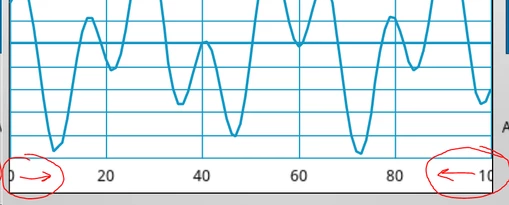


ferro_1-1741099199605.png


Thanks


Best answer by GaetanGodart

Hello @ferro ,


I don't think there is method to shift the minimal and maximal labels.

it would not make sense to shift the labels because then they would not be aligned with their value.
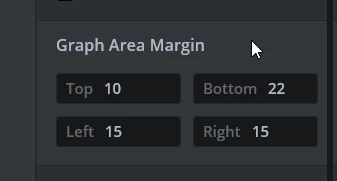
Instead you can just increase the margin of the graph area so that the labels are not hidden :
GaetanGodart_0-1741274468077.png
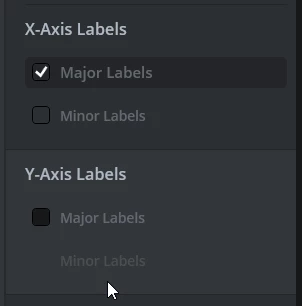
Then you can hide the y labels like so :
GaetanGodart_1-1741274512194.png


Regards,


1 reply

GaetanGodart
GaetanGodartBest answer
Technical Moderator
March 6, 2025

Hello @ferro ,


I don't think there is method to shift the minimal and maximal labels.

it would not make sense to shift the labels because then they would not be aligned with their value.
Instead you can just increase the margin of the graph area so that the labels are not hidden :

GaetanGodart_0-1741274468077.png
Then you can hide the y labels like so :

GaetanGodart_1-1741274512194.png


Regards,


ferro
ferroAuthor
Lead
March 6, 2025

Hi @GaetanGodart 

"I don't think there is method to shift the minimal and maximal labels."
Hm, unfortunate. I hoped labels could be accessed with getNextSibling () or similar.


"it would not make sense to shift the labels because then they would not be aligned"
I know, it seems a bit odd at first, but it's been like that for decades, and it seems users understand.

"Instead you can just increase the margin ..."
Thank you for this. I tried but every pixel is very presious on 320x240 display.

Thanks

GaetanGodart
Technical Moderator
March 7, 2025

Hello @ferro ,


We did not implement that function.

However, you can create a class that inherit from graph to be able to make your own custom graph and modify the functions there.
For your specific case, it seems that the range is exactly [0; 100] so if you modify the min and max value of the index only when drawing the labels, then it won't draw the outside labels maybes : 

GaetanGodart_0-1741344752995.png

Then you can draw them again with drawString perhaps :

GaetanGodart_1-1741344851063.png

This would work if you already know that you will have a static 0:100 graph, but then you could also simply not draw the label and add them manually on Designer.


You could make a custom graph where the outside labels are shifted I assume but I do not really know where to start.


Regards,
