jumman_JHINGA
Senior III
November 13, 2024
Solved

GUI is not getting displayed properly on TouchGFX custom board Configuration

  • November 13, 2024
  • 4 replies
  • 1550 views

Hello friends!

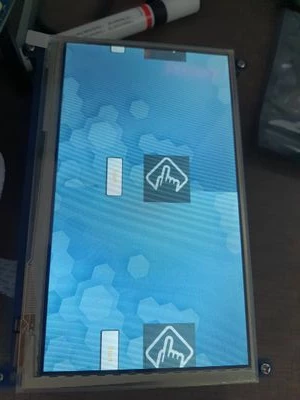
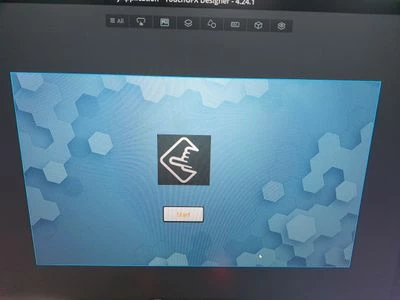
Im devloping GUI using TouchGFX on waveshare OpenH7XXI-C board. When im flashing the code. GUI image is getting splitted  from middel.

Touchgfx GUI:
17314848858501314158020927141917.jpg

LCD output

17314850153292005897318466097475.jpg

Best answer by jumman_JHINGA

I made silly mistake while configuring FMC. by correcting hsdram1.Init.ColumnBitsNumber = FMC_SDRAM_COLUMN_BITS_NUM_9; to hsdram1.Init.ColumnBitsNumber = FMC_SDRAM_COLUMN_BITS_NUM_8; solved my issue.

4 replies

jumman_JHINGA
Senior III
November 14, 2024

Is anyone know this issue???

jumman_JHINGA
Senior III
November 15, 2024

...

Osman SOYKURT
Technical Moderator
November 15, 2024

Hello @jumman_JHINGA ,

I don't know this board, does it have memory mapped or non-memory mapped flash? To me it looks like your framebuffer is not filled with correct values. Have you checked if if your framebuffer in memory is good? Does your screen has GRAM by the way?

Osman SOYKURTST Software Developer | TouchGFX
jumman_JHINGA
Senior III
November 18, 2024

Hii @Osman SOYKURT  thanks for replying. Im using W25Q128 quadspi flash... that is memory mapped.


And before i was getting blurry display... so i corrected the pin mapping of SDRAM in the BSP initialization function... after that im getting cleared display like that.


Im using wave share 1024x600 7inch LCD(f) and its data is here:


https://www.waveshare.com/wiki/File:7inch_1024X600_LCD_DS.pdf


I don't think this display is having GRAM .

jumman_JHINGA
Senior III
November 19, 2024

I have one more doubt... 

TouchgfxScrachBuffer A and B are in the flash memory section ... do i have to place these buffers into SDRAM section?

jumman_JHINGA
Senior III
January 17, 2025

hiii @Osman SOYKURT   

I tried Reading & Writting Data on SDRAM & QUADSPI manually. It passed all test cases but still im facing same issue.  please guid me to resolving this issue.


jumman_JHINGA
jumman_JHINGAAuthorBest answer
Senior III
January 18, 2025

I made silly mistake while configuring FMC. by correcting hsdram1.Init.ColumnBitsNumber = FMC_SDRAM_COLUMN_BITS_NUM_9; to hsdram1.Init.ColumnBitsNumber = FMC_SDRAM_COLUMN_BITS_NUM_8; solved my issue.

Osman SOYKURT
Technical Moderator
January 20, 2025

Good catch @jumman_JHINGA , great to hear you've solved your issue.

Osman SOYKURTST Software Developer | TouchGFX