Associate III
May 25, 2025
Question

H7R7 CUBEIDE project generate touchgfx error

  • May 25, 2025
  • 1 reply
  • 316 views

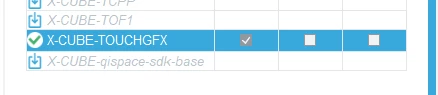
I want to make a project using h7r7 and enable touchgfx,In CUBEIDE,I chose both boot project and application project,but I can not check touchgfx for application project,and it is forcely checked for boot project,can't be changed.Any one knows this problem?is it a bug ?
20250525231950.png20250525232016.png

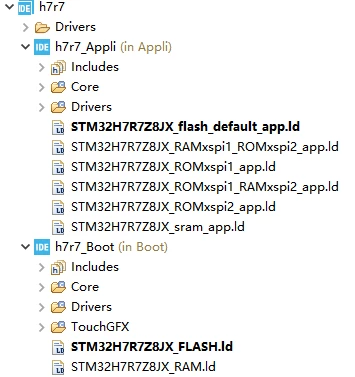
So,clearly the touchgfx files is generated under Boot Project.

I tried in cubemx,but the same result.

1 reply

Senior III
May 25, 2025

TouchGFX is resource-heavy (external flash, memory, display buffers) and relies on:

  • External flash via QSPI or OSPI

  • Linker scripts and startup logic pointing to GUI memory space

  • Often initialized early in the boot sequence

STM32CubeMX detects this and assumes TouchGFX should be placed in the Boot project — especially when memory mapping (QSPI, OSPI, external RAM) is managed there. That’s why it:

Forces TouchGFX to be enabled for the boot project

Disables it in the application project

PlacesTouchGFXfolder in h7r7_Boot, as seen in your screenshot

If the bootloader includes the GUI (common in factory firmware), let TouchGFX stay there. You'll then:

Run GUI from bootloader

Use the application project for other processing Keep TouchGFX in Boot. Don’t try moving it to App unless absolutely needed

ambAuthor
Associate III
May 26, 2025

hello @ahsrabrifat 

thanks for your reply.

Maybe I misunderstand the meaning of this two project. Correct me if I am wrong :the h7r7_boot means copy code from external flash to ram and run in ram,h7r7_appli means execute code directly in external flash.

Is it correct?

When I posted yesterday,I thought project h7r7_boot is only a bootloader.