Solved
HardFault (PC=0x40) when Switching Pages with Buttons in TouchGFX on STM32U5 + FreeRTOS
Hello everyone, I am a first-year university student. I am developing a GUI application on the STM32U585 using TouchGFX Designer and FreeRTOS, and I have encountered some issues. Due to my lack of experience, I would like to ask for your advice on how to solve these problems. Here is my GitHub repository for the code(https://github.com/weixuna/GPDMA_AMOLED_). Device information:
- MCU: STM32U585CIU6
- RTOS: FreeRTOS
- GUI: TouchGFX
- IDE: STM32CubeIDE
- GPDMA enabled
- The display is AMOLED, and the MCU communicates with the screen via QSPI in OCTOSPI mode.
Phenomenon:
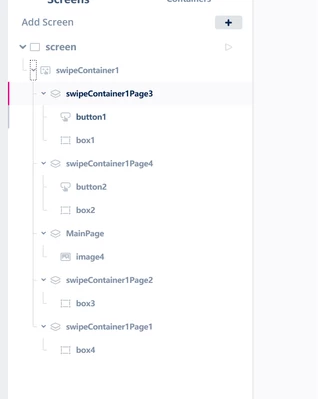
- I added two buttons in TouchGFX Designer.
- When I swipe to switch to a page (Screen) with two buttons, the program sometimes crashes and enters a HardFault.
- The crash happens during or after the page transition animation.
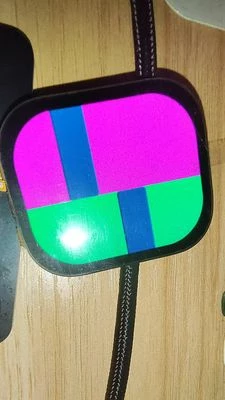
- If I add transition animations such as Cover, Wipe, or Block, there will be screen corruption (garbled display). If I use the Slide animation, there is no problem.
Debug information:
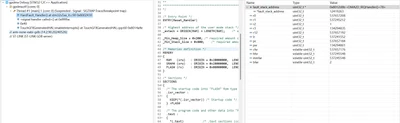
- When the HardFault occurs, the PC is 0x40 (sometimes 0x2).
- The call stack often points to TouchGFXGeneratedHAL::enableInterrupts() or the DMA2D interrupt.
- The LR and other registers in the fault stack frame contain abnormal values.
- I have already configured the MPU, but I am not sure if it is correct.
- FreeRTOS configMINIMAL_STACK_SIZE is 128
#define configMINIMAL_STACK_SIZE ((uint16_t)128)
#define configTOTAL_HEAP_SIZE ((size_t)80000)

const osThreadAttr_t defaultTask_attributes = {
 .name = "defaultTask",
 .priority = (osPriority_t) osPriorityNormal,
 .stack_size = 128 * 4
};
osThreadId_t GUI_TaskHandle;
const osThreadAttr_t GUI_Task_attributes = {
 .name = "GUI_Task",
 .priority = (osPriority_t) osPriorityNormal,
 .stack_size = 10240 * 4
};
void MPU_Config(void)
{
MPU_Region_InitTypeDef MPU_InitStruct = {0};
MPU_Attributes_InitTypeDef MPU_AttributesInit = {0};
/* MPU */
HAL_MPU_Disable();
/** Attribute 0: FrameBuffer (Normal Memory, Non-Cacheable) */
MPU_AttributesInit.Number = MPU_ATTRIBUTES_NUMBER0;
MPU_AttributesInit.Attributes = INNER_OUTER(MPU_NOT_CACHEABLE);
HAL_MPU_ConfigMemoryAttributes(&MPU_AttributesInit);
/** Attribute 1: OSPI (Device Memory) */
MPU_AttributesInit.Number = MPU_ATTRIBUTES_NUMBER1;
MPU_AttributesInit.Attributes = MPU_DEVICE_nGnRnE;
HAL_MPU_ConfigMemoryAttributes(&MPU_AttributesInit);
/** Region 0: FrameBuffer */
MPU_InitStruct.Enable = MPU_REGION_ENABLE;
MPU_InitStruct.Number = MPU_REGION_NUMBER0;
MPU_InitStruct.BaseAddress = 0x20000000U;
MPU_InitStruct.LimitAddress = 0x20080000U;
MPU_InitStruct.AttributesIndex = MPU_ATTRIBUTES_NUMBER0;
MPU_InitStruct.AccessPermission = MPU_REGION_ALL_RW;
MPU_InitStruct.DisableExec = MPU_INSTRUCTION_ACCESS_ENABLE;
MPU_InitStruct.IsShareable = MPU_ACCESS_NOT_SHAREABLE;
HAL_MPU_ConfigRegion(&MPU_InitStruct);
/** Region 1: OSPI */
MPU_InitStruct.Number = MPU_REGION_NUMBER1;
MPU_InitStruct.BaseAddress = 0x420D1000U;
MPU_InitStruct.LimitAddress = 0x420D2000U;
MPU_InitStruct.AttributesIndex = MPU_ATTRIBUTES_NUMBER1;
MPU_InitStruct.AccessPermission = MPU_REGION_ALL_RW;
MPU_InitStruct.DisableExec = MPU_INSTRUCTION_ACCESS_DISABLE;
MPU_InitStruct.IsShareable = MPU_ACCESS_NOT_SHAREABLE;
HAL_MPU_ConfigRegion(&MPU_InitStruct);
/* MPU */
HAL_MPU_Enable(MPU_PRIVILEGED_DEFAULT);
}Any help or experience would be greatly appreciated!