Associate II
October 25, 2024
Solved

How do I integrate what was created in TOUCH GFX DESIGNER into the IDE?

  • October 25, 2024
  • 3 replies
  • 3968 views

I developed firmware with CUBE IDE and then set up the 2.4" TFT LCD screen with buttons, etc., using TOUCH GFX DESIGNER. How do I import what I developed in TOUCH GFX into CUBE IDE?

Best answer by GaetanGodart

Hello @Emanuele78 ,


Once you have created you desired GUI, simply click on "Generate code" on the bottom right corner:
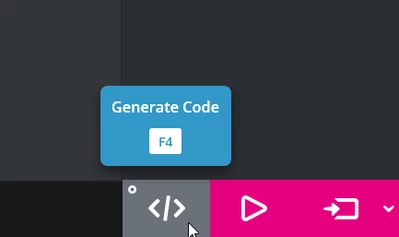
GaetanGodart_0-1729855272473.png

Then you can simply open the folder of your project on the bottom left:

GaetanGodart_1-1729855321130.png

Finally, open your STM32CubeIDE project in the STM32CubeIDE project.


Also, you can look at this video : How to TouchGFX: Creating my first GUI with TouchGFX Designer for STM32 GUI applications 


Hope this help! :smiling_face_with_smiling_eyes:
If this answers your question, I invite you to select this comment as "best answer".


Regards,

3 replies

GaetanGodart
GaetanGodartBest answer
Technical Moderator
October 25, 2024

Hello @Emanuele78 ,


Once you have created you desired GUI, simply click on "Generate code" on the bottom right corner:

GaetanGodart_0-1729855272473.png

Then you can simply open the folder of your project on the bottom left:

GaetanGodart_1-1729855321130.png

Finally, open your STM32CubeIDE project in the STM32CubeIDE project.


Also, you can look at this video : How to TouchGFX: Creating my first GUI with TouchGFX Designer for STM32 GUI applications 


Hope this help! :smiling_face_with_smiling_eyes:
If this answers your question, I invite you to select this comment as "best answer".


Regards,

Associate II
October 25, 2024

Thank you, I managed to import the file created in TouchGFX into the IDE. Now, for the next step, how do I integrate it into the IDE firmware I've already written? How should I proceed? Which folders do I need to copy from the TouchGFX file to the IDE? 

In the attached screenshot, you can see the two projects open. Thanks again.

Karl Yamashita
Principal
October 25, 2024

To many files. folders and adding paths to deal with. You're better off copying your files from the other project into the TouchGFX project.

If a reply has proven helpful, click on Accept as Solution so that it'll show at top of the post.CAN Jammer an open source CAN bus hacking toolCANableV3 Open Source
Associate II
November 8, 2024

I did as instructed, but I’m getting errors. The IDE indicates that some definitions are not recognized within the main.c file. However, the definitions are present in main.h, and main.c includes main.h. What could be causing this error? Thank you.

Karl Yamashita
Principal
November 8, 2024

You drag and drop the main.h file onto the TouchGFX project tree?

If a reply has proven helpful, click on Accept as Solution so that it'll show at top of the post.CAN Jammer an open source CAN bus hacking toolCANableV3 Open Source
Associate II
November 8, 2024

Yes, but I copied and pasted

Karl Yamashita
Principal
November 8, 2024

You can't drag/drop, or copy/paste onto the project tree. You have to use Window Explorer and paste in the Core folder src and inc respectfully like i said to do with the other files. 

You've copy/paste the main.h into i believe STM32CubeIDE\Application\User directory which the compiler doesn't see even though you can see it in the project tree. You can see that your main.h doesn't have the link icon like the other files do.

Follow my directions about importing/linking files, which you can do with the original main.h file. Then double click the main.h file to open it, copy what code/defines that you need from the first main.h into the TouchGFX main.h.

If a reply has proven helpful, click on Accept as Solution so that it'll show at top of the post.CAN Jammer an open source CAN bus hacking toolCANableV3 Open Source