
Senior III
April 30, 2025
Solved

How to execute/trigger an Interaction via code

  • April 30, 2025
  • 2 replies
  • 488 views

I have a series of interactions that shows/hide widgets on the screen. The interactions are basically triggered when a button is clicked and are all managed via TouchGFX Designer.

Is there a way to trigger them via code, so like generate a virtual click on a button via code, instead of actually clicking the screen?

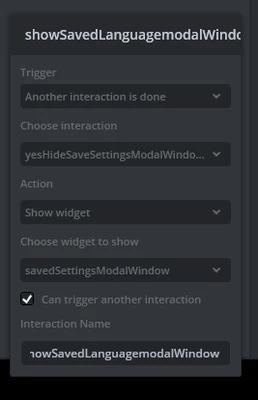
For istance I have an interaction named yesHideSaveSettingsModalWindows that, when it's done, trigger another interaction called showSavedLanguagemodalWindow

Is there a way to manually trigger showSavedLanguagemodalWindow ?
nico23_0-1746003905602.png


Best answer by LouisB

Hello @nico23,

With the way thing are generated with interaction triggered by other interaction in TouchGfx ,this is not possible. Another will be to have a separated function declared as an action, i.e showSavedLanguagemodalWindow() that will be called instead and specified as your action. With this solution you will also need to code manually the "Show widget". In that case that's rather easy :

void showSavedLanguagemodalWindow()
{
 savedSettingsModalWindow.setVisible(false);
 savedSettingsModalWindow.invalidate();
}

 The good thing about that is that you can call showSavedLanguagemodalWindow() whenever you need it your code independently from the interaction.

BR,

2 replies

LouisBBest answer
ST Employee
May 1, 2025

Hello @nico23,

With the way thing are generated with interaction triggered by other interaction in TouchGfx ,this is not possible. Another will be to have a separated function declared as an action, i.e showSavedLanguagemodalWindow() that will be called instead and specified as your action. With this solution you will also need to code manually the "Show widget". In that case that's rather easy :

void showSavedLanguagemodalWindow()
{
 savedSettingsModalWindow.setVisible(false);
 savedSettingsModalWindow.invalidate();
}

 The good thing about that is that you can call showSavedLanguagemodalWindow() whenever you need it your code independently from the interaction.

BR,

nico23Author
Senior III
May 5, 2025

Hi @LouisB ,

thanks for the answer! A small problem is that I have a chain of interactions triggered after that one so, I have to assest if I can code everything manually.