

JPabl.1
Associate III
October 16, 2024
Solved

how to release/pressed text inside custom container

  • October 16, 2024
  • 2 replies
  • 941 views

Hi there Touchgfx team!

I've this screen requirement, a list of settings. I'm doing it with a custom container that I already created. My custom container has a flex button with text(on the left) + the text on the right. 
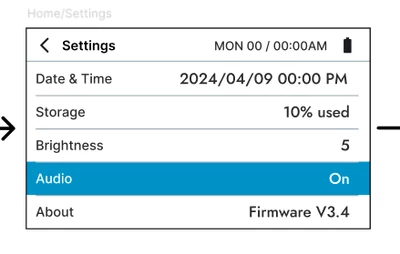
JPabl1_0-1729101170967.png

What I need is that once the user presses the button, the text color changes to white. Once its released, changes back to black. The flex button works perfect, but I'm having trouble setting it up for the right text. 

I could add the white and black images, or creating a function to check if the button is pressed every n ticks, but that seems cumbersome. Is there any other way? 


Thanks a lot in advance

Best answer by Mohammad MORADI ESFAHANIASL

It is the same concept. You just need to replace the code related to the screen with your custom container that is holding your flex button. For instance, the callback and function handler would be like:

class CustomContainer1 : public CustomContainer1Base
{
public:
 CustomContainer1();
 virtual ~CustomContainer1() {}

 virtual void initialize();

 void flexButtonClickHandler(const touchgfx::BoxWithBorderButtonStyle< touchgfx::ClickButtonTrigger >&, const ClickEvent& e);
protected:

 Callback<CustomContainer1, const touchgfx::BoxWithBorderButtonStyle< touchgfx::ClickButtonTrigger >&, const ClickEvent&> flexButtonClickedCallback;
};

 I hope this helps you!

2 replies

ST Employee
October 17, 2024

Hello @JPabl.1,

You can use the ClickListener() to get the state of the flex button (either Pressed or Released) and change the color your text based on that. 

Please follow the accepted solution in this forum thread

Best regards,

JPabl.1
JPabl.1Author
Associate III
October 18, 2024

Hi @Mohammad MORADI ESFAHANIASL thanks for the quick reply. 


I have the flex button inside a custom container. The example you send is inside a view, so I''m having a hard time wrapping my head around the callback function from the custom container.

How can I do that? 


ST Employee
October 21, 2024

It is the same concept. You just need to replace the code related to the screen with your custom container that is holding your flex button. For instance, the callback and function handler would be like:

class CustomContainer1 : public CustomContainer1Base
{
public:
 CustomContainer1();
 virtual ~CustomContainer1() {}

 virtual void initialize();

 void flexButtonClickHandler(const touchgfx::BoxWithBorderButtonStyle< touchgfx::ClickButtonTrigger >&, const ClickEvent& e);
protected:

 Callback<CustomContainer1, const touchgfx::BoxWithBorderButtonStyle< touchgfx::ClickButtonTrigger >&, const ClickEvent&> flexButtonClickedCallback;
};

 I hope this helps you!