
Lead II
June 4, 2025
Solved

How to set clickable area of flex button? I want the clickable area to be smaller than the image.

  • June 4, 2025
  • 1 reply
  • 328 views

I have a flex button. I have an image for released and an image for pressed.
The released image contains a drop shadow. The released image does not, but has a transparent boundary so the dimensions match.
I want the clickable area to be the button image excluding the shadow and transparent edge. I want to set this clickable area as a rectangle.
How do I do this?
Best answer by unsigned_char_array

I've found the solution.


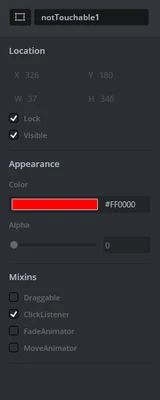
  1. Create a box object with clicklistener enabled:unsigned_char_array_0-1749113696937.png
  2. draw it over the button over the area you don't want to be clickable. 
  3. Set the alpha to 0.

The clickable area of the box overrules over the clickable area of the button. No need to implement a click event handler.

There is one limitation and that in order to cancel a click, by holding and sliding out of the button before releasing, you need to go outside the original area of the button.

1 reply

unsigned_char_arrayAuthorBest answer
Lead II
June 5, 2025

I've found the solution.


  1. Create a box object with clicklistener enabled:unsigned_char_array_0-1749113696937.png
  2. draw it over the button over the area you don't want to be clickable. 
  3. Set the alpha to 0.

The clickable area of the box overrules over the clickable area of the button. No need to implement a click event handler.

There is one limitation and that in order to cancel a click, by holding and sliding out of the button before releasing, you need to go outside the original area of the button.

"Kudo posts if you have the same problem and kudo replies if the solution works.Click ""Accept as Solution"" if a reply solved your problem. If no solution was posted please answer with your own."