

Solved
How to store the touchgfx image to SD card?
Hi all,
I have touchgfx project which has many pictures, so I must store them in the SD card.
I follow the touchGFX document and I meet some issue.
The document said:
We can extract the binary data for the bitmaps from the .elf file with a simple objcopy command:
$ arm-none-eabi-objcopy.exe --dump-section ExtFlashSection=images.bin TouchGFX/build/bin/target.elf
$ ls -l images.bin
-rw-r--r-- 1 christef Administrators 147136 Feb 20 11:56 images.bin
However, I didn't find the ELF file in the path TouchGFX/build/bin/target.elf; And the MDK IDE can't generate the ELF(replaced by AXF file);
When I try to use the AXF file, the command above is returned error(I also try to rename the AXF to ELF):
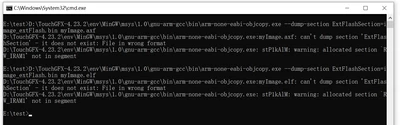
How to split the AXF? Or is there some tools can split the hex file by address?
Thanks for your help, have a luck day!