Junde
Senior III
December 18, 2024
Solved

How to use SVG in TouchGFX?

  • December 18, 2024
  • 2 replies
  • 1341 views

Hi there,

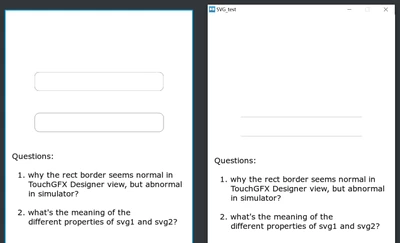
I am trying to use an SVG in my project, but the views between the TouchGFX and the simulator differ.

please refer to the project in the attachment.

Junde_0-1734502333538.png

My questions are on the page:

1. why the rect border seems normal in the TouchGFX Designer view, but abnormal in the simulator?
2. what's the mean of the different properties of svg1 and svg2?

Thanks for your help.


Best answer by GaetanGodart


Hello @Junde ,


1. why the rect border seems normal in the TouchGFX Designer view, but abnormal in the simulator?


This is not supposed to happen.
We will investigate to fix it.


2. what's the mean of the different properties of svg1 and svg2?

We made a video about it .
"Fit to size" will resize the SVG to fit the size of the SVG widget. This allows you to quickly resize the SVG.
You can also make sure that the SVG image is centered in the SVG widget .
You can also set the rotation point (rotation center) and the rotation angle.


After investigating, we found that the issue happens when the display rotation is set to portrait.

We do not have a quick fix yet but note that it is only the stroke that is not visible, so if you put a background that is of a different color, you will see the shape correctly with the rounded corners.


Regards,

2 replies

GaetanGodart
GaetanGodartBest answer
Technical Moderator
December 19, 2024


Hello @Junde ,


1. why the rect border seems normal in the TouchGFX Designer view, but abnormal in the simulator?


This is not supposed to happen.
We will investigate to fix it.


2. what's the mean of the different properties of svg1 and svg2?

We made a video about it .
"Fit to size" will resize the SVG to fit the size of the SVG widget. This allows you to quickly resize the SVG.
You can also make sure that the SVG image is centered in the SVG widget .
You can also set the rotation point (rotation center) and the rotation angle.


After investigating, we found that the issue happens when the display rotation is set to portrait.

We do not have a quick fix yet but note that it is only the stroke that is not visible, so if you put a background that is of a different color, you will see the shape correctly with the rounded corners.


Regards,

Junde
JundeAuthor
Senior III
December 20, 2024

Hi @GaetanGodart 

Thanks for your so detailed reply.

After some tests, I find:

1. when I draw a horizontal input box with a border in SVG format, I can see all the borders when I rotate it 90 degrees;

2. when I draw a vertical input box with a border in SVG format, I can see all the borders without rotation. And abnormal when rotating it 90 degrees...

That's very strange to me because based on result 1, test 2 might be able to do what I want to do. hahaha...


GaetanGodart
Technical Moderator
January 7, 2025

Hello @Junde ,


We have fixed the issue and the fix will be live in the incoming 4.25.0 release.
For now, you can prevent the issue by increase the canvas buffer size (check the "Override default buffer size").

GaetanGodart_0-1736258275475.png


Regards,

Junde
JundeAuthor
Senior III
January 9, 2025

@GaetanGodart 

Thank you for the information.

Good job.