Hello @Junde ,
1) user input(write something in the screen by finger); (what widget I can use?)
The best widget to use seems to be the canvas widget .
It is better to use this than to add a 1x1 box because you are limited in memory (and therefore limited in the amount of elements you can add).
You could get the position of the finder with the drag event or the handledragevent directly from the widget itself.
You could save the last position of the finger and draw a line between that last position and the current position. This would give you a boxy but simple implementation.
If you want to do things better, you can use 4 points instead of 2 to get a smoother curve using the quadraticbezierto() method.
2) transfer the screen pixel data to MCU from touchGFX; (How to get the partial pixel data in certain areas?)
You can get the framebuffer data by checking where you store the framebuffer.
Open your STM32CubeMX file (in your project folder, open the .ioc file), check "middleware", then "TouchGFX" and here you can see where your framebuffer is stored :
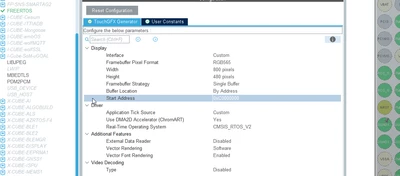
Your framebuffer size id width*height*RGBprecision. Here is another example of that : memory-consumption .
Now that you have the framebuffer location and size, you need to only fetch the data of the canvas (or alternatively you could isolate the drawing by saving the minX, minY, maxX and maxY and adding a bit of padding) and store it into whatever format you want (an array, a jpeg, a png, a bmp).
3) MCU recognizes the content with some lib; (Can some Lib be used from ST?)
It is up to you to do that research.
The first link on google mentions tesseract. I have personally used tesseract in Python and it worked fine (also exist in c++).
I hope this guidance is enough.
If this comment answers your problem, I invite you to select it as "best answer".
Otherwise, don't hesitate to specify where you are stuck.
Regards,