Associate III
October 28, 2024
Solved

I can't generate code with touchGFX due to .cproject file.

  • October 28, 2024
  • 2 replies
  • 2139 views


Hi everyone,

I’m experiencing some frustrating issues while trying to generate code for a blank project using TouchGFX with the STM32H757XIHX dual-core.

When I attempt to generate the code, I receive an error indicating that it cannot locate the .cproject file. I’ve generated this project using the IDE, which I really hate; Although TouchGFX supposedly supports Makefile as a toolchain, when I try to generate the code with Makefile, it throws an error stating that the toolchain is not accepted.

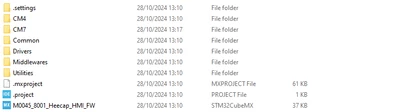
This leaves me with no option but to rely on the IDE, which generates a folder structure where the .cproject is located within the CM7 subproject. It seems that TouchGFX is looking for the .cproject in the root directory, where it’s not present.

Can anyone guide me on how to change the path or resolve this issue? I would really appreciate any help!

Although, if someone knows how to use TOUCHGFX with the Makefile as a toolchain (selected option in cubeMX instead of IDE), please let me know!! I do not want to use this useful tool.


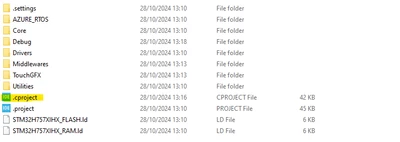
root:
massimoperdigo_0-1730118651105.png

CM7

massimoperdigo_1-1730118675053.png

thanks


Best answer by GaetanGodart

Great, I am glad it worked! :smiling_face_with_smiling_eyes:


I took a TBS we made, opened STM32CubeMX, selected Makefile toolchain, generated code in STM32CubeMX.
Then I opened TouchGFX Designer, added a screen and clicked on the generate code button.
I got an error message but it is in the "Post Generate Target" and the "Generate code", "Generate Assets" and "Post Generate" worked fine.
There is only an issue in the "Post Generate Target" which takes core of the files for the target, so the files for the compilation, etc (gcc, IAR, Keil, etc).
I checked the folder and I was able to see the new screen that I have added.
So even though I get an error message, everything I need is still there and it probably is the same for you.

Now you have to compile and flash using your custom Makefile.


Regards,

2 replies

GaetanGodart
Technical Moderator
November 5, 2024

Hello @massimoperdigo ,


So now, instead of selecting Makefile for the toolchain, you select STM32CubeIDE before generating code?

What makes you think that TouchGFX is looking for the .cproject in the root?
In our TBS, in the root, we have a folder called STM32CubeIDE where whe have the .project and the .cproject.
But for you, you have the .project in double.
Can you try to move the .cproject to the root manually (and maybe delete the .project in that is in the CM7 folder)?


Regards,

Associate III
November 6, 2024

I will try it. However, it is possible to create a project with cubeMX and generate code using Makefile toolchain? and then, make use of touchGFX designer to develop my GUI?

GaetanGodart
Technical Moderator
November 7, 2024

Hello @massimoperdigo ,


Yes you can use the Makefile toolchain, then create a GUI using TouchGFX Designer, then click on "Generate code" from TouchGFX Designer and then compile and flash using your own files.

Did changing the location of the file have any impact?


Regards,

Associate III
November 7, 2024

Yes, I changed the location manually and the first problem disappeared (cannot locate the .cproject file). however,

now, when I generate code from touchGFX, it shouts an error saying that Makefile toolchain is not supported...