Hello @MCA_Dev ,
There seems to be 2 ways of doing what you want :
- Dynamic bitmap create external (you don't care about the image in TouchGFX, you cerate it after)
- Use a specific memory region (use a default image as a place holder and overwrite it)
1) Dynamic bitmap create external
https://support.touchgfx.com/docs/api/classes/classtouchgfx_1_1_bitmap#function-dynamicbitmapcreateexternal
Usually, you will add a widget, set the image related to this image and then TouchGFX will convert it, and make sure it is aware of its existence, size and address. But dynamic bitmap create external allows to bypass that behavior and to make sure TouchGFX is aware of the existence of a new image.
Please refer to the documentation website to see how to use it.
2) Use a specific memory region
If the image that the user changes is always the same size, you can simply add that image widget with a placeholder/default image and then use your bootloader to overwrite it.
To do so you will have to make sure you know the address of the image so you must create a specific memory region / section for it.
If you open your .touchgfx file with a text editor you will see the available sections :
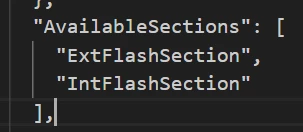
You can add your own custom ;section here that will contain the single image you want to overwrite, then add that section in the linker script either at the beginning of an existing memory region or in a specific memory region that you must specify first.
Regards,
