

AAlis.23
Associate III
February 28, 2025
Solved

interact with TouchGFX via physical key (e.g., a GPIO button)

  • February 28, 2025
  • 2 replies
  • 521 views

Split from https://community.st.com/t5/stm32-mcus-touchgfx-and-gui/how-to-work-with-buttons-without-touch-panel/td-p/165514


Hi,

I’m working with TouchGFX on an H743, following the example from the Nucleo board, and I have the state of a physical key (e.g., a GPIO button) available when MB1642ButtonController::sample is called. What is the simplest way to interact with TouchGFX based on this key state?

Specifically, I want to know:

  1. Do I have to handle everything through code by manually triggering events for widgets (like buttons)?
  2. Is there any way to map a key press (e.g., key "1") to a TouchGFX button press, similar to how the touch interface works, directly from the GUI?

Thanks in advance for any help or suggestions!
Best answer by JohanAstrup

Hello @AAlis.23.

First of all, I apologize for the very late reply!

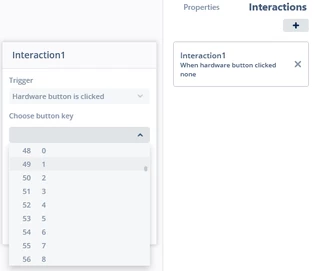
When you are using the ButtonController class, as it seems like you do, hardware buttons can be handled in the same way as buttons in the GUI. So, if you want to trigger an event on button "1", create an interaction and select "Trigger: Hardware button is clicked" with button key 49, which corresponds to "1". Then, you have the same actions available as you have for GUI buttons.
JohanAstrup_0-1755683356993.png

Best regards,
Johan

2 replies

JohanAstrupBest answer
ST Employee
August 20, 2025

Hello @AAlis.23.

First of all, I apologize for the very late reply!

When you are using the ButtonController class, as it seems like you do, hardware buttons can be handled in the same way as buttons in the GUI. So, if you want to trigger an event on button "1", create an interaction and select "Trigger: Hardware button is clicked" with button key 49, which corresponds to "1". Then, you have the same actions available as you have for GUI buttons.
JohanAstrup_0-1755683356993.png

Best regards,
Johan

AAlis.23
AAlis.23Author
Associate III
August 27, 2025

Hi!

Thanks a lot for getting back to me. I actually managed to get it working some time ago, but I really appreciate your message anyway!

Best,