
Solved
list layout west
How to put elements in list to the west? I set list direction WEST but it does not working.
I found out that its not supported

Maybe there is another way to put elements from east to west?

How to put elements in list to the west? I set list direction WEST but it does not working.
I found out that its not supported
Maybe there is another way to put elements from east to west?
Hello
Indeed, the West and North directions are not supported.
However, you can do a hack to add you elements to the West.
In Designer, just put your widgets in the opposite order:
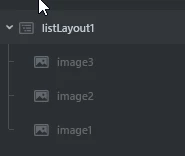
In code, just add them to the list in the opposite order (pseudo code):
listLayout.add(widget3);
listLayout.add(widget2);
listLayout.add(widget1);
Now, by doing this, the elements will appear to be ordered in the west direction but the list will still expand in the East direction so you should replace it in Designer to your desired location.
In code, you can replace it by using the functions virtual void moveTo(int16_t x, int16_t y) or void setXY(int16_t x, int16_t y).
See reference : list layout API
Finally, if you want to add elements to your list at runtime, instead of adding an element with the add method, you can insert after a specific child (widget) of the list layout with the insert method .
So the step to do that are :
- insert new widget right after the first child (2nd position)
- remove first child (newly added widget become first position)
- insert previously removed widget after the new first child
In pseudo code it would look like:
listLayout.insert(listLayout.getFirstChild(), newElement);
drawable* temp = listLayout.getFirstChild();
listLayout.remove(temp );
listLayout.insert(listLayout.getFirstChild(), temp );
//delete temp
Then you should reposition the listLayout if you want it to look like it expands to the left (West).
If this solves your problem, I invite you to select this comment as "best solution".
Regards,
Enter your E-mail address. We'll send you an e-mail with instructions to reset your password.