Senior
March 11, 2025
Solved

"LTDC" option not available as Application Tick Source in X-CUBE-TOUCHGFX

  • March 11, 2025
  • 2 replies
  • 1785 views

Hi,

as you can see in the first screenshot, in the X-CUBE-TOUCHGFX settings (TouchGFX Generator tab) the LTDC option for the Application Tick Source is not available. And at the bottom it says "LTDC in only available if enabled".

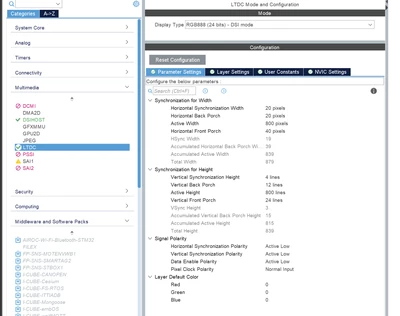
LTDC is enabled and configured (second screenshot). Does it need to be configured and/or enabled in some other ways or some other place too?

Thank you :)
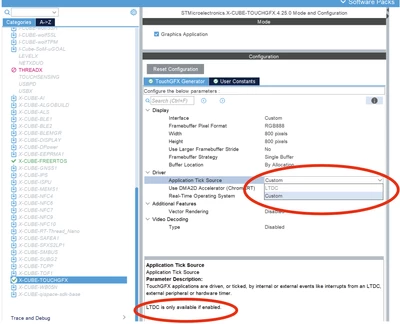
 

Ricko_0-1741661353205.png

Ricko_1-1741661458299.png


Best answer by jchernus-fikst

Yes, in your first screenshot, under Display -> Interface, you have the change the value from Custom to LTDC.

2 replies

jchernus-fikst
jchernus-fikstBest answer
Senior
March 11, 2025

Yes, in your first screenshot, under Display -> Interface, you have the change the value from Custom to LTDC.

RickoAuthor
Senior
March 11, 2025

Thank you @jchernus-fikst

but as you can see it is greyed out and cannot be selected. I was asking why and what else I would need to enable in order for it to not be greyed out so I can select it.

Thank you :)

jchernus-fikst
Senior
March 12, 2025

Please re-read my answer.

Your question asked about Driver -> Application Tick Source. I'm suggesting you change Display -> Interface. These are two different things. 

Julia

RickoAuthor
Senior
March 12, 2025

Sorry @jchernus-fikst long days i front of the PC, I misread your answer.

Yes, now it works.

Thank you! :)