
Modal Window from ListLayout
I have created a custom container which includes some text boxes, scrollists labels etc to allow the user to set the parameters for an alarm. I add one of these custom containers to my listlayout in code for each alarm to be set. So the user is presented with a list of alarms, and the opportunity to change the settings for each alarm. I have also created a modalwindow containing a keyboard. The desire is when the user clicks the box for an individual alarm to set the numeric value of the alarm limit, a modalwindow pops up, so the user can enter the new numeric value, which is saved into the model value and displayed in the relevant box in the list for this alarm, when he clicks save in the modal window and closes it.
The problem I have is that when the boxclickhandler displays the modalwindow, it only displays the tiny portion of the modal window which covers the listlayout, rather than popping up the modalwindow over the entire screen:
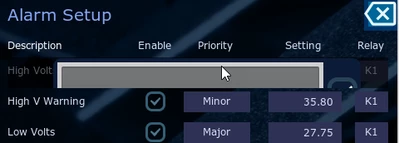
I guess this is because the modalwindow is a member of the customcontainer in the listlayout, not the underlying screen, so only covers the container not the screen. I have tried to create the modalwindow in the screen, but cannot get the callback to the boxclickhandler in the container to call the screen modalwindow.
Any ideas how I can achieve this?
The next problem will then become how to put the existing setting from the clicked customcontainer text field into the modalwindow keyboard box, and how to retrieve the new set vale and put it back in the relevant text field (and the model saved value).