ARM_and
Associate III
July 5, 2025
Solved

Naming issue prevents STM32CubeIDE to open/build projects generated by TouchGFXDesigner 4.25

  • July 5, 2025
  • 1 reply
  • 392 views

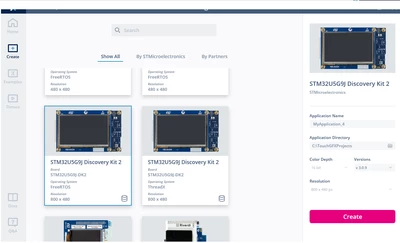
When creating a new project based on STM32U5G9J-DK2, TouchGFX designer defaults the project name to My_Application#, but when the project is generated it' still based on the TBS default package name of STM32U5G9J-DK2.

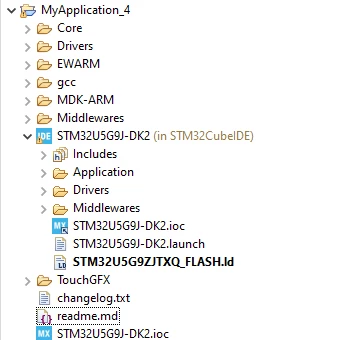
This seems to cause issues when opening the .ioc project in STM32CubeIDE, because the .ioc is still named STM32U5G9J-DK2.ioc and not the same as the application name:
 

ARM_and_0-1751722311425.png


ARM_and_1-1751722603181.png

ARM_and_2-1751722619033.png

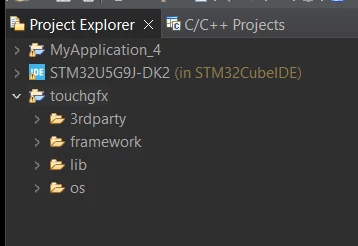
There are further issues with the linker file not matching, and a sub project being created with the name STM32U5G9J-DK2 and then main.c and other files in the sub project being used for build.

This seems to mean that if you have an actual project named STM32U5G9J-DK2 (e.g. the demo) and then created a second project named MyApplication_4 when you try to compile MyApplication_4, files from STM32U5G9J-DK2 project will be used.

Not sure if this issue exists on other boards, or if I'm doing something wrong.
Best answer by GaetanGodart

Hello @ARM_and ,


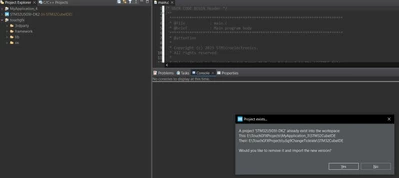
Indeed, opening projects with "Open Projects From File System..." seems to be problematic, here is what I get:

GaetanGodart_0-1752480480975.png

But when double clicking on the .project file to open it, it works correctly in STM32CubeIDE.
I get prompted to remove files which are conflictual (same name):

GaetanGodart_1-1752480584951.png

Which makes STM32CubeIDE clean the workplace.

I recommend you to open projects by double clicking on them (.project file) in the file systems explorer.


Regards,


1 reply

GaetanGodart
Technical Moderator
July 7, 2025

Hello @ARM_and ,


I have not heard of something similar and I was not able to reproduce the issue.

Here is what I have done:

  1. Open TouchGFX Designer 4.25.0
  2. Create a new project by selecting the STM32U5G9J-DK2 (the project is automatically named "MyApplication_3"
  3. Add some widget (optional)
  4. Click on "Generate code" (bottom right)
  5. Click on "Files" (bottom left)
  6. Go back one level in the folder hierarchy
  7. Open the STM32CubeIDE folder
  8. Open the .project file
  9. Compile successfully

Can you try to reproduce these steps and if you still encounter the issue send me the project?


Regards,

ARM_and
ARM_andAuthor
Associate III
July 7, 2025

Hi @GaetanGodart ,

Can you continue and repeat the same exact process and create MyApplication_4, open in STM32CubeIDE and let me know if you see any issues?

In my IDE (1.18.1) the second one will also be named STM32U5G9J-DK2 and I can't access MyApplication_3 after MyApplication_4 is opened in STM32CubeIDE.


-A

GaetanGodart
Technical Moderator
July 10, 2025

Hello @ARM_and ,


If I now create a new STM32U5G9J-DK2 called MyApplication_4, I can then open the STM32CubeIDE folder and then open the .project file, then STM32CubeIDE will try to open the new project that has the same name so there is a conflict.
I then get prompted to close the previous project because there can only be one project with the same name open at once.
I can then build and flash as usual.

I am not sure what you open in STM232CubeIDE, you open the whole STM32CubeIDE folder? Or do you just open the .project file?


Regards,