
Associate II
May 6, 2025
Solved

No Support for svg Numbers in TouchGFX?

  • May 6, 2025
  • 3 replies
  • 821 views

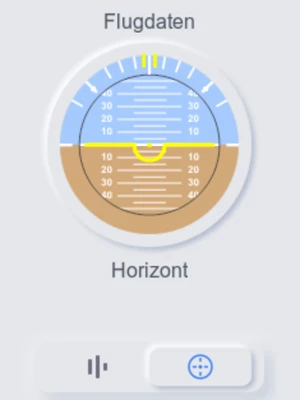
I am currently making an artificial horizon for a project in TouchGFX, but I just noticed that when I tried to use the svg of the Pitch_Angle_Indicator that has numbers I get a compile error. Are there any plans to implement the usage of numbers in svg images? 

BS

Neyus
Neyus_0-1746559982988.png


Best answer by unsigned_char_array

@Neyus wrote:

Hello @unsigned_char_array 

Unfortunately, I need to rotate and move the scale in reference to the pitch and roll angle of the sensor.


There are many solutions to that. You can use texture mapper, which allows you to rotate bitmap images.


If you want to keep using an SVG there is another solution. You can convert the text in the SVG image to vectors. In inkscape you can select the text and click Path->Object to Path.
I've tested it with an SVG image with text. It works with TouchGFX. You do need to remove some unsupported pieces from the SVG with a text editor, but then it works.

3 replies

ST Employee
May 7, 2025

Hello @Neyus ,

It's not supported, you can refer to SVG | TouchGFX Documentation , and we have no plan into supporting it at the moment.

BR,

Lead II
May 7, 2025

You can add the text on top of the SVG image or you can convert the SVG image to a PNG.

"Kudo posts if you have the same problem and kudo replies if the solution works.Click ""Accept as Solution"" if a reply solved your problem. If no solution was posted please answer with your own."
NeyusAuthor
Associate II
May 7, 2025

Hello @unsigned_char_array 

Unfortunately, I need to rotate and move the scale in reference to the pitch and roll angle of the sensor.


Lead II
May 7, 2025

@Neyus wrote:

Hello @unsigned_char_array 

Unfortunately, I need to rotate and move the scale in reference to the pitch and roll angle of the sensor.


There are many solutions to that. You can use texture mapper, which allows you to rotate bitmap images.


If you want to keep using an SVG there is another solution. You can convert the text in the SVG image to vectors. In inkscape you can select the text and click Path->Object to Path.
I've tested it with an SVG image with text. It works with TouchGFX. You do need to remove some unsupported pieces from the SVG with a text editor, but then it works.

"Kudo posts if you have the same problem and kudo replies if the solution works.Click ""Accept as Solution"" if a reply solved your problem. If no solution was posted please answer with your own."
Lead II
May 8, 2025

If you can mark my answer as the solution it can help others with the same issue too as they now see a solution that says it doesn't work, while there is a workaround (you can unmark a solution and select a new one).
I invested time in figuring out a solution, so I hope it can help multiple people.

"Kudo posts if you have the same problem and kudo replies if the solution works.Click ""Accept as Solution"" if a reply solved your problem. If no solution was posted please answer with your own."