Associate
February 17, 2025
Solved

Nucleo-H563ZI with RVA35HI - TouchGFX demo project not flashing correctly?

  • February 17, 2025
  • 7 replies
  • 2015 views

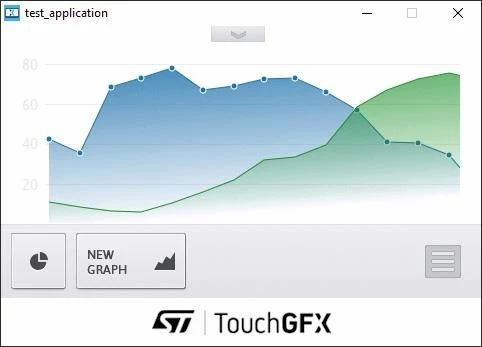
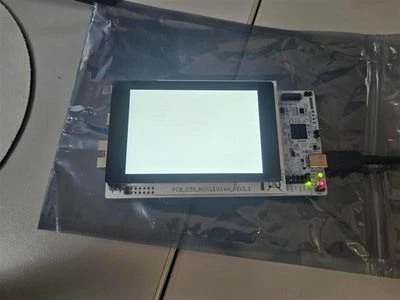
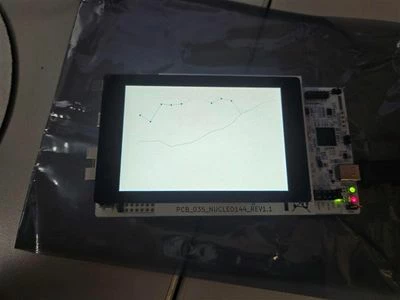
Hello. I am very very new to the world of STM32 microcontrollers and products. I've recently purchased the Nucleo-H563ZI board with RVA35HI Rev 1.1 display. I am starting slow, so to begin I tried utilizing the demo project in TouchGFX called "TouchGFX Demo 1 Alternate". After some troubleshooting, I've successfully flashed the demo project to my development board. The screen lights up white upon upload and I don't see the start up screen. Messing with it I discovered the project is uploaded, and still responding to touch because there is one screen that shows graphs, which for some reasons shows up. I've left the board in its default configuration as far as jumpers are concerned. I believe I have all required software downloaded. I've followed the instructions of some guides online and don't understand what I'm doing wrong.

Thank you.

See attached: Pictures of board lighting up, showing graph, and the simulator screen with the graphs.
8acc53b5-fe40-4f19-a5c6-8dbb2b5c9588.jpgf366cd57-a797-4b31-8149-c10b1a4503d4.jpgb06ecb51-4df5-4958-80ba-de4b679bac25.jpg

Best answer by Osman SOYKURT

Hello all,

Just a quick message to notify you that this issue has been fixed on the latest version of our TBS (v.3.0.6) : This one is running with all of our latest softwares: TouchGFX 4.25.0, STM32CubeMX 6.15.0 and STM32CubeProgrammer 2.20.0.

Best regards,

7 replies

GaetanGodart
Technical Moderator
February 17, 2025

Hello @brandonfox ,


I have test the STM32H563-dk with a RVA35HI Rev 1.0 on TouchGFX 4.24.2 with the same demo as you and it works fine for me.
I do not think much have changed between the 2 display revision.

Which version of TouchGFX did you use?

Here are the important jumpers:
Select STLK and 3.3V

GaetanGodart_0-1739804163356.png


Regards,

Associate
February 17, 2025

Hey Gaetan,

My version of TouchGFX is 4.24.2. My STM32Programmer version is 2.18.0.

My jumpers are in the same configuration as you have shown in your picture.

Thank you.

Osman SOYKURT
Technical Moderator
February 17, 2025

Hello @brandonfox ,

Just to make sure, you're using our TBS in TouchGFX Designer right (in "Example" tab in TouchGFX Designer)? You haven't changed anything from it (like in the "Config" tab in TouchGFX, or the linker script)?

OsmanSOYKURT_0-1739806882337.png


Could you verify that your images are well flashed to the external memory? To do that you can check your map file to see the address of the assets and then use STM32CubeProgrammer to verify that there's no empty data at that memory range. The external loader (needed by STM32CubeProgrammer) is provided in the gcc folder in our TBS (W25Q64_NUCLEO-H563ZI-RVA35HI-REV-1-1.stldr  --> You need to copy that into your C:\Program Files\STMicroelectronics\STM32Cube\STM32CubeProgrammer\bin\ExternalLoader)

OsmanSOYKURT_2-1739808461741.png


.map file :

....
...

ExtFlashSection
 0x90000000 0x4969d8
 *(ExtFlashSection ExtFlashSection.*)
 ExtFlashSection
 0x90000000 0x2b98 TouchGFX/build/STM32H563ZI-NUCLEO-RVA35HI/TouchGFX/generated/images/src/EasingEquation/image_easing_side_menu_button_selected.o
 0x90000000 image_easing_side_menu_button_selected
 ExtFlashSection
 0x90002b98 0x1c20 TouchGFX/build/STM32H563ZI-NUCLEO-RVA35HI/TouchGFX/generated/images/src/EasingEquation/image_easing_menu_button_pressed.o
 0x90002b98 image_easing_menu_button_pressed
 ExtFlashSection
 0x900047b8 0x279c TouchGFX/build/STM32H563ZI-NUCLEO-RVA35HI/TouchGFX/generated/images/src/EasingEquation/image_easing_bottom_menu_active.o
 0x900047b8 image_easing_bottom_menu_active

...
....


In this example you see 3 images flashed in external memory at address 0x90000000,  0x90002b98, 0x900047b8

OsmanSOYKURT_1-1739808032863.png

When verifying with STM32CubeProgrammer at address 0x90000000 , I can see the data.

Osman SOYKURTST Software Developer | TouchGFX
Tesla DeLorean
Guru
February 17, 2025

Might I suggest attaching a known working object file (.HEX or .ELF) as a diagnostic sanity check.

Tips, Buy me a coffee, or three.. PayPal VenmoUp vote any posts that you find helpful, it shows what's working..
Associate
February 18, 2025

Hey Osman,

I have programmed my development board with the target.hex file and it seems the problem is still occurring. When it attempts to verify the programming it encounters an error when it checks address 0x90000000 for being empty.

brandonfox_0-1739880930148.png

What would cause the external memory to not program but the internal memory to be programmed? 

Osman SOYKURT
Technical Moderator
February 18, 2025

Hello again @brandonfox,

Could you try to flash this file? (it's the same application as yours in theory, running the "TouchGFX Demo 1 Alternate" on Nucleo-H563ZI + RVA35HI Rev 1.1 TBS).

Osman SOYKURTST Software Developer | TouchGFX
Associate
February 18, 2025

brandonfox_0-1739888577184.png

It seems like I'm still running into the same problem.

Just for the hell of it I tried changing my programmer to "hardware reset" and that didnt change anything. Then I made a new project in TouchGFX to confirm the upload is working by changing the screen to a solid color (doesn't need to save to external memory) and that worked...

brandonfox_1-1739889558532.jpeg


Osman SOYKURT
Technical Moderator
February 24, 2025

Hello @brandonfox ,

Ok, we're progressing :)
Last thing you could try is to write on ext memory using STM32CubeProgrammer directly (just try to put random value in memory range of 0x90000000) Remember to use correct ext loader.

OsmanSOYKURT_0-1740400171619.png

If that doesn't work either, I would advise to contact Riverdi (and maybe ask them to change your screen).

Osman SOYKURTST Software Developer | TouchGFX
Associate
February 25, 2025

Writing to the flash locations didn't work. There is activity on the IO but the data is not taken.

As far as I understand the flash became write protected at some point.

Also if the flash is used in memory-mapped mode then only read operation is allowed.

There are posts that try to go into the status registers and clear bits but we are not familiar enough to do that.


Are there any project out there that can clear the write protect?

Tesla DeLorean
Guru
February 25, 2025

I've built loaders that can back out Winbond BPB/COM settings, and pull high D2/#WP

W25Q64 being the prime problematic device that's come across my desk.

What's the pin allocation usage here? I'll rustle up a loader / port to H5

https://github.com/cturvey/stm32extldr/tree/main/h7_w25q64


Edit:

STM32H563ZI / W25Q64

PB2:AF9 CLK

PG6:AF10 NCS

PD11:AF9 D0

PD12:AF9 D1

PE2:AF9 D2

PD13:AF9 D3


Tips, Buy me a coffee, or three.. PayPal VenmoUp vote any posts that you find helpful, it shows what's working..
Visitor II
April 4, 2025

I'm new developer, and i use same hardware configuration and have similiar problem. 

When i compile it, and try to download to the board, it shows fail like follows:


Erasing memory corresponding to sector 0:
Erasing internal memory sectors [0 35]

Erasing memory corresponding to sector 0:
Erasing external memory sectors [0 1185]
Error: failed to erase memory


Error: failed to erase memory
c:/TouchGFXProjects/MyApplication_9/gcc/include/flash_sections_int_ext.mk:5: recipe for target '_extflash_' failed
make[1]: *** [_extflash_] Error 1
make: *** [flash] Error 2
../gcc/Makefile:52: recipe for target 'flash' failed
Failed
Failed

Osman SOYKURT
Technical Moderator
May 15, 2025

Hello @BrianTea ,

This is a known issue; please use STM32CubeProgrammer 2.18.0 for the moment.

Osman SOYKURTST Software Developer | TouchGFX
Osman SOYKURT
Osman SOYKURTBest answer
Technical Moderator
July 22, 2025

Hello all,

Just a quick message to notify you that this issue has been fixed on the latest version of our TBS (v.3.0.6) : This one is running with all of our latest softwares: TouchGFX 4.25.0, STM32CubeMX 6.15.0 and STM32CubeProgrammer 2.20.0.

Best regards,

Osman SOYKURTST Software Developer | TouchGFX