
non
Associate III
November 1, 2024
Solved

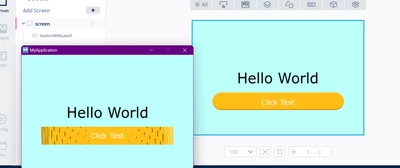
Program have a problem for interface at simulator and screen
  • November 1, 2024
  • 1 reply
  • 1426 views

non_0-1730456548228.png


Best answer by GaetanGodart

Hello @non ,


Since the issue happens on the simulator (and your board), it means that the issue is in the code.
The simulator just compiles the code, generate the framebuffer and use graphic libraries to display the framebuffer so usually you will see the exact same thing on the simulator and on the board unless you have transfer issue (SPI, etc).

In your case, I have tried to import your GUI in a new simulator project ("Create new" => "Simulator") and it worked fine.
Also, I have found this thread where someone also has issue with button where it looks very similar to your problem and he solved it by fixing his flushFrameBuffer function.
I would assume this is also the issue for your project.


I hope this helps! :smiling_face_with_smiling_eyes:
If this comment answers your question, I invite you to select it as "best answer".


Regards,

1 reply

GaetanGodart
Technical Moderator
November 1, 2024

Hello @non ,


Can you share the project and tell us more about the steps you took to get this error?


Regards,

non
nonAuthor
Associate III
November 6, 2024

Sorry for late 

non_0-1730869347894.png

75802.jpg

GaetanGodart
GaetanGodartBest answer
Technical Moderator
November 7, 2024

Hello @non ,


Since the issue happens on the simulator (and your board), it means that the issue is in the code.
The simulator just compiles the code, generate the framebuffer and use graphic libraries to display the framebuffer so usually you will see the exact same thing on the simulator and on the board unless you have transfer issue (SPI, etc).

In your case, I have tried to import your GUI in a new simulator project ("Create new" => "Simulator") and it worked fine.
Also, I have found this thread where someone also has issue with button where it looks very similar to your problem and he solved it by fixing his flushFrameBuffer function.
I would assume this is also the issue for your project.


I hope this helps! :smiling_face_with_smiling_eyes:
If this comment answers your question, I invite you to select it as "best answer".


Regards,
