
Senior III
April 29, 2025
Question

Scroll List array object has more items then the one selected in TouchGFX Designer

  • April 29, 2025
  • 2 replies
  • 383 views

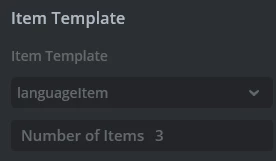
I have created a scroll list object in TouchGFX Designer. The Scroll List takes a custom container as item. I have 3 items in my scroll list
nico23_0-1745931412717.png

For some reason, when I call languageSelectorScrollListItems.getNumberOfDrawables(); it returns 5

Checking the member declaration I'm seeing that it is defined as an array with 5 items

touchgfx::DrawableListItems<languageItem, 5> languageSelectorScrollListItems;
 
Why is that?

2 replies

nico23Author
Senior III
April 29, 2025

Ok so for some reason the languageSelectorScrollListItems is set as an array of 5 elements. What I needed was instead the languageSelectorScroll.getNumberOfItems() which returns the correct numbers of items in the Scroll List.

I'll keep this post open to understand why languageSelectorScrollListItems has been set to a fixed 5 

nico23Author
Senior III
May 1, 2025

From what I'm understanding, the getNumberOfDrawables just returns the number of, in fact, drawables in your costume container that will be used as an item + 1.

So, if, in my costume container, I have just a text area, it will return 2.

To get the number of items in the list, the method is getNumberOfItems 

Now, I still have to understand how to access the specific item (for instance, I want to access item number 3 of the scroll list) and then access the text area of that specific item. Is there a way to do that or do I need to implement code to trace the index of every item beforehand to access them?

Senior
May 1, 2025

Check Demo9, it uses a custom table to do the association between enum/value/bitmap in
SubeDemoInfo.hpp (yes there is a typo in their filename).

sphere_wheelBase::setAnimationEnddedCallback()