
Associate II
June 25, 2024
Question

ScrollWheel does'nt draw numbers until I move it

  • June 25, 2024
  • 3 replies
  • 851 views

Hi!

I'm developing an application in the simulator, I'm stuck on one bug with the scrollWheel.
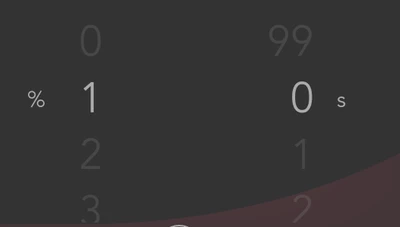
Iaki_Bidasoro_0-1719302738725.png


I have done these two scrollWheel that i update on their respective callbacks like this:

void Display_Stages::m_scroll_pressureUpdateItem (Item_To_Select &item, int16_t itemIndex)
{
 item.Update_Text (itemIndex);
}
void Display_Stages::m_scroll_pressureUpdateCenterItem (Selected_Item &item, int16_t itemIndex)
{
 item.Update_Text (itemIndex);
}

void Display_Stages::m_scroll_timeUpdateItem (Item_To_Select &item, int16_t itemIndex)
{
 item.Update_Text (itemIndex);
}
void Display_Stages::m_scroll_timeUpdateCenterItem (Selected_Item &item, int16_t itemIndex)
{

 item.Update_Text (itemIndex);
}


The problem is that when i make the widgets visible i do scroll.animateToItem (value) so that it can go where the value we want to modify is, and this works fine, but when its a new value and the  m_scroll_pressure.animateToItem (value) value =  0, as it is the same value that the position the widget is created in the callback doesn't trigger and it doesn't print a single number until i scroll a bit.


This is how it looks when bugged:

Iaki_Bidasoro_1-1719303260281.png


Am I doing something wrong? 

Thanks in advance.

3 replies

GaetanGodart
Technical Moderator
June 25, 2024

Hello @Iñaki_Bidasoro ,


My first thought is that you don't invalidate.
Try something like:

void Display_Stages::m_scroll_pressureUpdateItem (Item_To_Select &item, int16_t itemIndex)
{
 item.Update_Text (itemIndex);
 pressureWheel.invalidate();
}
void Display_Stages::m_scroll_pressureUpdateCenterItem (Selected_Item &item, int16_t itemIndex)
{
 item.Update_Text (itemIndex);
 pressureWheel.invalidate();
}

void Display_Stages::m_scroll_timeUpdateItem (Item_To_Select &item, int16_t itemIndex)
{
 item.Update_Text (itemIndex);
 timeWheel.invalidate();
}
void Display_Stages::m_scroll_timeUpdateCenterItem (Selected_Item &item, int16_t itemIndex)
{

 item.Update_Text (itemIndex);
 timeWheel.invalidate();
}

(replace "pressureWheel" and "timeWheel" by the name of your scrollWheels).


If this comment solves your issue, I invite you to select it as "best answer".

If this doesn't solve your problem, I invite you to share your project in a 7z zipped file so I can try it myself.


Regards,

GaetanGodart
Technical Moderator
September 2, 2024

Hello @Iñaki_Bidasoro ,

Have you been able to solve your problem?
If so, I invite you to select the most helpful comment as "best answer".

Regards,

Dadigno
Associate III
May 27, 2025

Hello,

I'm stuck with the same problem. @Iñaki_Bidasoro, did you manage to solve it?

@GaetanGodart, your solution doesn't work for me. The ScrollWheel doesn't update unless I call animateToItem from a hardware button callback. Both scrollWheelMenuUpdateCenterItem and scrollWheelMenuUpdateItem are called, but they have no effect on the framebuffer.

It actually works in the simulator, so I suspect there might be a bug in the widget.


Regards,

Davide


GaetanGodart
Technical Moderator
May 27, 2025

Hello @Dadigno ,


The project you share have no ioc file so I cannot run it on a board.
If I create a new project with a board and import your GUI, I get errors.

Can you please share the full project with with the ioc file (so not just the TouchGFX folder but the "root" folder).


Regards,

Dadigno
Associate III
May 27, 2025

The board is custom, so I don't think you can test it directly.

However, you can test this behavior in your own context with a simple scrollwheel. Take a look at my MenuView.cpp class.