Senior III
April 16, 2025
Solved

sending a callback from a button inside a container (wheel item) to the view

  • April 16, 2025
  • 1 reply
  • 385 views

I have a scroll wheel languageSelectorWheel with several items. Every item is a container languageSelectorItem

On the container I have a toggle button. When I click any toggle button, I want to send a trigger on the view of the scroll wheel to execute a function.
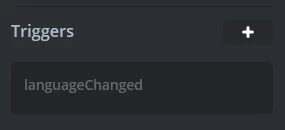
nico23_1-1744798309967.png


On the toggle button I have added an interaction onClick via TouchGFX that emits the trigger languageChanged. The trigger is set on the languageSelectorItem container
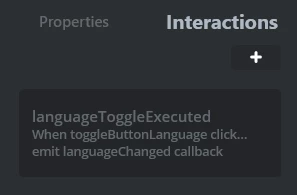
nico23_0-1744798288466.png

On the view where the languageSelectorWheel is added, I have set the callback

void languageSettingsView::languageChanged()
 
Unfortunatly, it seems it is not called when i toggle the button (settings a breakpoint on the line that call 
emitLanguageChangedCallback(); in languageSelectorBase where void languageSelectorBase::buttonCallbackHandler(const touchgfx::AbstractButton& src) is defined enters)
 
My thought is that because the trigger is set on the container, it won't be passed to the view
Best answer by nico23

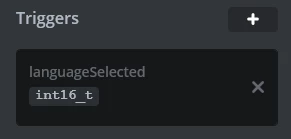
Ok so I figure it out. I set a trigger on the container that returns its index

nico23_0-1744871336082.png

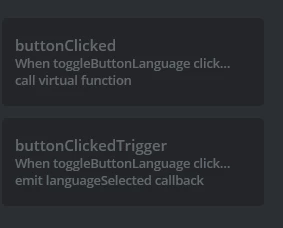
On the interactions I have added a button click that both call a function and executes the trigger

nico23_1-1744871388680.png

languageItem.hpp (container)

Here you must register the trigger

 void setLanguageSelectedCallback(touchgfx::GenericCallback<const int16_t>& callback)
 {
 languageSelectedCallback = &callback;
 }

protected:
 int16_t itemNumber;
 touchgfx::GenericCallback<const int16_t>* languageSelectedCallback;

languageItem.cpp (container)

here you execute the callback

void languageItem::buttonClicked()
{
 // Call the callback when the button is clicked, passing the item number
 if (languageSelectedCallback && languageSelectedCallback->isValid())
 {
 languageSelectedCallback->execute(itemNumber);
 }
}

languageSettingsView.hpp

Here you register the callback from the container

protected:
 /*
 * Callback Declarations
 */
 touchgfx::Callback<languageSettingsView, const int16_t> languageItemLanguageSelectedCallback;

 /*
 * Callback Handler Declarations
 */
 void languageItemLanguageSelectedCallbackHandler(const int16_t itemIndex);


languageSettingsView.cpp (view)

Finally in the view you can initialize all the callback, one for each element of the wheel

languageSettingsView::languageSettingsView():
 languageItemLanguageSelectedCallback(this, &languageSettingsView::languageItemLanguageSelectedCallbackHandler)
{

 for (int i = 0; i < languageSelectorScrollListItems.getNumberOfDrawables(); i++)
 { languageSelectorScrollListItems[i].setLanguageSelectedCallback(languageItemLanguageSelectedCallback);
 }
}

And then you can use the callback on the View to react according to the index

void languageSettingsView::languageItemLanguageSelectedCallbackHandler(const int16_t itemIndex)
{


}

Clearly on the View you need a function that set the itemNumber, something like

void languageSettingsView::languageSelectorScrollUpdateItem(languageItem& item, int16_t itemIndex)
{
 item.setItemNumber(itemIndex);
}

Where the setItemNumber function must be added to the container

1 reply

nico23AuthorBest answer
Senior III
April 17, 2025

Ok so I figure it out. I set a trigger on the container that returns its index

nico23_0-1744871336082.png

On the interactions I have added a button click that both call a function and executes the trigger

nico23_1-1744871388680.png

languageItem.hpp (container)

Here you must register the trigger

 void setLanguageSelectedCallback(touchgfx::GenericCallback<const int16_t>& callback)
 {
 languageSelectedCallback = &callback;
 }

protected:
 int16_t itemNumber;
 touchgfx::GenericCallback<const int16_t>* languageSelectedCallback;

languageItem.cpp (container)

here you execute the callback

void languageItem::buttonClicked()
{
 // Call the callback when the button is clicked, passing the item number
 if (languageSelectedCallback && languageSelectedCallback->isValid())
 {
 languageSelectedCallback->execute(itemNumber);
 }
}

languageSettingsView.hpp

Here you register the callback from the container

protected:
 /*
 * Callback Declarations
 */
 touchgfx::Callback<languageSettingsView, const int16_t> languageItemLanguageSelectedCallback;

 /*
 * Callback Handler Declarations
 */
 void languageItemLanguageSelectedCallbackHandler(const int16_t itemIndex);


languageSettingsView.cpp (view)

Finally in the view you can initialize all the callback, one for each element of the wheel

languageSettingsView::languageSettingsView():
 languageItemLanguageSelectedCallback(this, &languageSettingsView::languageItemLanguageSelectedCallbackHandler)
{

 for (int i = 0; i < languageSelectorScrollListItems.getNumberOfDrawables(); i++)
 { languageSelectorScrollListItems[i].setLanguageSelectedCallback(languageItemLanguageSelectedCallback);
 }
}

And then you can use the callback on the View to react according to the index

void languageSettingsView::languageItemLanguageSelectedCallbackHandler(const int16_t itemIndex)
{


}

Clearly on the View you need a function that set the itemNumber, something like

void languageSettingsView::languageSelectorScrollUpdateItem(languageItem& item, int16_t itemIndex)
{
 item.setItemNumber(itemIndex);
}

Where the setItemNumber function must be added to the container