
Associate II
January 20, 2025
Solved

Shows wrong images of the buttons

  • January 20, 2025
  • 5 replies
  • 1272 views

Hello Gang.
I have STM32U5G9J-DK2 discovery kit.
Latest software, TouchGFX and ...Cube
I am NOOB and may be do something wrong but I do not see any mistakes from my side.
I did small test project in the TouchGFX
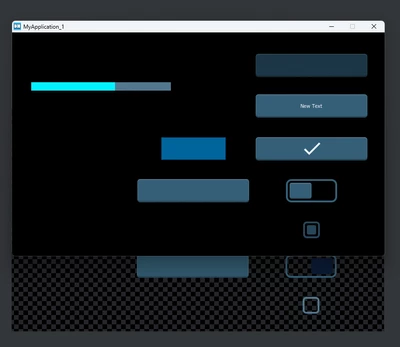
Screenshot 2025-01-19 at 22.29.11.png

But after uploading it to the kit I got :
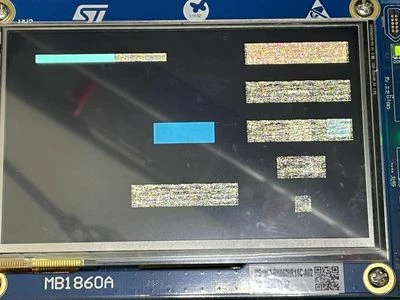
WhatsApp Image 2025-01-20 at 07.47.41_52a9f13b.jpg


I did something wrong???


Thank U :)

Best answer by dibor

Hi All
I am really NOOB :)
For program a target I have use CubeProgrammer and do not use programmer of Designer.
I didn't erase external memory and because that got strange artifacts/effects :(

Looks from the demo there still many data.
After full erase of external memory - all items/widgets looking good.

Thanks for the help :)

5 replies

GaetanGodart
Technical Moderator
January 20, 2025

Hello @dibor ,


It looks like your application is not able to fetch the assets correctly. Maybe they reach the wrong address, maybe your code to access your memory is wrong.

Since I see a couple images rendering correctly, I would assume that the images that render correctly are stored in internal memory while the wrong ones are stored in external memory and the issues comes from interaction with your external memory.
Can you verify that by putting some assets in internal memory and looking at the result?

If the issue is the external memory, have a look at this article and this other article .

If that is not the issue, can you run some other tests so we can try to isolate the issue?


Regards,

diborAuthor
Associate II
January 20, 2025

Hi @GaetanGodart 

Thanks for the quick answer :)

I do not play with any settings, only choose right discovery kit and put few buttons and one progress bar on the screen.
As U can see only flex button shown "correctly".

I"ll try to play with this kit more.


BTW, first provided link to article do not exist.


Thank U.

Andrew Neil
Super User
January 20, 2025

@dibor wrote:

BTW, first provided link to article do not exist.


Try this: https://support.touchgfx.com/docs/development/board-bring-up/how-to/06-flash-external-addressable

(original link from @GaetanGodart had a spurious 'a' added on the end of the URL)


A complex system that works is invariably found to have evolved from a simple system that worked.A complex system designed from scratch never works and cannot be patched up to make it work.
diborAuthor
Associate II
January 20, 2025

Hi.

Thanks a lot.


Did exact same steps.

Will try to do today on other computer.


diborAuthorBest answer
Associate II
January 20, 2025

Hi All
I am really NOOB :)
For program a target I have use CubeProgrammer and do not use programmer of Designer.
I didn't erase external memory and because that got strange artifacts/effects :(

Looks from the demo there still many data.
After full erase of external memory - all items/widgets looking good.

Thanks for the help :)

GaetanGodart
Technical Moderator
January 21, 2025

Hello @dibor ,


No problem, we all learn!

I am glad you found the solution.


Regards,