
Senior III
June 26, 2025
Solved

Single function to redirect to certain view

  • June 26, 2025
  • 4 replies
  • 342 views

I'm having a Model that receives data from the backend. I need that, according to the data received, independently of what view you're in, the presenter of the view executes a function that goes to a specific view.


For instance, I'm receiving 1 in the Model, weathever the view I'm in, there will be a function in the Presenter that recieves the 1 and knows that it has to change view to the appropriate one.


My function that maps the input to the view I've to change to is always the same, so I'm trying to avoid copying the whole logic in every presenter and just implement a single function that calls the bigger function that manages the logic.


The idea is to create a singleton class in the common folder and use it. I was just wondering if this behavior could be achieved in some way with FrontendApplication.cpp
Best answer by MBrau.7

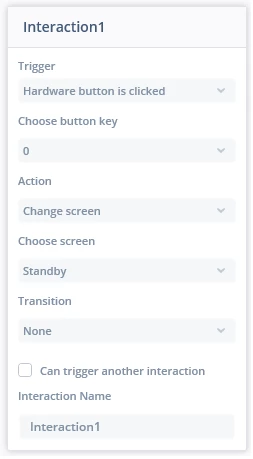
If you create a screen via designer, the goto()-function is not automatically created.
To create the goto()-function for your "Service" screen in FrontendApplicationBase you need to 
implement an interaction via designer where a screen change is triggered.


You could do something like this:

InteractionScreenChange.png

4 replies

MBrau.7
Associate II
June 27, 2025
FrontendApplication& application = *static_cast<FrontendApplication*>(touchgfx::Application::getInstance());
application.gotoXYZScreenNoTransition();


nico23Author
Senior III
June 27, 2025

Hi @MBrau.7 

for some reason, even if the view has been created with a name "service" the application().gotoserviceScreenNoTransition(); doesn't work as the code is not correctly generated in the FrontendApplicationBase

MBrau.7
MBrau.7Best answer
Associate II
June 27, 2025

If you create a screen via designer, the goto()-function is not automatically created.
To create the goto()-function for your "Service" screen in FrontendApplicationBase you need to 
implement an interaction via designer where a screen change is triggered.


You could do something like this:

InteractionScreenChange.png

nico23Author
Senior III
June 27, 2025

Ah, it makes sense. I thought it would automatically generate it based on the view you created

Thanks