
Associate III
June 13, 2025
Question

STMH7S7 CUBEIDE,Post Generate Target failed。

  • June 13, 2025
  • 2 replies
  • 508 views

I made a test project for h7s7 using cubeIDE,the structure generated is below:
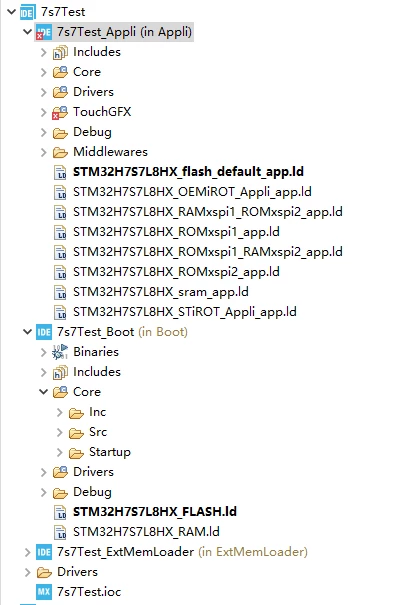
微信图片_20250613124958.png

Then I opened touchgfx designer and import a blank UI, when I tried to build the project, a error came out:

Generate Code
Generate
Wrote generated/gui_generated/include/gui_generated/screen1_screen/Screen1ViewBase.hpp
Wrote generated/gui_generated/src/screen1_screen/Screen1ViewBase.cpp
Done
Generate Assets
make -f simulator/gcc/Makefile assets -j8
Reading ./application.config
Reading ./target.config
Done
Post Generate
touchgfx update_project --project-file=simulator/msvs/Application.vcxproj
Done
Post Generate Target
touchgfx update_project
Unable to locate D:/STM32CubeIDE/workspace_1.7.0/7s7Test/.cproject
Failed
Failed


The .cproject is actually located in D:/STM32CubeIDE/workspace_1.7.0/7s7Test/Appli/.cproject

but touchgfx designer goes to  wrong folder.

Anyone who can help?

2 replies

ST Employee
June 18, 2025

Hello @amb ,

How did you created your project ,you made it from CUBEMX ?

BR,

ambAuthor
Associate III
June 19, 2025

hello @LouisB 

I use CubeIDE v1.15.

I made it work by copy .cproject file to  D:/STM32CubeIDE/workspace_1.7.0/7s7Test/,

but  not a elegant solution.

ST Employee
June 19, 2025

Hello @amb,

Ok, but when you created the project it was from CubeMX or in TouchGFX designer ?


BR,

ambAuthor
Associate III
June 23, 2025

I created the project in CubeIDE.

ST Employee
June 26, 2025

Hello @amb,

Since you create your project in CubeIDE and if you plan to Build on target from CubeIDE, this will not cause issue as the files are generated. The post generate is if you want to either run build simulator or on target from the designer.

BR,