Senior III
May 20, 2025
Solved

Strange horizontal ghost effect mostly on light images

  • May 20, 2025
  • 7 replies
  • 731 views

I'm experiencing a strange horizontal ghost/stripe effect mostly on light images (it's very visibile in text)
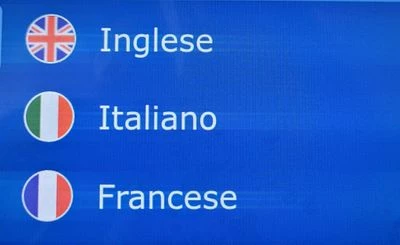
20250520_132355.jpg

What could it be?

I'm using the STM32H7S78 microcontroller
nico23_0-1747740703998.pngnico23_1-1747740715158.png


Best answer by nico23

Hi @GaetanGodart ,

It turned out to be the initialization of the oscillator in the SystemClock_Config.

Tuning RCC_OscInitStruct.PLL3.PLLR from 12 to 24 fixed the issue. Additionally, the touchscreen began to respond more effectively to touches.

7 replies

GaetanGodart
Technical Moderator
May 21, 2025

Hello @nico23 ,


It looks like the issue doesn't only happen on text but also on the left of the flags.

Are you using a custom board or are you using the STM32H7S78-DK?


Regards,

nico23Author
Senior III
May 21, 2025

Yes, it seems the issue happens on white/very bright pixels mostly

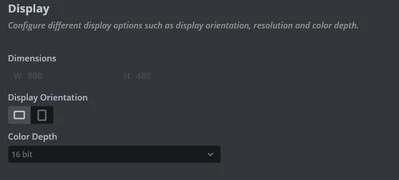
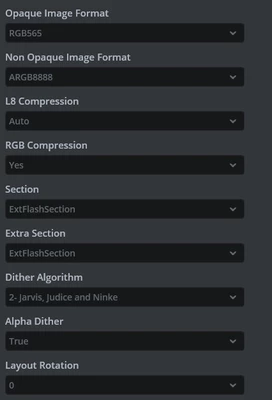
Yes, it's a custom board. These are the configurations for the display

static void MX_LTDC_Init(void)
{

 /* USER CODE BEGIN LTDC_Init 0 */

 /* USER CODE END LTDC_Init 0 */

 LTDC_LayerCfgTypeDef pLayerCfg = {0};

 /* USER CODE BEGIN LTDC_Init 1 */

 /* USER CODE END LTDC_Init 1 */
 hltdc.Instance = LTDC;
 hltdc.Init.HSPolarity = LTDC_HSPOLARITY_AH;
 hltdc.Init.VSPolarity = LTDC_VSPOLARITY_AH;
 hltdc.Init.DEPolarity = LTDC_DEPOLARITY_AH;
 hltdc.Init.PCPolarity = LTDC_PCPOLARITY_IIPC;
 hltdc.Init.HorizontalSync = 3;
 hltdc.Init.VerticalSync = 3;
 hltdc.Init.AccumulatedHBP = 11;
 hltdc.Init.AccumulatedVBP = 11;
 hltdc.Init.AccumulatedActiveW = 811;
 hltdc.Init.AccumulatedActiveH = 491;
 hltdc.Init.TotalWidth = 819;
 hltdc.Init.TotalHeigh = 499;
 hltdc.Init.Backcolor.Blue = 0;
 hltdc.Init.Backcolor.Green = 0;
 hltdc.Init.Backcolor.Red = 0;
 if (HAL_LTDC_Init(&hltdc) != HAL_OK)
 {
 Error_Handler();
 }
 pLayerCfg.WindowX0 = 0;
 pLayerCfg.WindowX1 = 800;
 pLayerCfg.WindowY0 = 0;
 pLayerCfg.WindowY1 = 480;
 pLayerCfg.PixelFormat = LTDC_PIXEL_FORMAT_RGB565;
 pLayerCfg.Alpha = 255;
 pLayerCfg.Alpha0 = 0;
 pLayerCfg.BlendingFactor1 = LTDC_BLENDING_FACTOR1_PAxCA;
 pLayerCfg.BlendingFactor2 = LTDC_BLENDING_FACTOR2_PAxCA;
 pLayerCfg.FBStartAdress = 0;
 pLayerCfg.ImageWidth = 800;
 pLayerCfg.ImageHeight = 480;
 pLayerCfg.Backcolor.Blue = 0;
 pLayerCfg.Backcolor.Green = 0;
 pLayerCfg.Backcolor.Red = 0;
 if (HAL_LTDC_ConfigLayer(&hltdc, &pLayerCfg, 0) != HAL_OK)
 {
 Error_Handler();
 }
 
 
 /* USER CODE BEGIN LTDC_Init 2 */

 /* USER CODE END LTDC_Init 2 */

}

I'm using I-Cache with SCB_EnableICache and

static void MX_DMA2D_Init(void)
{

 /* USER CODE BEGIN DMA2D_Init 0 */
 hdma2d.Instance = DMA2D;
 hdma2d.Init.Mode = DMA2D_R2M;
 hdma2d.Init.ColorMode = DMA2D_OUTPUT_RGB888;
 hdma2d.Init.OutputOffset = 0;
 /* USER CODE END DMA2D_Init 0 */
 
 if (HAL_DMA2D_Init(&hdma2d) != HAL_OK)
 {
 Error_Handler();
 }
 /* USER CODE BEGIN DMA2D_Init 2 */

 /* USER CODE END DMA2D_Init 2 */

}

and GPU2D

static void MX_GPU2D_Init(void)
{

 /* USER CODE BEGIN GPU2D_Init 0 */

 /* USER CODE END GPU2D_Init 0 */

 /* USER CODE BEGIN GPU2D_Init 1 */

 /* USER CODE END GPU2D_Init 1 */
 hgpu2d.Instance = GPU2D;
 if (HAL_GPU2D_Init(&hgpu2d) != HAL_OK)
 {
 Error_Handler();
 }
 /* USER CODE BEGIN GPU2D_Init 2 */

 /* USER CODE END GPU2D_Init 2 */

}

is there a specific thing I should look into to see what's wrong with the rendering?

Ozone
Principal
May 21, 2025

> (it's very visibile in text)

Which is basically proof that this is EMI / bandwidth related - the sections with the greatest signal contrast shows the greatest interference.

Display cable too long, or of insufficient quality ?

nico23Author
Senior III
May 22, 2025

Hi @Ozone 

I've done other tries.

It turnes out the issue appears when I use a full background image. When there's no background image, no issue is detected. Please see below

20250522_085924.jpg


20250522_090016.jpg


GGODA
Associate II
May 22, 2025

Hello @nico23 ,


Did you add an image or a box?

Can you try to add a box as a background? Try different colors.

What part of the display do you invalidate?


Regards,

nico23Author
Senior III
May 22, 2025

Hi @GGODA 

the background is an image.

In the latest two images, I've just generated the code. No user code is added.

I'll try with a box as background

GaetanGodart
Technical Moderator
June 2, 2025

Hello @nico23 ,


Have you had the opportunity to try another display?
If you don't have one, you can share the GUI with me and I can try on some of the discovery kits.


Regards,

GGODA
Associate II
May 22, 2025

I did not want to assume a cheap display but that is also what it made me think of.

We could verify whether it is the display's fault by trying the same GUI on a different display if you have one.


Regards,

Ozone
Principal
May 22, 2025

Well, there is still the possibility of insufficient cabling, or you don't meet the requirements / specificiations of the display. Even an inappropriate power supply (for the display) can cause issues.

I would consult the responsible hardware guy, assuming you have one (and it is not you ...).

nico23Author
Senior III
June 3, 2025

Hi @GaetanGodart ,

we are still investigating. I'll post an update here as soon as I know more

nico23AuthorBest answer
Senior III
June 5, 2025

Hi @GaetanGodart ,

It turned out to be the initialization of the oscillator in the SystemClock_Config.

Tuning RCC_OscInitStruct.PLL3.PLLR from 12 to 24 fixed the issue. Additionally, the touchscreen began to respond more effectively to touches.

GaetanGodart
Technical Moderator
June 6, 2025

Hello @nico23 ,


I am glad you found a solution. :)
Don't hesitate to create a new thread if you face another issue.


Regards,