
Natali
Associate III
January 24, 2025
Question

Suggestion for new version

  • January 24, 2025
  • 3 replies
  • 1175 views

hi

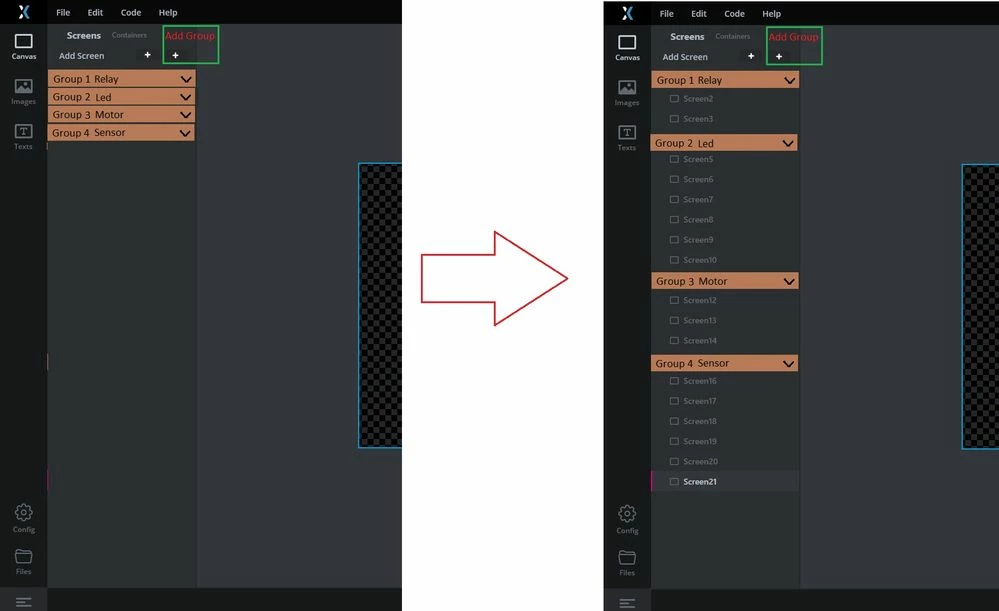
When there are many menus, finding them becomes a bit difficult. If this menu is added, it will be possible to categorize them.16297084997291791.jpg
3 replies

Natali
NataliAuthor
Associate III
January 26, 2025

Maybe this is also useful.


40014.jpg

Osman SOYKURT
Technical Moderator
January 30, 2025

Hello @Natali ,

Thank you for this very interesting idea! We've already considered adding a feature to create groups of screens. While I can confirm that this feature is on our roadmap, I cannot provide a specific release version or date at this time.

For the second request, we need to find the best way to categorize the files in general. You suggested separating 'ScreenViews' and 'ScreenPresenters', for instance, but we've heard from other users who want to separate screens instead, like 'Screen1' and 'Screen2'. We are trying to figure out what makes more sense.

Osman SOYKURTST Software Developer | TouchGFX
Natali
NataliAuthor
Associate III
February 2, 2025

Thank you for your attention
There is an old item forgotten also in this post

shared one Modal window for all screen 

qq3g7bad
Visitor II
February 4, 2025

Hi,

Does this post help?
Example: Grouping of Views with Common Functionality

I've used this approach successfully before, though it can be a bit tricky. I've been waiting for an official solution for a long time!

Best regards,

qq3g7bad
Visitor II
January 31, 2025

Hi,

I saw your post regarding the difficulty of sorting screens in TouchGFX Designer. I’d like to suggest a possible workaround that might help.

If you establish a consistent naming convention for your screens and containers (e.g., prefixing them with numbers or categories), you can use a PowerShell script I created called sort.touchgfx.

This script sorts the screens and containers inside the .touchgfx file in alphabetical order, making it easier to manage large projects. It works by treating the .touchgfx file as JSON and reordering the entries automatically.

Would this approach be helpful in your case? 

Best regards,
qq3g7bad

Natali
NataliAuthor
Associate III
February 2, 2025

Hi

In the project I'm currently working on, I have 80 pages and 45 containers so far. This means there are over 200 different files in the GUI folder. The only thing I've done so far is naming all the containers with the CNTR_ prefix, which at least ensures they are grouped together in one place. For the rest of the menus, I'm also trying to choose a consistent prefix so they are arranged sequentially as well.
