
Associate
September 3, 2024
Solved

Take data from one screen to another

  • September 3, 2024
  • 4 replies
  • 1777 views

Hello everyone, I hope you can help me!!!

I'm at the beginning of programming in C++, and I'm having difficulty taking a variable from my main.c file to my screen created in touch gfx.

This error appears, where it apparently does not find the variable declaration.


Run Simulator
Generate
Done
Generate Assets
make -f simulator/gcc/Makefile assets -j8
Reading ./application.config
Reading ./target.config
Done
Post Generate
touchgfx update_project --project-file=simulator/msvs/Application.vcxproj
Done
Post Generate Target
touchgfx update_project
.cproject file: ../STM32CubeIDE/.cproject
Writing STM32CubeIDE project file: ../STM32CubeIDE/.project
Writing STM32CubeIDE project file: ../STM32CubeIDE/.cproject
Done
Compile
make -f simulator/gcc/Makefile -j8
Reading ./application.config
Reading ./target.config
Linking build/bin/simulator.exe
build/MINGW32_NT-6.2/gui/src/monitor_screen/MonitorView.o: In function `ZN11MonitorView15handleTickEventEv':
C:\TouchGFXProjects\MyApplication_2\TouchGFX/gui/src/monitor_screen/MonitorView.cpp:22: undefined reference to `dado'
collect2.exe: error: ld returned 1 exit status
generated/simulator/gcc/Makefile:160: recipe for target 'build/bin/simulator.exe' failed
make[2]: *** [build/bin/simulator.exe] Error 1
generated/simulator/gcc/Makefile:155: recipe for target 'generate_assets' failed
make[1]: *** [generate_assets] Error 2
simulator/gcc/Makefile:32: recipe for target 'all' failed
make: *** [all] Error 2
Failed
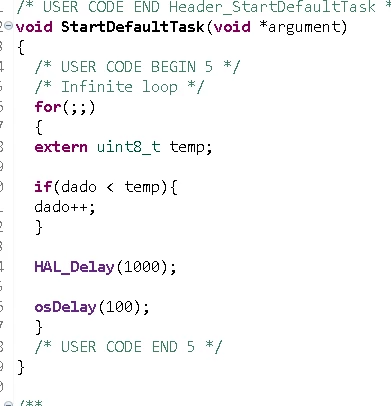
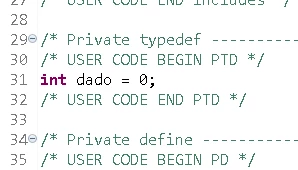
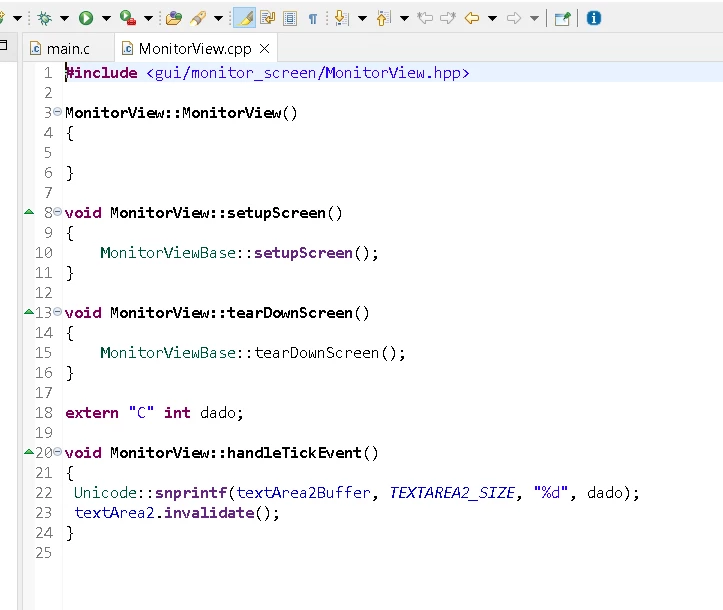
main c loop.png


main c.png


tela 1.png


I followed what the course instructor said, but apparently it doesn't work.

Best answer by Karl Yamashita

Looks like you're trying to take a short cut and not using MVP approach.

See this video tutorial on how to pass a variable, in this case an ADC value, from main to the Presenter

https://youtu.be/EbWOv_0Lp-U?si=s2OKKDyJN6vpb-3a


4 replies

Associate III
September 4, 2024

I am not sure the value "dado" is in other .c file (ex : in main.c)

If yes, you can try modify line 18 to "extern int dado;"


Kenwang_0-1725437127950.png


BADAAuthor
Associate
September 4, 2024

Hi, I removed the "C" and recompiled, but the same error appeared, I'm trying to backend an analog reading in main.c to the screen, I'm going to send the more simplified file of the project.


Associate III
September 5, 2024

I can build your project in STM32CubeIDE 1.16.0 with touchGFX 4.24.0. Did you try to reinstall them ?


1.png

mƎALLEm
Technical Moderator
September 4, 2024

Hello @BADA 

Next time, please paste your code using </> button instead sharing screenshots. Please refer to our recommendation here on how to post a thread in this community.

Thank you for your understanding.

"To give better visibility on the answered topics, please click on ""Accept as Solution"" on the reply which solved your issue or answered your question."
Karl Yamashita
Karl YamashitaBest answer
Principal
September 5, 2024

Looks like you're trying to take a short cut and not using MVP approach.

See this video tutorial on how to pass a variable, in this case an ADC value, from main to the Presenter

https://youtu.be/EbWOv_0Lp-U?si=s2OKKDyJN6vpb-3a


If a reply has proven helpful, click on Accept as Solution so that it'll show at top of the post.CAN Jammer an open source CAN bus hacking toolCANableV3 Open Source
BADAAuthor
Associate
September 5, 2024

Really, I was doing the wrong process, thank you for the help and reference!!

GaetanGodart
Technical Moderator
September 5, 2024

Hello @BADA  and welcome to the community! :smiling_face_with_smiling_eyes:


As other said, you can properly format your code (and log text) by using the </> button :

GaetanGodart_0-1725524788722.png


Regarding your question, since you created your variable from a TouchGFX file, you should include this file in your main.c.

Other than that, it is recommended to use the MVP design pattern to send or receive data from to GUI (TouchGFX) to the rest of the application (main.c and others). You can read more here : model-view-presenter-design-pattern 
Here is a video tutorial to send data from a screen to the main.c : Touch GFX #8. Send Data from UI to MCU || UART 


I hope this helps.
Once you solve your problem, I invite you to select the most helpful comment as "best answer".


Regards,


PS: If you want to properly display your code and log text using the </> button, you can do it by editing your message like so :

GaetanGodart_1-1725525093901.png