
Associate II
July 8, 2024
Solved

Text Area alignment change

  • July 8, 2024
  • 5 replies
  • 3260 views

How to change the alignment of textarea from the default style set in touchgfx designer?


In touchgfx designer(Version:4.21.3) I have set to Left alignment. I use this textarea for multiple purposes, for few I need to set to Left alignment and for few I need to set to Right alignment. I tried using ' textArea.setTextAlignment(TEXT_ALIGNMENT_RIGHT);'  but it says set alignment is not a member.
 

Best answer by ferro

Hi @BhavyaSri 

I use TextAreaWithOneWildcard


// T_ALIGN_LEFT, T_ALIGN_CENTER, T_ALIGN_RIGHT Ids text is "<>" with different alignment
// T_TEXT_MULTIALIGN holds the text to dispaly and alignment does not matter

TextAreaWithOneWildcard::setTypedText ( touchgfx::TypedText ( T_ALIGN_CENTER ) ); 
TextAreaWithOneWildcard::setWildcard ( touchgfx::TypedText ( T_TEXT_MULTIALIGN ).getText () );
TextAreaWithOneWildcard::invalidate ();


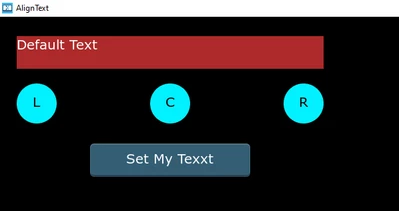
Example:

ferro_0-1720463890528.png


5 replies

GaetanGodart
Technical Moderator
July 8, 2024

Hello @BhavyaSri ,


I have not seen a method called "setTextAlignment' in the textArea API. 

You could try the method resizeToCurrentTextWithAlignment().
I think you should set the alignment directly from Designer instead of code.


If this comment solves your problem, I invite you to select it as "best answer".


Regards,

BhavyaSriAuthor
Associate II
July 8, 2024

Thanks for your reply!


I cannot use from designer as I use Same textarea for multiple applications. Some of them need it to be right justified and some of them need it to be Left Justified. I have default set it as Left justified in designer, however for some cases I want to change that to Right justified via code.


Regards,

Bhavya

ferro
ferroBest answer
Lead
July 8, 2024

Hi @BhavyaSri 

I use TextAreaWithOneWildcard


// T_ALIGN_LEFT, T_ALIGN_CENTER, T_ALIGN_RIGHT Ids text is "<>" with different alignment
// T_TEXT_MULTIALIGN holds the text to dispaly and alignment does not matter

TextAreaWithOneWildcard::setTypedText ( touchgfx::TypedText ( T_ALIGN_CENTER ) ); 
TextAreaWithOneWildcard::setWildcard ( touchgfx::TypedText ( T_TEXT_MULTIALIGN ).getText () );
TextAreaWithOneWildcard::invalidate ();


Example:

ferro_0-1720463890528.png


ferro
Lead
July 8, 2024

@BhavyaSri 

Attached is Gfx project with extension .pdf - rename it to .zip. Forum does not allow me to attach file with .zip. Strange as I see .zip files shared here.

ferro_0-1720450432559.png


ferro
Lead
July 8, 2024

Hi @GaetanGodart

Do you know why my .zip file attachments are refused by forum ? Thanks.


ferro_1-1720450675466.png


GaetanGodart
Technical Moderator
July 8, 2024

Hello @ferro ,


The ".zip" extension is not supported. Most people use the ".7z" extension to share their files.


Regards,

BhavyaSriAuthor
Associate II
July 8, 2024

Hi @ferro ,

I'm not able to see .pdf also. I'm able to see only image.

Also, just to add more details to my query:

1. I used textArea1 text field and enabled it as WildCard Buffer is designer.

2. I use 'Unicode::strncpy(textArea1Buffer,textfieldval, TEXTAREA1_SIZE);' in code and this 'textfieldval' will be changed based on microcontroller output.

Please let me know if additional details are required.

ferro
Lead
July 8, 2024
BhavyaSriAuthor
Associate II
July 8, 2024

Thanks for the solution @ferro and Thanks for the suggestions @GaetanGodart  . I have found the solution for left, right alignments(I need only left, right alignment).

Solution: 

1. I have declared in Texts section as 'T_ALIGN_LEFT',' T_ALIGN_RIGHT' Ids text is "<>" with different alignment in designer.

2. Where ever, I wanted to set to Right Alignment, I'm writing code as 

  • textArea1.setTypedText(touchgfx::TypedText (T_ALIGN_RIGHT));
  • Unicode::strncpy(textArea1Buffer,textfieldval,TEXTAREA1_SIZE);
  • textArea1.setWildcard(textArea1Buffer);
  • textArea1.invalidate();

3. And using this code to set it back to Left alignment whereever required:

  • textArea1.setTypedText(touchgfx::TypedText (T_ALIGN_LEFT));
  • textArea1.invalidate();
NGune.1
Associate III
November 27, 2024

Hi,

To be a reference for the others, can you please be more clear about how it is resolved?

I define my text areas in the code (since, in the beginning it is unknown that how many text areas will be needed). 

In the .hpp I have:

 touchgfx::TextAreaWithOneWildcard Line[100][10];

 in the View.cpp, I have something like:

Line[i][j].setPosition(50+(j)*90, (i*24+5), 90, 24);
Line[i][j].setColor(touchgfx::Color::getColorFromRGB(255, 255, 255));
Line[i][j].setLinespacing(0);

snprintf(swap, 10, "%lu",aTemp[i][j]);
Unicode::strncpy(dst, swap, 10);
Unicode::snprintf(TextBuffer[i][j], 10, dst);

Line[i][j].setWildcard(TextBuffer[i][j]);
Line[i][j].setTypedText(touchgfx::TypedText(T_RESOURCEID1));
Line[i][j].setTypedText( touchgfx::TypedText(T_ALIGN_CENTER));
EditorContainer.add(Line[i][j]);
Line[i][j].invalidate();


It doesn't compile and gives error for the line that has this T_ALIGN_CENTER. it says:

'T_ALIGN_CENTER' was not declared in this scope

What am I doing wrong?

Thanks

ferro
Lead
November 27, 2024

Hi,

1. missing

#include <texts/TextKeysAndLanguages.hpp>

2. or ALIGN_CENTER is missing in Text view:

ferro_0-1732722768127.png


If not then past here compiler error screenshot please

NGune.1
Associate III
November 27, 2024

Hi Ferro,

Number 2 was missing. 

I added a new group, "ResourceID2" and made it center_aligned in the Designer. And then i my code wrote:

Line[i][j].setTypedText(touchgfx::TypedText(T_RESOURCEID2));

Everything with this ResourceId2 is now centered.

Thank you.